Our pick: Best value
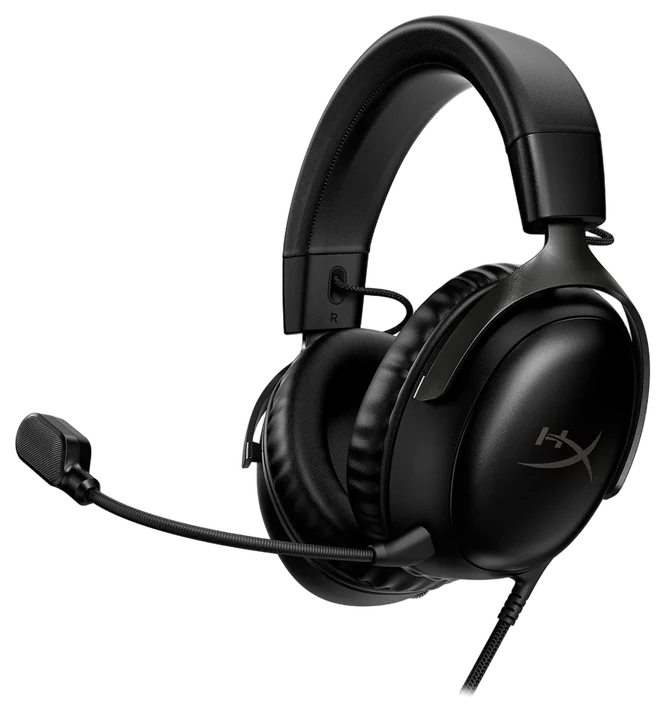
HyperX Cloud III
~$60–100 Lowest price
Get it if you play at one desk and don’t want to think about charging — the mic alone is worth the gap versus the Nova 7.
- Best for
- Value and comfort
- Connection
- Wired 3.5mm / USB
Get the HyperX Cloud III unless you switch between a console and a PC in the same evening: the Arctis Nova 7 buys wireless convenience, not better sound.
Our verdict
Get the HyperX Cloud III unless you need to switch between a console and a PC in the same evening — wireless buys convenience here, not better sound.
Our pick: Best value
~$60–100 Lowest price
Get it if you play at one desk and don’t want to think about charging — the mic alone is worth the gap versus the Nova 7.
Best wireless
~$180–200
Get it if you regularly switch between PC, console, and phone, or the cable is the actual reason you haven’t bought a gaming headset yet.
The price gap~$100–120 more for the Arctis Nova 7 Gen 2
Each bar is an estimated price range, on one scale from ~$60 to ~$200.
Dated notes already published on this page, newest first. Every correction we make is logged on the corrections page.
We compared published driver and frequency specifications, independent microphone comparisons, wireless implementation and latency, battery figures, and long-term owner reports on comfort and pad wear. We haven’t worn either headset ourselves; the driver, latency and comfort claims come from published specs, independent microphone comparisons and long-term owner reports we drew on. Prices are always moving, so every button and link pulls the live listing.
How we rank
Published specifications, verified owner reviews, and independent safety or standards data where it applies — weighted the same for every pick, never sponsored placement.
Best value~$60–100
The sensible answer, at half the price
Get it if you play at one desk and don’t want to think about charging — the mic alone is worth the gap versus the Nova 7.
Skip it if you move between a PC, console, and phone in the same week, or the cable itself is the dealbreaker.
The HyperX Cloud III has been the default recommendation in this category for years and the reason has not changed: it does the important things as well as headsets costing twice as much. HyperX’s own spec sheet lists 53mm drivers, and RTINGS’ bench testing calls the tuning close to neutral with clear mids, though it flags a lighter, less rumbly bass than some rivals.
The detachable microphone is the bigger story: RTINGS rates its noise handling as good and says voices come through clear and full-bodied even with background noise, which backs up this headset’s reputation as one of the better mics at any price.
Comfort is the other half of its reputation, and outside testing backs it up: SoundGuys scored the memory-foam padding and lightweight build 8.5 out of 10 for comfort, and RTINGS separately calls the build sturdy and comfortable through long sessions. That combination is where cheaper headsets fail and where expensive ones often do too. Being wired, it also has zero latency, never needs charging, and works with anything that has a 3.5mm socket (PC, console, handheld, phone) without pairing or dongles.
The limitation is the cable, and how much it matters is entirely situational. You are tethered to the desk, and the cable will eventually be the part that fails, though it is replaceable. There is no active noise cancellation and no Bluetooth for music on the move, a separate pair of wireless earbuds covers that. At $60–100, it is the most sensible purchase in gaming audio.
Strengths
Tradeoffs
Best wireless~$180–200
Wireless done properly, including simultaneous Bluetooth
Get it if you regularly switch between PC, console, and phone, or the cable is the actual reason you haven’t bought a gaming headset yet.
Skip it if you sit at one desk full-time — the Cloud III gets you the same core sound and a better mic for less.
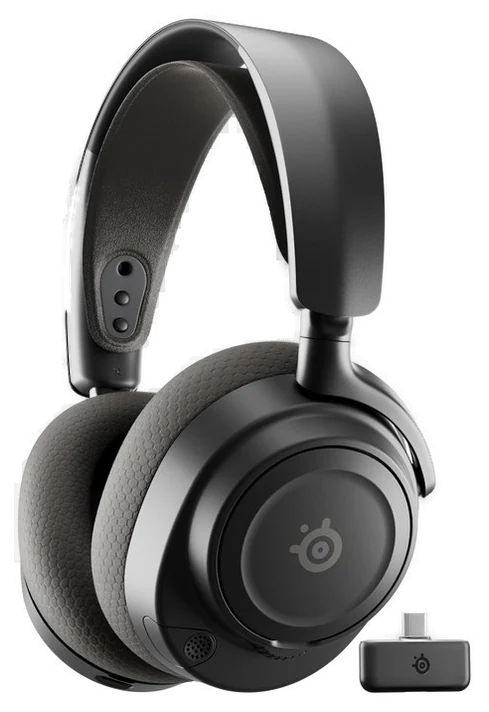
The SteelSeries Arctis Nova 7 Gen 2 is what you buy when the cable is the problem. RTINGS’ latency testing confirms the 2.4GHz dongle connection is low enough to be imperceptible in play, and, the feature that separates it, SteelSeries’ own product page confirms it runs Bluetooth simultaneously alongside that dongle, so you can hear game audio and take a phone call or run a Discord channel from your phone at the same time.
Battery life sits around 54 hours over the 2.4GHz dongle, closer to 42 over Bluetooth, which in practice means charging roughly weekly rather than nightly, and a short top-up charge buys several hours. The suspension headband distributes weight better than a conventional design, which suits long sessions and glasses wearers, and RTINGS’ own testing backs that up, rating the build comfortable and well-built through extended sessions. The retractable microphone tucks away when you are using it as ordinary headphones. Build quality is solid and the software EQ is genuinely useful rather than decorative.
The honest assessment on sound: it is good, and it is not meaningfully better than the Cloud III. The microphone is good but a step behind HyperX’s — RTINGS notes some sibilance emphasis on the Nova 7’s boom mic and weaker clarity over its wired connection than wireless, a caveat the Cloud III doesn’t have to work around.
You are paying the premium for wireless, dual connection and battery. Nothing else. It also needs charging, which is one more thing to forget. At $180–200, that is a fair price for the convenience, provided you know that is what you are buying.
Strengths
Tradeoffs
6 common questions, answered.
On a 2.4GHz dongle, not enough to matter. The delay is a few milliseconds and is imperceptible in play, including competitively. Bluetooth is a different story: latency there is high enough to desynchronize audio from action, which is why both of these use a dedicated dongle for gaming and reserve Bluetooth for calls and music. If a headset offers only Bluetooth for gaming, that is a genuine drawback rather than a technicality.
Virtual surround processing on a stereo headset is a mixed blessing. It can help you judge whether a sound is in front or behind, which matters in shooters, but it usually does so by degrading the clarity of the stereo image. Many competitive players turn it off and rely on plain stereo, which is more precise for judging left-right position. Try both for a week. It is a preference, not an upgrade, and it costs nothing to test.
More than most buyers weigh it, because it is the one part of the headset you never experience yourself. Everyone else does. A poor gaming headset mic sounds thin and picks up keyboard noise, and in a party of five that is what people remember. This is the single clearest area where the cheaper option here wins outright: the HyperX microphone is excellent and better than the more expensive headset’s.
For pure sound quality, no. A good pair of $100 headphones will usually beat a $100 gaming headset, because none of the budget goes into a microphone or wireless. What a gaming headset buys is convenience and a decent mic in one object. If you already own good headphones, adding a standalone USB microphone is often the better-sounding and better-value route, at the cost of desk space.
Three to five years typically, and the failure points are predictable. Ear pads compress and flake first, usually within two years of heavy use. Both of these have replaceable pads, and buying a fresh set is the cheapest way to make an old headset feel new. On the wired model, the cable is the next thing to go, and it detaches. On the wireless model, the battery degrades after a few hundred cycles and is not user-replaceable, which caps its realistic life.
This category discounts aggressively and often. Both of these drop meaningfully during the late-November sales and around the mid-year sales event, and the HyperX in particular is frequently well under its list price. Previous-generation models fall hard as soon as a successor appears, and since year-on-year changes here are incremental, last year’s flagship on discount is usually better value than this year’s mid-range.
Correction, 5 September 2026The compare card called the SteelSeries pick “Arctis Nova 7”. The headset compared here is the Arctis Nova 7 Gen 2, as its section header says, and the card now matches. Logged on the corrections page.Every correction we’ve made
 GuideThe Best Gaming Headsets for 2026: Where Comfort and Mic Quality Diverge
 GuideThe Best Gaming Monitors of 2026: Why 1440p Is Still the Sweet Spot
 GuideThe Best Gaming Chairs: Racing Style Against True Ergonomics
 GuideThe Best Gaming Mice and Keyboards of 2026: What Pros Use vs. What You Need