The Best Chargers and Power Banks of 2026, With GaN Wattage Explained
Charging gear finally standardized on USB-C and got small enough to disappear, provided you buy the right wattage. We compared teardown testing and reliability data to pick four pieces that cover a whole life of devices.
By the BYB Editorial Team
Published July 28, 2026 · Updated · Prices checked OctoberOct 12, 2026
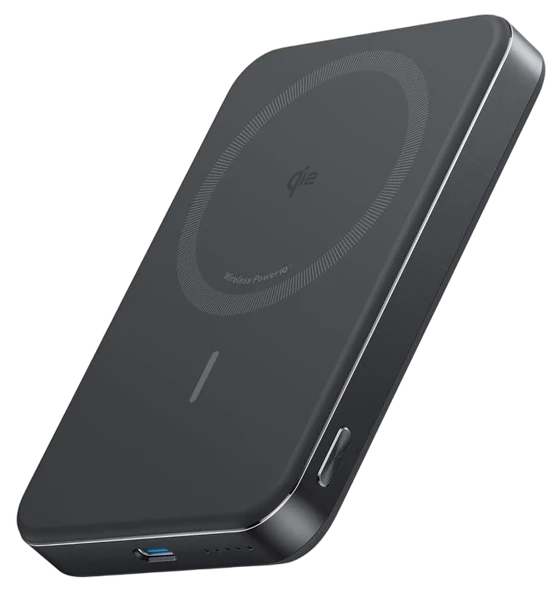
Anker MagGo Power Bank$70–90The Anker MagGo Power Bank, about $70–90 — snaps onto the back of an iPhone and charges without a cable, the only form factor people keep using past week two.Check price
Travelling
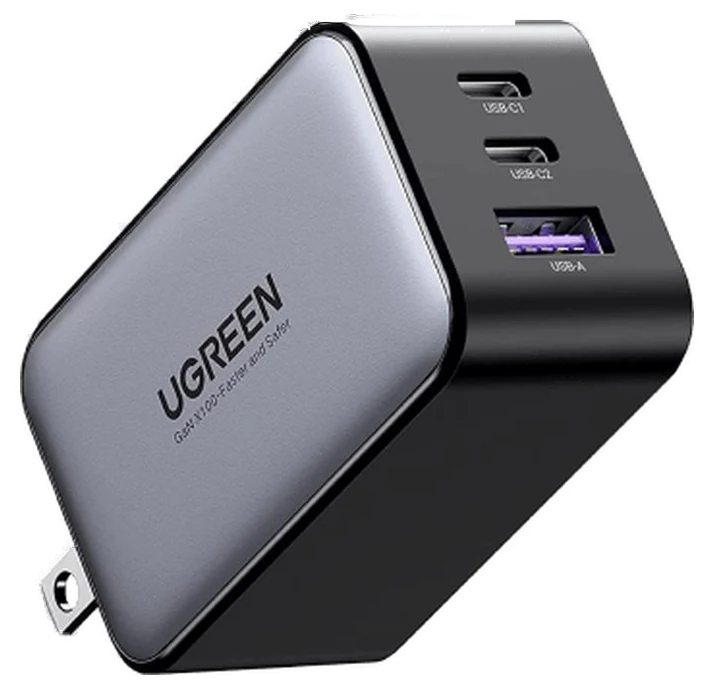
UGREEN Nexode 65W$35–50The UGREEN Nexode 65W, $35–50 — runs a laptop and a phone from one plug.Check price
Match the wattage
20–30W for phones, 30–45W for tablets, 60–100W for laptops.
Charging gear finally standardized on USB-C and got small enough to disappear, provided you buy the right wattage. We compared teardown testing and reliability data to pick four pieces that cover a whole life of devices.
How we choseWhat we compared, and how we rank
We compiled teardown and thermal testing (ChargerLAB and peers), real-capacity measurements, and long-term reliability reviews. Prices are always moving, so every button and link pulls the live listing.
How we rank
Published specifications, verified owner reviews, and independent safety or standards data where it applies — weighted the same for every pick, never sponsored placement.
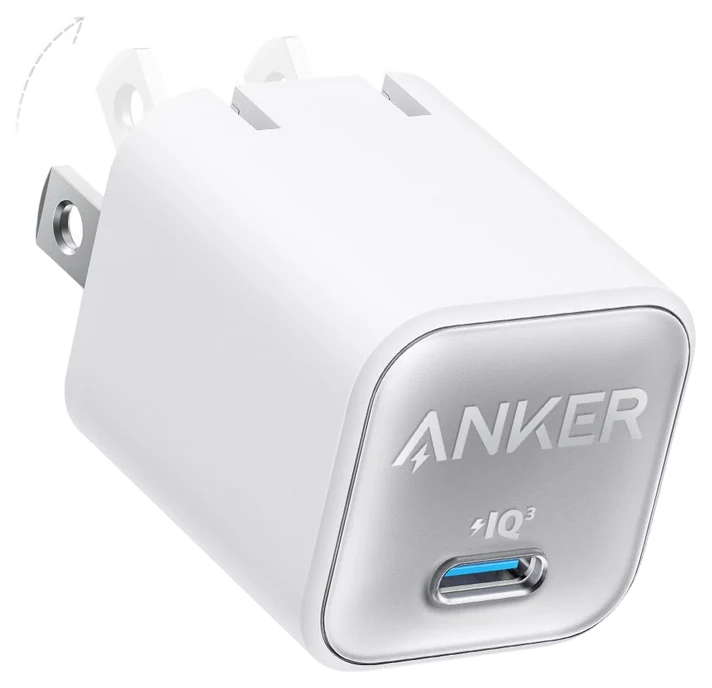
The Anker Nano is the charger to scatter through your life. Bag, desk, kitchen, car kit. Thirty GaN watts fast-charges any phone on the market and will even nurse a laptop in a pinch, from a foldable-plug cube smaller than the ancient 5W brick phones used to ship with.
GaN is the reason this category got good: gallium-nitride electronics run cooler and pack smaller than old silicon, and Anker’s implementation tests among the most reliable at this size. The foldable plug means it never gouges a bag or a pocket.
There’s no real catch beyond single-port. This is deliberately a one-device charger. At $15–25 at Amazon it’s cheap enough that owning three ends the where’s-my-charger genre of household argument permanently. That’s the whole pitch, and it’s a good one.
Strengths
Fast-charges any phone at 30W
Foldable plug, pocket-cube size
GaN runs cool and reliable
Cheap enough to buy several
Tradeoffs
Single port only
Won’t sustain laptop charging
No cable included
Pick 2 of 5: No. 2Best for travel
2
UGREEN Nexode 65W
Best for travel
The one-charger travel answer
Get it if you carry a laptop and want one charger for everything.
Skip it if you only charge a phone. The Nano covers it for less.
Sixty-five GaN watts across three ports means the UGREEN Nexode 65W replaces the laptop brick, the phone cube, and the earbud plug with one palm-size unit: the single biggest simplification in travel tech of the past few years.
Reviewers rank UGREEN’s thermal engineering among the best at the price: the Nexode holds its rated output without the throttling that plagues cheap multi-port bricks, and it splits power sensibly when everything charges at once. Pack this and one good C-to-C cable and the dongle bag gets lighter.
Fine print: with all three ports busy, the laptop port drops below full speed. Enough to charge while working, slower for gaming laptops (which need their own bricks anyway). At $35–50 at Amazon with frequent coupons, it’s the one-charger-for-everything answer.
Strengths
Replaces three chargers in one
Top-tier thermal performance
Three ports, sensible power splitting
Travel-friendly size and price
Tradeoffs
Full 65W only on single-port use
Gaming laptops need more power
Prongs don’t fold on all versions
Pick 3 of 5: No. 3Best magnetic power bank
3
Anker MagGo Power Bank
Best magnetic power bank
The snap-on top-up
Get it if you want charging you’ll use because it’s effortless.
Skip it if your phone lacks magnets. Buy a cabled bank instead.
Magnetic banks turned charging into a gesture, and the Anker MagGo is the best of them: snap it to the back of a MagSafe-compatible phone and keep scrolling, no cable, no pocket spaghetti, no thinking.
This is a real Qi2 implementation pushing a genuine 15 wireless watts, earlier magnetic banks crawled at 7.5W, and the built-in kickstand folds out for video calls and travel movie stands. Ten thousand milliamp-hours is roughly two full phone charges, in a slab that disappears into a jacket pocket.
Physics still applies: wireless charging generates more heat and wastes some capacity versus a cable (the USB-C port is there when you want max speed). At $70–90 at Amazon, it’s the commuter and festival essential, the bank you’ll carry because using it is effortless.
Strengths
Snap-on charging, zero cables
True 15W Qi2 wireless speed
Kickstand doubles as a stand
Two phone charges per fill
Tradeoffs
Wireless wastes some capacity as heat
Needs MagSafe-compatible phone or case
Slower than wired when hurried
Also on the shortlist
Two more, in brief
Pick 4 of 5: No. 4Best for Apple desks~$90–120
4
Belkin 3-in-1 Charging Station
Upgrade pickBest for Apple desks
The nightstand endgame
Get it if you charge an iPhone, Apple Watch, and AirPods nightly.
Skip it if you’re not in the Apple ecosystem. It’s overkill.
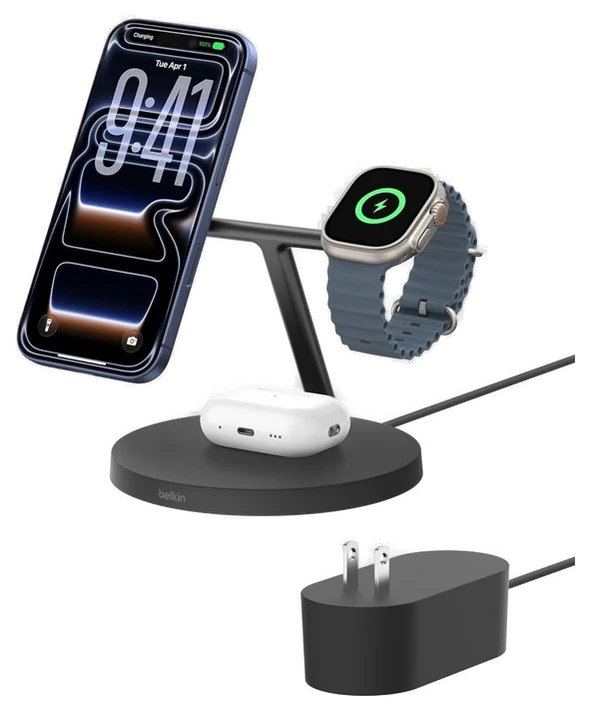
The nightstand three-device problem (phone, watch, earbuds, three cables) collapses into the Belkin 3-in-1 station, which Belkin has quietly perfected across generations into the default recommendation for Apple households.
The phone floats magnetically at a useful viewing angle (standby clock, bedside controls), the watch puck charges at full fast-charge speed, a detail cheaper stands skimp on, and the pad below catches AirPods. One wall plug, zero cable management, every morning.
It’s unapologetically Apple-focused: Android phones charge on it, but the magnetic alignment and watch puck are built for the Apple stack. At $90–120 at Amazon it’s priced like furniture, and owners talk about it like furniture: the upgrade you notice every single night.
Get it if you charge an iPhone, Apple Watch, and AirPods nightly.
Skip it if you’re not in the Apple ecosystem. It’s overkill.
The nightstand three-device problem (phone, watch, earbuds, three cables) collapses into the Belkin 3-in-1 station, which Belkin has quietly perfected across generations into the default recommendation for Apple households.
Read the full case
The phone floats magnetically at a useful viewing angle (standby clock, bedside controls), the watch puck charges at full fast-charge speed, a detail cheaper stands skimp on, and the pad below catches AirPods. One wall plug, zero cable management, every morning.
It’s unapologetically Apple-focused: Android phones charge on it, but the magnetic alignment and watch puck are built for the Apple stack. At $90–120 at Amazon it’s priced like furniture, and owners talk about it like furniture: the upgrade you notice every single night.
Strengths
Ends nightstand cable clutter
Full-speed Apple Watch charging
Useful floating viewing angle
One plug charges three devices
Tradeoffs
Apple-centric by design
Premium price for a charger
Takes real nightstand space
Pick 5 of 5: No. 5Best for laptops
5
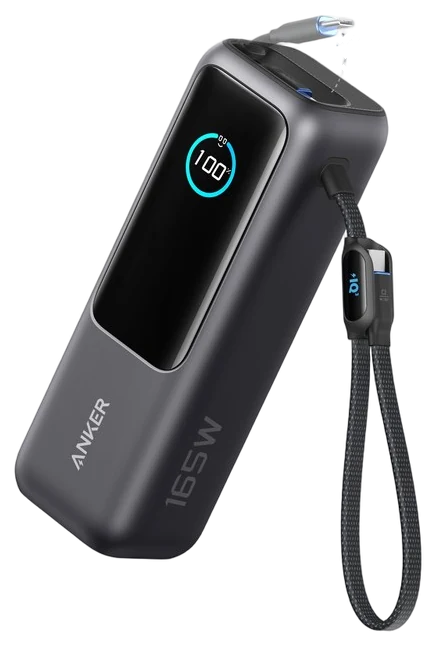
Anker Laptop Power Bank (25K, 165W)
Best for laptops
Laptop-class capacity with the cables already attached
Get it if you travel with a laptop and cannot count on finding an outlet.
Skip it if you only top up a phone, or you want a 16-inch MacBook Pro charging at its full 140W.
Where the MagGo above is a 10,000mAh pack sized for a phone, this is the opposite end: the brick for a day with a laptop and no promise of an outlet. Anker lists 25,000mAh and 165W total output, with two USB-C cables built into the body so it still works without the cable pouch. Engadget made it the laptop pick of its 2026 roundup; Anker rates the cell at 90Wh, under the 100Wh airline carry-on limit, and its own store shows it sold out at this writing, with retail stock near $120.
Anker’s spec sheet lists three USB-C ports plus one USB-A. Two USB-C ports are built-in cables, one retractable and one doubling as a carry strap, each rated to 100W alone, with total output settling at 130W once three or four devices draw at once. Size is 6.18 by 2.12 by 1.93 inches, weight 21.0 ounces, and a full recharge takes roughly two hours from a 100W-plus charger. Macworld’s own tests got a MacBook Air M3 to 51 percent and an iPhone 15 to 53 percent in 30 minutes, refilling the pack itself in about 95 minutes.
The ceiling is 100W per port: a 16-inch MacBook Pro’s 140W adapter charges here, slower than at home, and Anker’s own Prime Power Bank (26K, 300W) is the answer for that machine, about $230 list with stacking codes that routinely land it near $180. Two smaller marks: Macworld measured recharge input peaking near 90W against the advertised 100W, and Engadget’s one complaint was the display getting marred over time. At $70 to $120 and 21 ounces, it’s also far more pack than anyone who just tops up a phone will draw on.
Strengths
Two USB-C cables built into the pack
100W from a single USB-C port
The fixed cable doubles as the carry strap, so the pack needs no pouch
Display reads out charge level and wattage
Engadget’s laptop-power pick in its 2026 roundup
Tradeoffs
100W per port falls short of a 16-inch MacBook Pro’s 140W
21 ounces, a bag item rather than a pocket one
Engadget found the display gets marred over time
Macworld measured input near 90W, not the listed 100W
Overkill at this price if you only charge a phone
Pick 5 of 5: No. 5Best for laptops
Anker Laptop Power Bank (25K, 165W)
Laptop-class capacity with the cables already attached
Get it if you travel with a laptop and cannot count on finding an outlet.
Skip it if you only top up a phone, or you want a 16-inch MacBook Pro charging at its full 140W.
Where the MagGo above is a 10,000mAh pack sized for a phone, this is the opposite end: the brick for a day with a laptop and no promise of an outlet. Anker lists 25,000mAh and 165W total output, with two USB-C cables built into the body so it still works without the cable pouch. Engadget made it the laptop pick of its 2026 roundup; Anker rates the cell at 90Wh, under the 100Wh airline carry-on limit, and its own store shows it sold out at this writing, with retail stock near $120.
Read the full case
Anker’s spec sheet lists three USB-C ports plus one USB-A. Two USB-C ports are built-in cables, one retractable and one doubling as a carry strap, each rated to 100W alone, with total output settling at 130W once three or four devices draw at once. Size is 6.18 by 2.12 by 1.93 inches, weight 21.0 ounces, and a full recharge takes roughly two hours from a 100W-plus charger. Macworld’s own tests got a MacBook Air M3 to 51 percent and an iPhone 15 to 53 percent in 30 minutes, refilling the pack itself in about 95 minutes.
The ceiling is 100W per port: a 16-inch MacBook Pro’s 140W adapter charges here, slower than at home, and Anker’s own Prime Power Bank (26K, 300W) is the answer for that machine, about $230 list with stacking codes that routinely land it near $180. Two smaller marks: Macworld measured recharge input peaking near 90W against the advertised 100W, and Engadget’s one complaint was the display getting marred over time. At $70 to $120 and 21 ounces, it’s also far more pack than anyone who just tops up a phone will draw on.
Strengths
Two USB-C cables built into the pack
100W from a single USB-C port
The fixed cable doubles as the carry strap, so the pack needs no pouch
Display reads out charge level and wattage
Engadget’s laptop-power pick in its 2026 roundup
Tradeoffs
100W per port falls short of a 16-inch MacBook Pro’s 140W
21 ounces, a bag item rather than a pocket one
Engadget found the display gets marred over time
Macworld measured input near 90W, not the listed 100W
Overkill at this price if you only charge a phone
Start with the hungriest thing you need to charge, because a charger that’s fine for a phone will crawl on a laptop.
Match the wattage to your device: phones want 20-30W, tablets around 45W, and most laptops need 65-100W; the common mistake is buying a small charger and wondering why your laptop barely keeps up.
Count the ports, and the fine print: a multi-port charger usually splits its total wattage when everything’s plugged in, so check the per-port numbers, not just the headline figure.
Look for GaN: gallium-nitride chargers run cooler and pack the same power into a much smaller brick, which matters when it’s in your bag.
Anker Prime 100W charger — an excellent three-port GaN desk charger, but it’s overkill and pricier than the 65W UGREEN we picked unless you’re charging two laptops at once.
UGREEN Nexode 145W power bank — great for laptop travel, left off only because it’s heavier and pricier than the Anker laptop bank already on the list.
Baseus Blade laptop power bank — slim enough to slide beside a laptop, but the flat shape trades capacity for thinness; a fine second pick, not the first.
Apple 35W Dual USB-C — reliable and compact, but you pay the Apple tax for less wattage than the 65W GaN options here.
Charging FAQs
6 common questions, answered.
What wattage charger do I need?
Phones: 20–30W (more is wasted). Tablets: 30–45W. Most laptops: 60–65W; workstation laptops: 100W. A 65W GaN charger covers everything but the last category. That’s why it’s the traveler default.
Is GaN worth it over regular chargers?
Yes — GaN runs cooler and smaller at the same wattage, and prices have converged with older chargers. A 65W GaN brick is a third the size of the silicon one. Prices have converged, so there’s no longer a reason to buy the old technology.
Why does my power bank charge less than its rated mAh?
Voltage conversion and heat eat 30–40%, a 10,000mAh bank realistically delivers 1.5–2 phone charges, not three. That’s physics, not fraud; distrust any bank claiming otherwise, and buy from brands that publish real output numbers.
Are cheap no-name chargers safe?
The risk isn’t drama, it’s quiet corner-cutting: weaker surge protection, optimistic wattage labels, and heat handling that shortens your battery’s life. Anker, UGREEN, and Belkin publish real certifications and honor warranties, and their budget lines cost only a few dollars more than the mystery brands. On the device that touches your phone’s battery every night, that’s the cheapest insurance in tech.
Can I use one USB-C charger for everything?
Yes. That’s the point of USB-C Power Delivery. A 65W GaN charger fast-charges a phone, tablet, and most laptops interchangeably; devices negotiate and draw only what they need, so higher-wattage chargers can’t hurt smaller devices. The only fine print is cables: laptop-class charging needs a cable rated for it, so keep one good 100W-rated C-to-C cable in the bag.
Do power banks wear out?
Yes, expect noticeable capacity loss after roughly 300–500 full charge cycles, which for most people means two to four years. Heat is the accelerant: avoid leaving banks in hot cars and charging them under pillows. When a bank starts feeling half as capable as it was, it is; recycle it at an electronics drop-off rather than the trash, and replace it on a sale.
20Aug 2026Correction, 20 August 2026In an audit pass, the FAA rule on carrying spare batteries was misstated and has been corrected. Logged on the corrections page.Every correction we’ve made ›
Prices on this page are re-checked weekly — see the full Electronics price index for every product we cover.
Keep reading
Where to go next.
Related guides, then every guide in the department.
New guides, re-ranked picks and the month's notable changes. No weekly filler, ever.
Unsubscribe any time. Your address goes to our newsletter provider and nowhere else — see our privacy policy.
Manage Consent
To provide the best experiences, we use technologies like cookies to store and/or access device information. Consenting to these technologies will allow us to process data such as browsing behavior or unique IDs on this site. Not consenting or withdrawing consent, may adversely affect certain features and functions.
Functional
Always active
The technical storage or access is strictly necessary for the legitimate purpose of enabling the use of a specific service explicitly requested by the subscriber or user, or for the sole purpose of carrying out the transmission of a communication over an electronic communications network.
Preferences
The technical storage or access is necessary for the legitimate purpose of storing preferences that are not requested by the subscriber or user.
Statistics
The technical storage or access that is used exclusively for statistical purposes.The technical storage or access that is used exclusively for anonymous statistical purposes. Without a subpoena, voluntary compliance on the part of your Internet Service Provider, or additional records from a third party, information stored or retrieved for this purpose alone cannot usually be used to identify you.
Marketing
The technical storage or access is required to create user profiles to send advertising, or to track the user on a website or across several websites for similar marketing purposes.