The Best Baby Monitors:Wi-Fi, non-Wi-Fi and Wearables
Baby monitors split on one philosophical question: is the feed on your phone (Wi-Fi) or on a dedicated screen that cannot be hacked (radio)? We compared the best of both, plus the FDA-cleared wearable.
By the BYB Editorial Team
Published July 28, 2026 · Prices checked OctoberOct 5, 2026
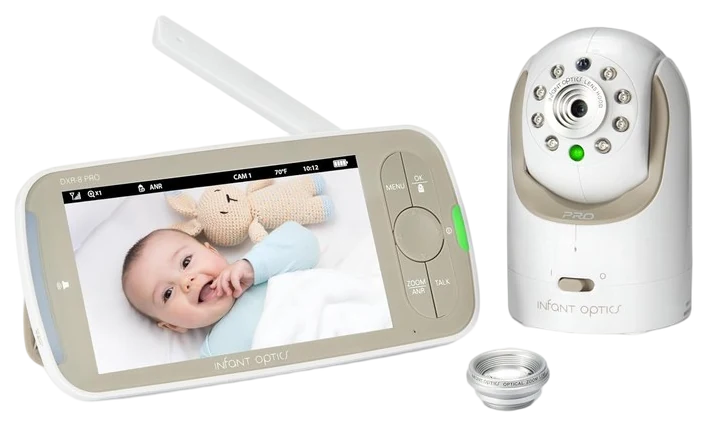
Infant Optics DXR-8 Pro$170–200The Infant Optics DXR-8 Pro, about $170–200 — a closed radio link and a screen nobody can log into from outside the house, with interchangeable lenses.Check price
Want phone viewing too
eufy E21, $140–250 — pairs a local monitor with remote access.
Feeling more anxious, not less
Buy down rather than up — more features don’t fix that.
Baby monitors split on one philosophical question: is the feed on your phone (Wi-Fi) or on a dedicated screen that cannot be hacked (radio)? We compared the best of both, plus the FDA-cleared wearable.
How we choseWhat we compared, and how we rank
We compiled range and battery testing, security records, and thousand-night parent reviews. Prices are always moving, so every button and link pulls the live listing.
How we rank
Published specifications, verified owner reviews, and independent safety or standards data where it applies — weighted the same for every pick, never sponsored placement.
Pick replacedThis guide previously recommended the eufy SpaceView and described it as a hybrid you could switch between a local radio link and Wi-Fi phone viewing. That is wrong: eufy's spec sheets for the SpaceView and SpaceView Pro both state that they are not Wi-Fi capable and need no app. The pick has been replaced with the eufy Baby Monitor E21, which does work both ways.
Dated notes already published on this page, newest first. Every correction we make is logged on the corrections page.
The Infant Optics DXR-8 Pro tops nearly every non-Wi-Fi list for reasons that matter most at 3 a.m. It runs on a private FHSS radio link, so there is no router, no cloud, nothing to hack and nothing to buffer, and it puts the feed on a dedicated screen instead of the phone you would otherwise doom-scroll over the crib. Owners describe it the way you would describe a good appliance. It works, every night.
The signature feature is the swappable lens system: run the close-up view over the bassinet, then switch to wide-angle when your kid graduates to a toddler bed across the room. The Pro generation added active noise reduction that filters fan hum and white-noise machines, so the parent unit carries cries rather than static.
Long-term owner reviews keep landing on the same two points, which are range that covers a normal house and yard, and battery that survives a full night on the nightstand. What it deliberately does not do is leave the house.
There is no app, so checking the nursery from the office or a date night is off the table, and that is what the eufy E21 hybrid below is for. The screen is fine rather than phone-crisp, too. At around $170–200 at Amazon it costs real money for a single-purpose device, but for security-minded parents that single purpose is the point.
Strengths
Closed FHSS radio link, nothing to hack
Swappable lenses grow from crib to toddler bed
Active noise reduction passes cries, not static
Dedicated screen keeps your phone out of it
Tradeoffs
No remote viewing away from home, ever
Screen is fine rather than phone-crisp
Real money for a single-purpose device
Pick 2 of 5: No. 2Best of both
2
eufy Baby Monitor E21
Best of both
The hybrid answer
Get it if you want a dedicated screen daily and the phone view occasionally.
Skip it if you would never enable Wi-Fi, in which case buy a cheaper radio-only monitor.
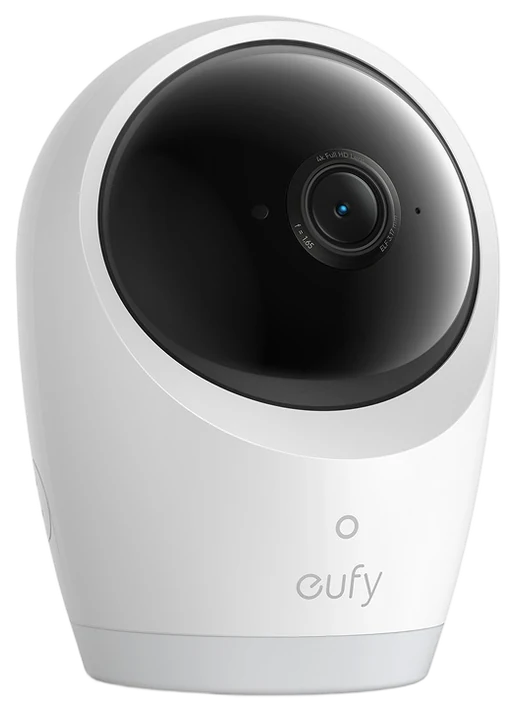
The eufy Baby Monitor E21 dissolves the category’s central argument instead of picking a side. Day to day it behaves like a classic monitor, with a 5-inch dedicated parent screen on a local link that works the moment you plug it in, no account and no router involved. But when you are traveling, at work, or leaving the sitter in charge, you can switch Wi-Fi on and pull the feed up in the eufy app. One monitor, both philosophies, and you decide which one you are using on any given night.
The hardware holds up its end of the pitch. The camera pans 330 degrees and tilts 60, steering from the parent unit or the phone, so you can follow a crib escape artist without opening the door, and it shoots 4K with an 8x zoom, which is what makes digitally zooming into a face still look like a face. A 5,000mAh battery sits in the camera itself, so it moves to a travel cot or a grandparent’s spare room without hunting for a socket.
Two catches. The parent screen is 5 inches at 720p, so the 4K sensor is doing its work in the app and in the zoom rather than on the handheld display. And flipping Wi-Fi on reopens the exact security question radio-only parents bought their way out of, so the hybrid premise only pays off if you use both modes. At roughly $140 to $250, against a $259.99 list, it costs more than a radio-only unit and does considerably more.
Strengths
Local parent screen daily, Wi-Fi when wanted
330° pan and 60° tilt, 4K with 8x zoom
Battery in the camera, so it travels
Works fully without Wi-Fi if you prefer
Tradeoffs
Wi-Fi mode reopens the security tradeoff
Parent screen is 720p, not 4K
Dearer than radio-only monitors
Pick 3 of 5: No. 3Best under $100~$50–100
3
VTech Video Monitor
Budget pickBest under $100
The budget dependable
Get it if you want the essentials handled for the least money.
Skip it if you want analytics, app access or premium hardware.
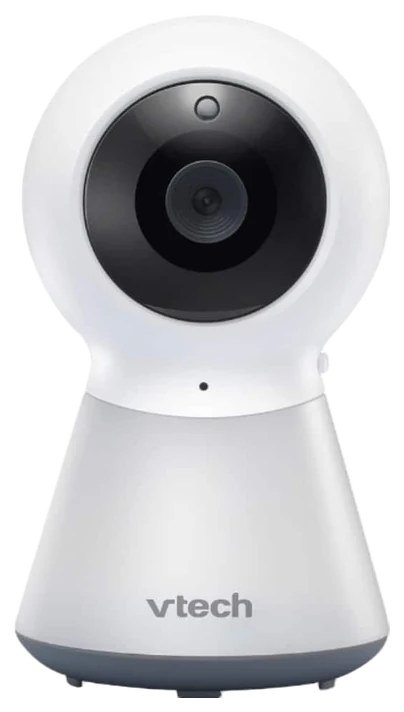
VTech’s video monitors are the registry pick when the budget has other battles to fight. VTech has quietly shipped more baby monitors than nearly anyone, and its budget models cover the actual job description, which is see baby, hear baby, soothe baby remotely, without the anxiety-pricing this category loves. Parent reviews on thousand-night timescales keep reaching the same verdict: where it counts, it does what the expensive monitors do, for half the money.
The essentials are all present. A 5-inch parent screen, infrared night vision that shows you a dark nursery, two-way talk for remote soothing, and built-in lullabies for the nights that need backup. Range and battery match monitors at twice the price, and because it runs on a closed radio link it carries the same nothing-to-hack security as the premium non-Wi-Fi picks, which budget shoppers rarely realize they are getting for free.
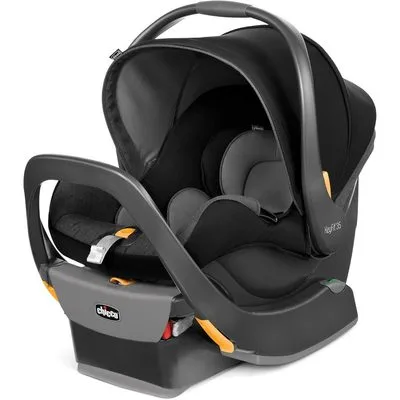
The compromises are the visible kind: more plastic in the build, a screen that is serviceable rather than sharp, no swappable lenses or pan-tilt steering, and no app access, ever. If sleep analytics or away-from-home viewing matter to you, this is not your branch of the decision tree. At usually under $100 at Amazon it leaves real money in the registry for the car seat, and every monitor gets outgrown eventually.
Strengths
Covers the core job: see, hear, soothe
Range and battery match pricier monitors
Closed radio link, premium-grade security for free
Leaves registry money for the car seat
Tradeoffs
Serviceable screen, plasticky build
No lens swapping or pan-tilt steering
No app access, ever
Also on the shortlist
Two more, in brief
Pick 4 of 5: No. 4Best sleep analytics
4
Nanit Pro
Best sleep analytics
The sleep-data flagship
Get it if you will act on sleep data and trends.
Skip it if you want a screen that is not your phone.
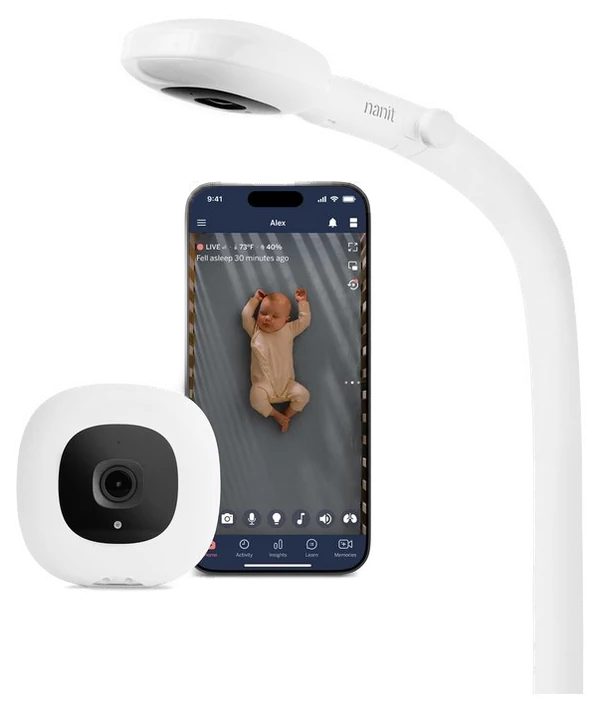
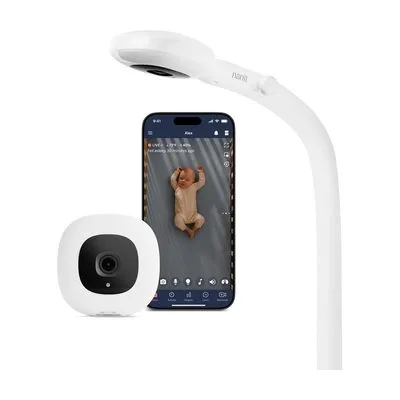
The Nanit Pro is what happens when a baby monitor decides to become a data product. The camera mounts overhead for a bird’s-eye view of the whole crib, and the app turns that feed into information you can act on: wake windows, sleep trends, how last week compares to this one. For data-driven parents and anyone mid-sleep-training campaign, it is the premium Wi-Fi benchmark the rest of the category gets measured against.
The analytics are the reason to pay up. The system tracks sleep onset, night wakings and how often you visited, and the included breathing band lets the camera read breathing motion from a printed pattern, with no electronics touching your baby. Parents report the weekly summaries change behavior, so schedules shift and bedtimes move. Video quality is excellent, and two-way audio, a night-light and sound alerts cover the standard monitor duties while the data does the differentiating.
The catches are the Wi-Fi category’s usual suspects, plus one. The feed lives and dies with your router, there is no dedicated parent screen because your phone is the monitor, and the deeper analytics history sits behind a subscription beyond what is bundled at purchase, so check the current terms before you commit. At around $250–300 at Amazon it is the most monitor most families will consider: worth it if you will act on the data, oversized if you want to see the crib.
Skip it if you want a screen that is not your phone.
The Nanit Pro is what happens when a baby monitor decides to become a data product. The camera mounts overhead for a bird’s-eye view of the whole crib, and the app turns that feed into information you can act on: wake windows, sleep trends, how last week compares to this one. For data-driven parents and anyone mid-sleep-training campaign, it is the premium Wi-Fi benchmark the rest of the category gets measured against.
Read the full case
The analytics are the reason to pay up. The system tracks sleep onset, night wakings and how often you visited, and the included breathing band lets the camera read breathing motion from a printed pattern, with no electronics touching your baby. Parents report the weekly summaries change behavior, so schedules shift and bedtimes move. Video quality is excellent, and two-way audio, a night-light and sound alerts cover the standard monitor duties while the data does the differentiating.
The catches are the Wi-Fi category’s usual suspects, plus one. The feed lives and dies with your router, there is no dedicated parent screen because your phone is the monitor, and the deeper analytics history sits behind a subscription beyond what is bundled at purchase, so check the current terms before you commit. At around $250–300 at Amazon it is the most monitor most families will consider: worth it if you will act on the data, oversized if you want to see the crib.
Strengths
Sleep analytics that change schedules
Overhead mount gives the clearest crib view
Breathing band, no electronics on baby
Excellent video and polished app
Tradeoffs
Deeper analytics history requires a subscription
Lives and dies with your Wi-Fi
No dedicated screen, your phone is the monitor
Pick 5 of 5: No. 5Best wearable~$290–340
5
Owlet Dream Sock
Upgrade pickBest wearable
The vitals wearable
Get it if vitals reassurance is the specific thing keeping you awake. Torn between it and the Nanit? Our Nanit vs Owlet comparison settles it.
Skip it if you mainly want to see and hear the nursery.
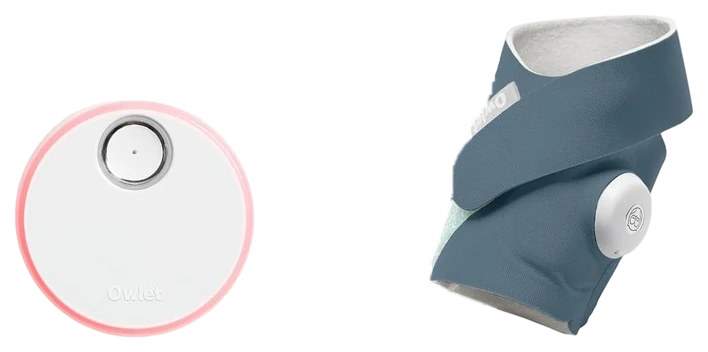
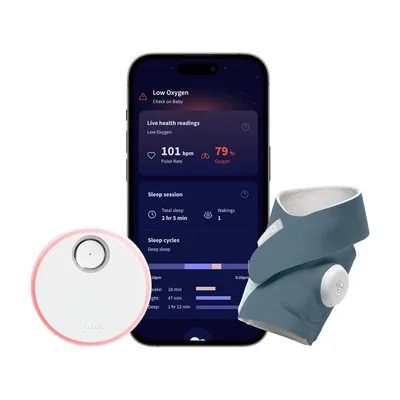
The Owlet Dream Sock answers a different anxiety than every camera on this list. The soft sock wraps around your baby’s foot and tracks heart rate and oxygen saturation while they sleep, alerting you if readings leave safe ranges. It is the only pick here with FDA clearance behind its vitals readings, a regulatory bar the vague breathing-detection features on camera monitors never had to clear, and the reason it gets recommended to a specific kind of parent.
For the families it is built for, meaning preemie parents, NICU graduates and anyone who physically cannot stop getting up to check, owner reviews describe the same outcome again and again. The sock buys the one thing no camera can, which is sleep for the adults. The base station glows green when readings are normal, so reassurance does not even require opening the app, and the sock charges quickly enough to slot into the nightly routine without becoming another chore.
Be clear-eyed about what it is not. The AAP does not consider any consumer monitor a SIDS preventive, and safe-sleep practices remain the actual intervention, so the sock is reassurance rather than protection. There is also no video, so most families pair it with a camera like the budget VTech. At around $290–340 at Amazon it is the priciest pick in this guide, and worth it only if vitals reassurance is the specific thing keeping you awake.
Strengths
FDA-cleared heart-rate and oxygen tracking
Alerts only when readings leave safe ranges
Green-glow base station for reassurance at a glance
Get it if vitals reassurance is the specific thing keeping you awake. Torn between it and the Nanit? Our Nanit vs Owlet comparison settles it.
Skip it if you mainly want to see and hear the nursery.
The Owlet Dream Sock answers a different anxiety than every camera on this list. The soft sock wraps around your baby’s foot and tracks heart rate and oxygen saturation while they sleep, alerting you if readings leave safe ranges. It is the only pick here with FDA clearance behind its vitals readings, a regulatory bar the vague breathing-detection features on camera monitors never had to clear, and the reason it gets recommended to a specific kind of parent.
Read the full case
For the families it is built for, meaning preemie parents, NICU graduates and anyone who physically cannot stop getting up to check, owner reviews describe the same outcome again and again. The sock buys the one thing no camera can, which is sleep for the adults. The base station glows green when readings are normal, so reassurance does not even require opening the app, and the sock charges quickly enough to slot into the nightly routine without becoming another chore.
Be clear-eyed about what it is not. The AAP does not consider any consumer monitor a SIDS preventive, and safe-sleep practices remain the actual intervention, so the sock is reassurance rather than protection. There is also no video, so most families pair it with a camera like the budget VTech. At around $290–340 at Amazon it is the priciest pick in this guide, and worth it only if vitals reassurance is the specific thing keeping you awake.
Strengths
FDA-cleared heart-rate and oxygen tracking
Alerts only when readings leave safe ranges
Green-glow base station for reassurance at a glance
Buys anxious parents actual sleep
Tradeoffs
Not a SIDS preventive, and no consumer monitor is
No video; most families add a camera
Priciest pick in the guide
The core decision is radio versus Wi-Fi. Closed-radio monitors (like VTech or Infant Optics) transmit locally on a dedicated frequency — there’s no app, no internet connection, and nothing to hack, but you also can’t check in remotely. Wi-Fi models (like Nanit) route video through an app, which enables remote viewing from work or while traveling, plus features like sleep analytics, at the cost of relying on your home network and a cloud connection. Beyond that, check video resolution and night vision quality, since a monitor you’ll use at 2 a.m. needs to produce a usable image in near-total darkness, not just daylight marketing photos.
Basic radio-only monitors run $50-100. Video monitors with app options land $170-250. Wi-Fi models with sleep analytics or wearable vitals tracking run $250-340.
The biggest mistake is assuming a camera’s “breathing tracking” feature is medically validated — it generally isn’t; only wearables like the Owlet Dream Sock carry FDA clearance for vitals monitoring. The second is paying for remote-access features you won’t realistically use over a simpler, more secure local monitor. Safe-sleep practices, not monitor features, remain the real intervention against SIDS risk.
Cubo Ai Plus — The AI that flags a covered face or a rollover is genuinely clever, but the sleep analytics and event history you’re paying for sit behind a roughly $100-a-year subscription.
Lollipop Baby Monitor — It’s cute and cheap up front, but breathing and sleep tracking need the paid Care plan, and it leans entirely on your home WiFi to work at all.
Babysense HD S2 — It’s a fine non-WiFi split-screen unit, but it mostly overlaps with our VTech pick without adding enough to earn its own spot.
Google Nest Cam (indoor) — It’s a great little camera, but it isn’t built for babies (no temperature reading, no lullabies) and full event history wants a Nest Aware subscription.
Baby monitor FAQs
6 common questions, answered.
Wi-Fi or non-Wi-Fi baby monitor?
Non-Wi-Fi radio monitors win on security, because the link is closed, on reliability, because nothing depends on your router, and on simplicity. Wi-Fi wins when you need remote viewing for travel, work or grandparent duty, and when you want analytics. The eufy hybrid, or simply running both types, are the increasingly common compromises.
Are baby monitor “breathing tracking” features medical devices?
Only the FDA-cleared ones, meaning Owlet’s Dream Sock, carry regulatory review, and even those are consumer reassurance products rather than apnea medical monitors. The AAP does not consider any consumer monitor a SIDS preventive. Safe-sleep practices remain the actual intervention.
What range do radio monitors get?
Plan on covering a typical home, not the advertised 1,000 feet. Through real walls, expect solid coverage across a typical home and yard. Wi-Fi monitors sidestep range entirely but inherit your router’s dead zones instead, and the garage-apartment scenario is where each type gets tested.
Do premium Wi-Fi monitors require a subscription?
Often, at least for the full experience. Nanit bundles some analytics with the camera but keeps deeper history and insights behind a paid tier, while Owlet’s core vitals alerts work without one. Check current terms before buying, because they change. Radio monitors like the Infant Optics, eufy and VTech never charge ongoing fees, which is part of their appeal: the price on the box is the whole price.
How long does a baby monitor stay useful?
Longer than most baby gear. Video monitoring routinely runs into the toddler years, through crib-climbing and the toddler-bed transition, which is why swappable lenses on the Infant Optics and remote pan-tilt on the eufy matter more over time than they seem to at the registry stage. The Owlet sock is the exception. It fits roughly the first eighteen months, and its vitals mission naturally winds down as babies grow out of the anxious newborn window.
Is the expensive monitor worth it over the budget VTech?
Only if you will use what the extra money buys. The VTech covers seeing, hearing and soothing as well as anything here. Paying more gets you specific additions: the Infant Optics lens system and noise reduction, the eufy optional app access, the Nanit sleep analytics, the Owlet vitals readings. If none of those made you nod, the budget pick is the answer. Monitors get outgrown either way, and the leftover cash has plenty of other jobs.
Sources
Who the write-ups above lean on, and where each one is cited.
FDACited for Owlet Dream Sock, and in the FAQ and the buying advice.
3Aug 2026Correction, 3 August 2026This guide previously recommended the eufy SpaceView and described it as a hybrid you could switch between a local radio link and Wi-Fi phone viewing. That is wrong: eufy’s spec sheets for the SpaceView and SpaceView Pro both state that they are not Wi-Fi capable and need no app. The pick has been replaced with the eufy Baby Monitor E21, which does work both ways.Every correction we’ve made ›
Prices on this page are re-checked weekly — see the full Baby & Kids price index for every product we cover.
Keep reading
Where to go next.
The close calls side by side, then related guides.
New guides, re-ranked picks and the month's notable changes. No weekly filler, ever.
Unsubscribe any time. Your address goes to our newsletter provider and nowhere else — see our privacy policy.
Manage Consent
To provide the best experiences, we use technologies like cookies to store and/or access device information. Consenting to these technologies will allow us to process data such as browsing behavior or unique IDs on this site. Not consenting or withdrawing consent, may adversely affect certain features and functions.
Functional
Always active
The technical storage or access is strictly necessary for the legitimate purpose of enabling the use of a specific service explicitly requested by the subscriber or user, or for the sole purpose of carrying out the transmission of a communication over an electronic communications network.
Preferences
The technical storage or access is necessary for the legitimate purpose of storing preferences that are not requested by the subscriber or user.
Statistics
The technical storage or access that is used exclusively for statistical purposes.The technical storage or access that is used exclusively for anonymous statistical purposes. Without a subpoena, voluntary compliance on the part of your Internet Service Provider, or additional records from a third party, information stored or retrieved for this purpose alone cannot usually be used to identify you.
Marketing
The technical storage or access is required to create user profiles to send advertising, or to track the user on a website or across several websites for similar marketing purposes.