The Best Home Security Cameras:Subscription Costs Included
Security cameras have a hidden spec: the monthly fee. We compared video quality, reliability and, critically, what each brand charges to actually store your footage, across five cameras worth mounting.
By the BYB Editorial Team
Published July 28, 2026 · Prices checked OctoberOct 5, 2026
Security cameras have a hidden spec: the monthly fee. We compared video quality, reliability and, critically, what each brand charges to actually store your footage, across five cameras worth mounting.
How we choseWhat we compared, and how we rank
We compiled video and night-vision testing, reliability reports, and full subscription-cost math: the number most reviews bury. Prices are always moving, so every button and link pulls the live listing.
How we rank
Published specifications, verified owner reviews, and independent safety or standards data where it applies — weighted the same for every pick, never sponsored placement.
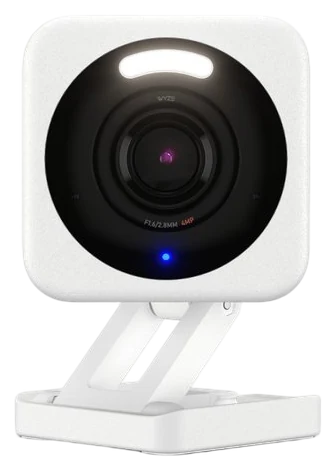
Wyze’s entire thesis is that a good camera shouldn’t cost more than dinner, and the Cam v4 delivers again: sharp 2.5K video, color night vision that resolves faces in the dark, and the differentiator. A microSD slot that makes cloud fees strictly optional.
Tom’s Guide called it the new king of budget security cameras, and the arithmetic is why: you can cover every angle of a home with v4s for the price of a single premium camera elsewhere. The app is full-featured, motion detection is solid, and the optional cloud tier is cheap if you want it.
The notes: it needs a power cable (no battery model here, that’s the Blink), and the security record is a real caveat, since a February 2024 caching fault briefly showed as many as 13,000 users thumbnails from strangers’ cameras, which is why privacy-critical rooms deserve a look at the local-first eufy. At $35–40 on Amazon, the v4 is the value benchmark the whole category answers to.
Strengths
2.5K video at a $35 price
MicroSD makes cloud fees optional
Real color night vision
Cover a whole home affordably
Tradeoffs
Needs a power cable
Brand had past security stumbles
Plastic build is weather-adequate
Pick 2 of 5: No. 2Best battery
2
Blink Outdoor 4
Best battery
The two-year-battery specialist
Get it if you want cameras where wires can’t go, with no charging ritual.
Skip it if you want the sharpest video, Wyze or Reolink.
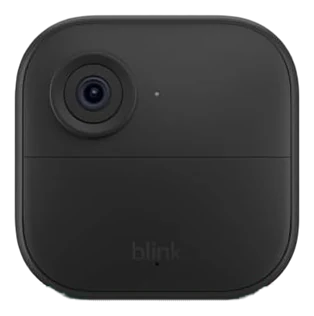
Blink’s pitch is radical laziness, and the Outdoor 4 delivers it: mount it anywhere with zero wiring and change a pair of AAs roughly every two years. That figure is a best case rather than a promise: Tom’s Guide calls it fairly accurate against older Blink cameras while noting busy placements drain it faster, and SafeWise declined to certify a two-year rating it had only had weeks to test.
Amazon owns the brand, so Alexa integration is native, cameras on the Echo Show by voice, and sale pricing is famously aggressive. The Sync Module 2 adds local USB storage that sidesteps the subscription entirely, which most buyers miss at checkout.
Video quality is good 1080p rather than the Wyze’s 2.5K, and cold climates trim battery life. But for the garage, driveway, and side-gate spots where wiring is a fantasy, the Outdoor 4 at $60–100 on Amazon, routinely halved during Amazon events, is the answer.
Strengths
Two AA lithium cells rated up to two years
Mount anywhere, zero wiring
Native Alexa integration
Local storage via Sync Module
Tradeoffs
1080p trails the field
Cold weather cuts battery
Best features assume Alexa
Pick 3 of 5: No. 3Best ecosystem
3
Ring Outdoor Cam
Best ecosystem
The neighborhood standard
Get it if a Ring doorbell already runs your front door.
Skip it if avoiding subscriptions is the goal. eufy is built for that.
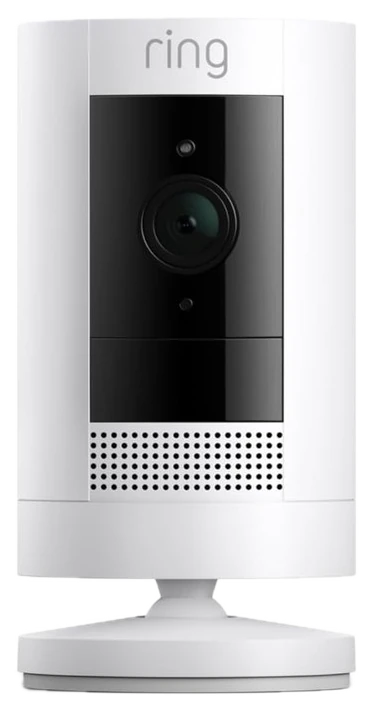
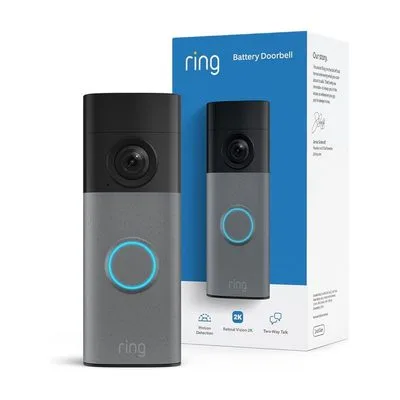
Ring’s outdoor cameras are the ecosystem play: if a Ring doorbell already guards your front door, these join the same app, the same alerts, the same neighborhood features. One plan does cover every device at the address, but only from the middle tier up: Ring’s entry plan covers a single camera, so check which tier you are buying.
The polish is the product: the app is the category’s smoothest, battery and plug-in versions cover any mounting situation, and Alexa announces visitors by name of camera. For households already inside Ring, adding coverage is frictionless in a way mixed-brand setups never are.
The cost: without a plan there’s no video history at all. This is the most subscription-dependent pick here, which is exactly what the eufy exists to oppose. At $60–100 on Amazon, buy it to extend a Ring home, not to start a fee-free one.
Strengths
One plan covers every device, from the mid tier up
Most polished app in the category
Battery and wired options
Deep Alexa integration
Tradeoffs
No video history without paying
Privacy record draws scrutiny
Value depends on Ring commitment
Also on the shortlist
Two more, in brief
Pick 4 of 5: No. 4No monthly fees~$100–200 per camera
4
eufy SoloCam (solar)
Upgrade pickNo monthly fees
The no-subscription flagship
Get it if you want to pay once and never think about fees or charging.
Skip it if upfront budget is tight. Wyze covers more for less today.
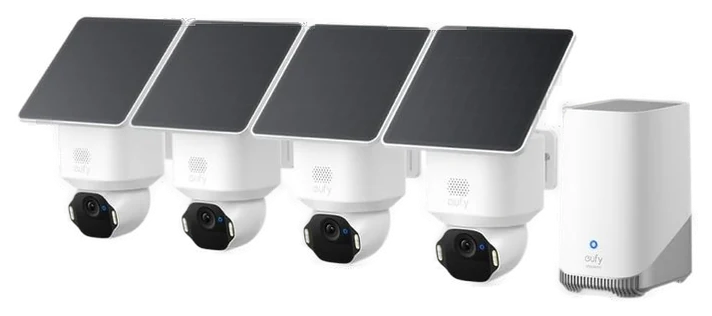
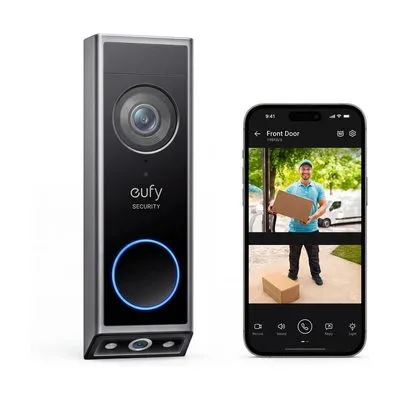
eufy built its brand on one promise (no subscription, ever) and the solar SoloCams complete the thought: a small panel keeps the battery topped indefinitely, footage lives on the device, and person detection runs locally instead of in a billable cloud.
The three-year math is the argument: a higher sticker price, then nothing, while cloud-first rivals quietly accumulate hundreds in fees. Video quality is strong 2K, the app is mature, and HomeBase expansion adds capacity for multi-camera homes. One asterisk belongs on the privacy claim. After The Verge showed in late 2022 that eufy streams could be pulled up unencrypted, Anker admitted in February 2023 that its cameras had been sending footage to its web portal without end-to-end encryption, and said it had fixed it. The local-storage architecture is genuine; the company’s record on it is not spotless.
Upfront cost is the barrier at $100–200 per camera on Amazon, and the solar panel wants a few hours of daily sun. But as the buy-it-once philosophy applied to home security, nothing else executes it this completely.
Strengths
Solar power ends charging forever
Zero subscription by design
Local AI person detection
Cheapest total cost by year three
Tradeoffs
Highest upfront price here
Panel needs real sunlight
Expansion favors its own HomeBase
Pick 4 of 5: No. 4No monthly fees~$100–200 per camera
Get it if you want to pay once and never think about fees or charging.
Skip it if upfront budget is tight. Wyze covers more for less today.
eufy built its brand on one promise (no subscription, ever) and the solar SoloCams complete the thought: a small panel keeps the battery topped indefinitely, footage lives on the device, and person detection runs locally instead of in a billable cloud.
Read the full case
The three-year math is the argument: a higher sticker price, then nothing, while cloud-first rivals quietly accumulate hundreds in fees. Video quality is strong 2K, the app is mature, and HomeBase expansion adds capacity for multi-camera homes. One asterisk belongs on the privacy claim. After The Verge showed in late 2022 that eufy streams could be pulled up unencrypted, Anker admitted in February 2023 that its cameras had been sending footage to its web portal without end-to-end encryption, and said it had fixed it. The local-storage architecture is genuine; the company’s record on it is not spotless.
Upfront cost is the barrier at $100–200 per camera on Amazon, and the solar panel wants a few hours of daily sun. But as the buy-it-once philosophy applied to home security, nothing else executes it this completely.
Strengths
Solar power ends charging forever
Zero subscription by design
Local AI person detection
Cheapest total cost by year three
Tradeoffs
Highest upfront price here
Panel needs real sunlight
Expansion favors its own HomeBase
Pick 5 of 5: No. 5Enthusiast pick
5
Reolink Argus 3 Pro
Enthusiast pick
The tinkerer’s choice
Get it if you want control and quality without ongoing fees.
Skip it if you want maximum hand-holding. Ring’s app wins there.
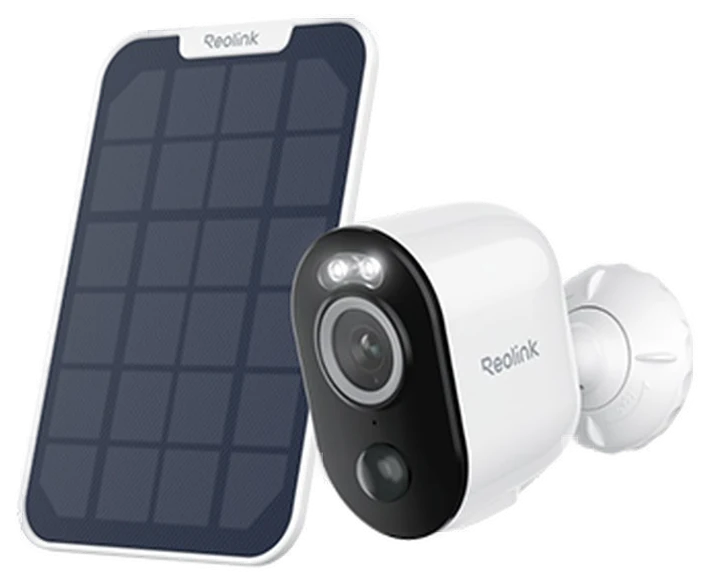
The Argus 3 Pro is the spec-sheet reader’s pick, and Reolink sells it as a kit: a 5MP camera recording 2880 by 1620 to a microSD card of up to 512GB, paired with the 3-watt solar panel that keeps its 5200mAh battery charged, for $99.99 on Amazon.
Person, vehicle and animal detection run on the camera without a subscription, and Reolink’s free tier adds seven days of clip storage, so the recurring cost is zero once you feed it a card. MBReviews called it the best outdoor camera on price to performance and features, and Digital Trends recommended buying it for the video quality and the savings.
The limits come from those same reviews. Digital Trends found subdued colors and blown-out highlights in high-contrast scenes. MBReviews measured about two seconds of latency near the router, rising to three and a half further away, and reported false alarms on windy days.
The sensor runs at 15 frames per second, which is enough to identify who walked up the path and too few for smooth motion. The battery alone lasts five to seven days in regular use, which is exactly why the version worth buying is the solar bundle rather than the bare camera. Note that the plain Argus this guide used to name was discontinued in 2020.
Get it if you want control and quality without ongoing fees.
Skip it if you want maximum hand-holding. Ring’s app wins there.
The Argus 3 Pro is the spec-sheet reader’s pick, and Reolink sells it as a kit: a 5MP camera recording 2880 by 1620 to a microSD card of up to 512GB, paired with the 3-watt solar panel that keeps its 5200mAh battery charged, for $99.99 on Amazon.
Read the full case
Person, vehicle and animal detection run on the camera without a subscription, and Reolink’s free tier adds seven days of clip storage, so the recurring cost is zero once you feed it a card. MBReviews called it the best outdoor camera on price to performance and features, and Digital Trends recommended buying it for the video quality and the savings.
The limits come from those same reviews. Digital Trends found subdued colors and blown-out highlights in high-contrast scenes. MBReviews measured about two seconds of latency near the router, rising to three and a half further away, and reported false alarms on windy days.
The sensor runs at 15 frames per second, which is enough to identify who walked up the path and too few for smooth motion. The battery alone lasts five to seven days in regular use, which is exactly why the version worth buying is the solar bundle rather than the bare camera. Note that the plain Argus this guide used to name was discontinued in 2020.
Strengths
5MP video, free AI detection
microSD to 512GB, no plan needed
Solar panel included in the kit
You own the footage pipeline
Tradeoffs
15fps, not smooth motion
Needs the solar panel to stay charged
Cloud history beyond the free week costs extra
The sticker price on a camera is only half the story; the monthly plan is the other half. Sort out how you’ll store footage and power the thing before you buy.
Where footage lives: cameras save clips either locally, on a microSD card or base station, or in the cloud. Local storage is usually free, so check whether your camera lets you skip the cloud entirely.
Watch the subscription: many cheap cameras lock person alerts and saved video history behind a monthly plan. A $30 camera on a $10-a-month plan quietly becomes a few hundred dollars over three years.
Power and placement: decide between wired for set-and-forget uptime, battery for easy placement with recharges, or solar to skip the ladder. Match that to where the camera needs to go.
The common mistake: buying on price alone and finding the useful features are all paywalled. Add up three years of subscription before you decide something is cheap.
Arlo Pro 5S 2K — excellent hardware, but nearly everything worth having is locked behind an Arlo Secure plan, which is the opposite of what this guide is about.
Google Nest Cam (battery) — polished and smart, but the best alerts and more than a few hours of video history need a Nest Aware subscription.
TP-Link Tapo C325WB — a cheap outdoor cam with free microSD recording and no required fees, but it’s wired-only, so you need an outdoor outlet where you want it.
Lorex 2K Wired — fully local storage with no monthly fees ever, but you’re running cable and living inside Lorex’s own app rather than a big ecosystem.
Security camera FAQs
6 common questions, answered.
Do security cameras require a subscription?
Only some brands. Ring effectively does (no video history without a plan); Wyze, eufy, and Reolink offer real local storage with zero fees. Over three years the difference is hundreds of dollars. Do the subscription math before comparing hardware prices.
Battery or wired cameras?
Wired for busy areas (constant recording, no charging), battery for placement freedom. Batteries in high-traffic spots drain in weeks, not months. That’s the trap. Solar models like eufy’s split the difference for outdoor spots with sun.
Are cheap cameras like Wyze secure?
Yes, if you follow the same basics any camera needs: unique password, two-factor on, firmware updated. Every major brand has had incidents; the mitigations are identical. Local-storage models add the option of keeping footage entirely off the cloud.
How many cameras do I need?
Fewer than the starter-pack marketing suggests. Most homes are well covered with three: front door (usually a doorbell), driveway or garage, and the backyard or side entry blind spot. Interior cameras divide households on privacy grounds, many owners schedule them off when home. Start with the entries burglary statistics favor: front door, back door, and the ground-floor window line.
Where should I mount outdoor cameras?
Nine to ten feet up, angled slightly down: high enough to resist tampering, low enough to catch faces rather than hat brims. Cover approach paths, not just the door itself, and check the night-vision range before finalizing. Infrared has real distance limits. One practical tip owners learn late: avoid pointing at streets and neighbors; motion zones cut the false alerts and the awkwardness alike.
Do Wi-Fi cameras work in a power or internet outage?
Battery cameras keep recording locally through power cuts (their radios die only if your router does), and models with microSD or hub storage (the Wyze, eufy, Blink, and Reolink picks) keep capturing even offline, syncing alerts when the connection returns. Cloud-only cameras go dark with the internet. If outage coverage matters, local storage isn’t optional; it’s the feature.
Sources
Who the write-ups above lean on, and where each one is cited.
Digital TrendsCited for Reolink Argus 3 Pro, and in the buying advice.
Tom’s GuideCited for Wyze Cam v4 and Blink Outdoor 4.
The VergeCited for eufy SoloCam (solar), and in the buying advice.
Prices on this page are re-checked weekly — see the full Smart Home price index for every product we cover.
Keep reading
Where to go next.
The close calls side by side, then related guides.
New guides, re-ranked picks and the month's notable changes. No weekly filler, ever.
Unsubscribe any time. Your address goes to our newsletter provider and nowhere else — see our privacy policy.
Manage Consent
To provide the best experiences, we use technologies like cookies to store and/or access device information. Consenting to these technologies will allow us to process data such as browsing behavior or unique IDs on this site. Not consenting or withdrawing consent, may adversely affect certain features and functions.
Functional
Always active
The technical storage or access is strictly necessary for the legitimate purpose of enabling the use of a specific service explicitly requested by the subscriber or user, or for the sole purpose of carrying out the transmission of a communication over an electronic communications network.
Preferences
The technical storage or access is necessary for the legitimate purpose of storing preferences that are not requested by the subscriber or user.
Statistics
The technical storage or access that is used exclusively for statistical purposes.The technical storage or access that is used exclusively for anonymous statistical purposes. Without a subpoena, voluntary compliance on the part of your Internet Service Provider, or additional records from a third party, information stored or retrieved for this purpose alone cannot usually be used to identify you.
Marketing
The technical storage or access is required to create user profiles to send advertising, or to track the user on a website or across several websites for similar marketing purposes.