The Best Smart Locks for 2026:Keyless Entry Without the Lock-in
A smart lock replaces the single most-used object on your house. We compared reliability records, battery reality and entry methods across four locks, including the one that keeps your existing keys.
By the BYB Editorial Team
Published July 28, 2026 · Updated · Prices checked OctoberOct 5, 2026
A smart lock replaces the single most-used object on your house. We compared reliability records, battery reality and entry methods across four locks, including the one that keeps your existing keys.
How we choseWhat we compared, and how we rank
We compiled reliability and battery testing, locksmith commentary on mechanical quality, and long-term owner reviews. Prices are always moving, so every button and link pulls the live listing.
How we rank
Published specifications, verified owner reviews, and independent safety or standards data where it applies — weighted the same for every pick, never sponsored placement.
NoteIn an audit pass, auto-lock was described as eliminating the most common failure; it sharply cuts it, and the sentence now says so. Logged on the corrections page.
Dated notes already published on this page, newest first. Every correction we make is logged on the corrections page.
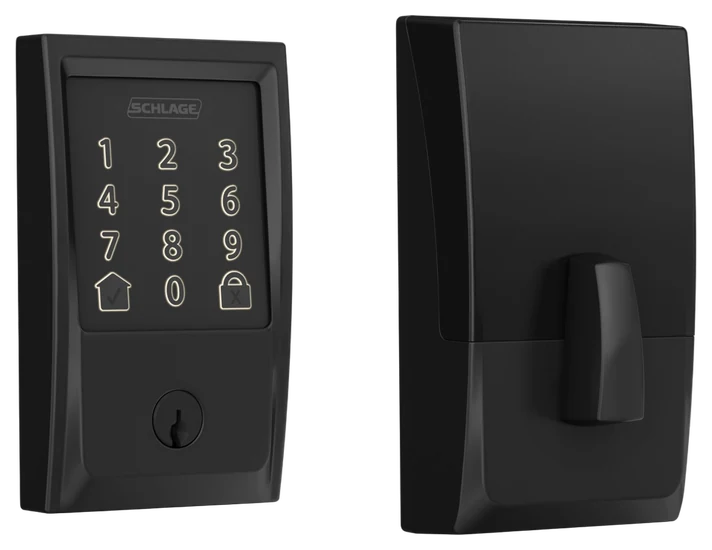
The Schlage Encode leads because Schlage got the order of operations right: it’s a top-security-grade deadbolt first and a gadget second: ANSI Grade 1, the residential maximum, with hardware a locksmith respects before the electronics even boot.
Wi-Fi lives inside the lock, so there’s no hub to buy or bridge to babysit: codes for everyone (up to a hundred), app control from anywhere, and Alexa or Google voice control out of the box. Owner reviews consistently praise the keypad’s reliability years in. The metric that matters.
Battery life runs shorter than hub-based rivals, the price of built-in Wi-Fi, and the design is handsome-traditional rather than modern. At $220–280 on Amazon, it’s the buy-once security-first answer this category needed.
Strengths
ANSI Grade 1, maximum residential security
No hub or bridge required
100 schedulable codes
Locksmith-grade hardware pedigree
Tradeoffs
Built-in Wi-Fi taxes batteries
Chunkier traditional styling
Premium price
Pick 2 of 5: No. 2Most entry options
2
ULTRALOQ U-Bolt Pro
Most entry options
The everything-entry value pick
Get it if you want fingerprint entry everyone in the house can use, for less than the Schlage costs.
Skip it if curb-appeal hardware matters, see the Yale.
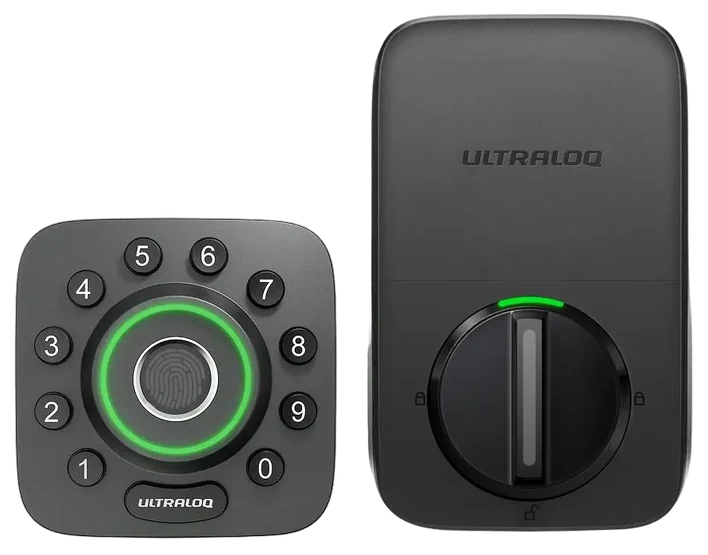
The U-Bolt Pro’s fingerprint reader is the feature that converts skeptics: a half-second thumb press beats codes, phones, and keys alike: and kids adore it. Groceries in both arms stops being a puzzle.
Six total entry methods (fingerprint, keypad, app, key, auto-unlock, even knock-to-open via phone) mean there is always a way in, and the enthusiast community has made it the perennial value favorite. Build quality lands solidly mid-premium.
The aesthetic is function-forward rather than elegant, and full remote features want the Wi-Fi bridge add-on on some configurations. At $150–200 on Amazon with regular coupons, it delivers the most entry flexibility per dollar in the category.
Strengths
Half-second fingerprint entry
Six ways in. Never locked out
Enthusiast value favorite
Frequent coupon pricing
Tradeoffs
Utilitarian looks
Bridge needed for some remote features
Fingerprints challenge wet hands
Pick 3 of 5: No. 3Best for renters
3
August Smart Lock
Best for renters
The renter’s retrofit
Get it if you rent, or want smart entry without changing hardware.
Skip it if you want a hardware upgrade too. Go Schlage or Yale.
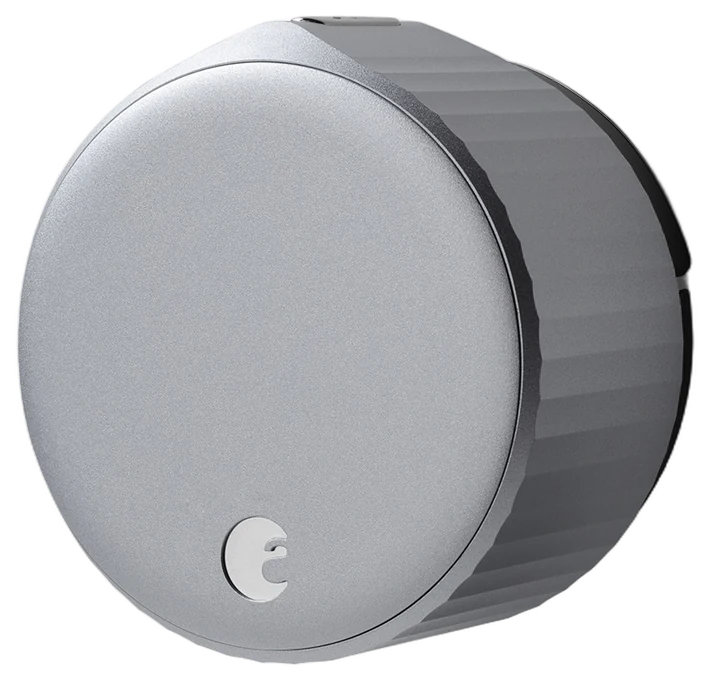
August solved the renter problem elegantly: the August Smart Lock replaces only the inside thumb-turn of your existing deadbolt, the outside face and your landlord’s keys stay exactly as they were. Move out, unscrew it, take it along.
The daily magic is auto-unlock: arrive home and the door greets you unlocked; leave and it locks behind you. Guest access by app or code, a clean activity log, and Wi-Fi in the current generation without the old bridge dongle.
Because it keeps your existing deadbolt, its security is your deadbolt’s security, pair accordingly, and the motor asks for a well-aligned door. At $150–230 on Amazon, it remains the definitive renter and light-touch answer.
Strengths
Landlord-invisible retrofit
Auto-unlock arrival magic
Takes ten minutes to install
Leaves with you when you move
Tradeoffs
Inherits your deadbolt’s security
Misaligned doors tax the motor
No keypad without add-on
Also on the shortlist
Two more, in brief
Pick 4 of 5: No. 4Best design
4
Yale Assure Lock 2
Best design
The clean keypad classic
Get it if design and future-proof modularity lead your list.
Skip it if max security grade per dollar decides. Encode wins.
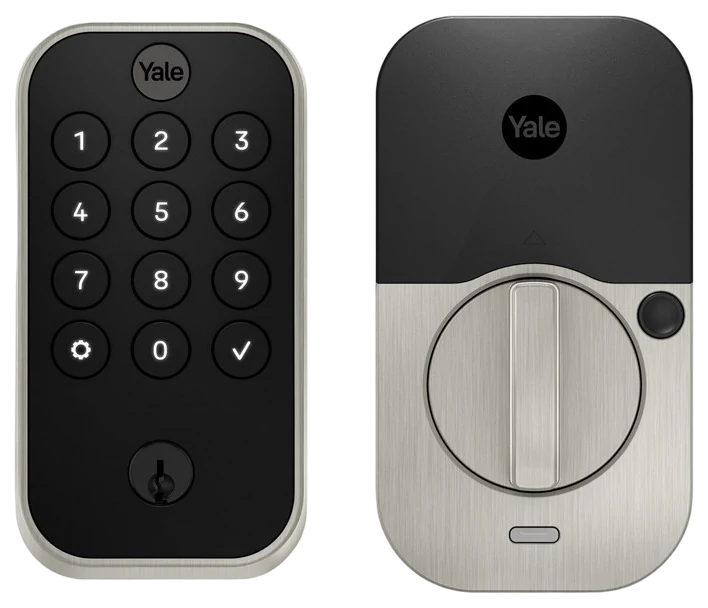
The Yale Assure Lock 2 is the design pick: the slimmest, cleanest hardware in the category, from a lockmaker with 180 years of pedigree. If door hardware is jewelry to you, this is the one that earns compliments.
The key-free version removes the cylinder entirely (nothing to pick, nothing to bump), a bold and defensible security posture. Swappable modules add Wi-Fi, Z-Wave, or Matter as your smart home evolves, future-proofing the purchase.
The touchscreen invites smudge-pattern paranoia (Yale scrambles digits to counter it), and modules add cost to the sticker. At $160–260 on Amazon depending on configuration, it’s the pick where aesthetics and adaptability share top billing.
Get it if design and future-proof modularity lead your list.
Skip it if max security grade per dollar decides. Encode wins.
The Yale Assure Lock 2 is the design pick: the slimmest, cleanest hardware in the category, from a lockmaker with 180 years of pedigree. If door hardware is jewelry to you, this is the one that earns compliments.
Read the full case
The key-free version removes the cylinder entirely (nothing to pick, nothing to bump), a bold and defensible security posture. Swappable modules add Wi-Fi, Z-Wave, or Matter as your smart home evolves, future-proofing the purchase.
The touchscreen invites smudge-pattern paranoia (Yale scrambles digits to counter it), and modules add cost to the sticker. At $160–260 on Amazon depending on configuration, it’s the pick where aesthetics and adaptability share top billing.
Strengths
Slimmest, cleanest hardware here
Key-free option: nothing to pick
Swappable connectivity modules
Yale’s 180-year pedigree
Tradeoffs
Modules inflate final price
Touchscreen loves fingerprints
Fewer codes than Schlage
Pick 5 of 5: No. 5Best under $150~$95–110
5
eufy Security Smart Lock C220
Budget pickBest under $150
Keyless entry on a real deadbolt without the $200 ask
Get it if you want keyless entry on a standard front door and do not want to spend $200 to get it.
Skip it if you run your house through Apple Home, or the front door is the only thing standing between the street and your living room.
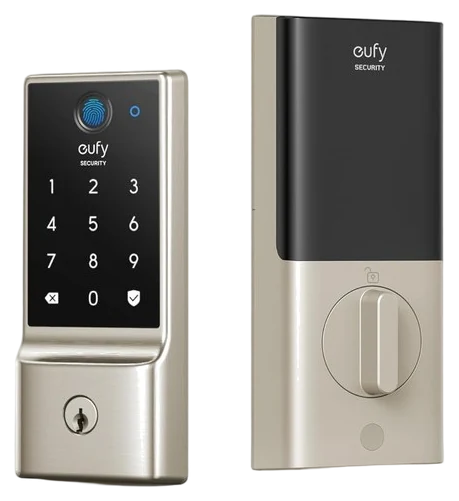
Every other lock in this guide costs meaningfully more, so the list had no entry-level pick. The C220 is it. This is a full deadbolt replacement rather than a retrofit, with a fingerprint reader on the front and Wi-Fi built into the lock body. It handles what most people want: keyless entry, plus a way to check the deadbolt from anywhere.
eufy rates it BHMA Grade 3 and IP53, and the keypad stores up to 50 fingerprints and 100 passcodes. Eight AA batteries carry it roughly eight months, and there is an emergency power port on the front for a portable charger. The Wi-Fi radio sits inside the lock, so nothing extra plugs into a wall. Warranty is 18 months. List is $169.99, but it sells near $100.
Grade 3 is the bottom of the three numbered lock grades. PCWorld puts that at 100,000 cycles and two hammer blows, against 250,000 and ten for Grade 1. Voice control is Alexa and Google Assistant; eufy’s spec sheet lists no Apple Home or Matter. If the front door is your whole security plan, the AAA certified Schlage Encode above is worth the extra.
Strengths
Full deadbolt replacement with fingerprint entry for around $100
Wi-Fi sits inside the lock, so there is no bridge to buy or keep powered
Stores up to 50 fingerprints and 100 passcodes
Emergency power port on the keypad if the batteries run flat
eufy covers it for 18 months
Tradeoffs
BHMA Grade 3, the lowest of the numbered lock grades
No Apple Home and no Matter, so it stays outside the Home app
IP53 covers spray, not a door that takes driving rain head-on
Eight AA batteries to change roughly every eight months
Owner reports mention the fingerprint reader struggling with wet or dirty hands
Pick 5 of 5: No. 5Best under $150~$95–110
eufy Security Smart Lock C220
Keyless entry on a real deadbolt without the $200 ask
Get it if you want keyless entry on a standard front door and do not want to spend $200 to get it.
Skip it if you run your house through Apple Home, or the front door is the only thing standing between the street and your living room.
Every other lock in this guide costs meaningfully more, so the list had no entry-level pick. The C220 is it. This is a full deadbolt replacement rather than a retrofit, with a fingerprint reader on the front and Wi-Fi built into the lock body. It handles what most people want: keyless entry, plus a way to check the deadbolt from anywhere.
Read the full case
eufy rates it BHMA Grade 3 and IP53, and the keypad stores up to 50 fingerprints and 100 passcodes. Eight AA batteries carry it roughly eight months, and there is an emergency power port on the front for a portable charger. The Wi-Fi radio sits inside the lock, so nothing extra plugs into a wall. Warranty is 18 months. List is $169.99, but it sells near $100.
Grade 3 is the bottom of the three numbered lock grades. PCWorld puts that at 100,000 cycles and two hammer blows, against 250,000 and ten for Grade 1. Voice control is Alexa and Google Assistant; eufy’s spec sheet lists no Apple Home or Matter. If the front door is your whole security plan, the AAA certified Schlage Encode above is worth the extra.
Strengths
Full deadbolt replacement with fingerprint entry for around $100
Wi-Fi sits inside the lock, so there is no bridge to buy or keep powered
Stores up to 50 fingerprints and 100 passcodes
Emergency power port on the keypad if the batteries run flat
eufy covers it for 18 months
Tradeoffs
BHMA Grade 3, the lowest of the numbered lock grades
No Apple Home and no Matter, so it stays outside the Home app
IP53 covers spray, not a door that takes driving rain head-on
Eight AA batteries to change roughly every eight months
Owner reports mention the fingerprint reader struggling with wet or dirty hands
A lock is the one gadget where a dead battery or a bad fit locks you out, so measure twice before you buy. These are the things that trip people up.
Retrofit or full replacement: a retrofit like August keeps your existing deadbolt and key and mounts on the inside, while a full replacement swaps the whole lock. Retrofits are simplest for renters; replacements give you keypads and fingerprints.
How it connects: some locks have Wi-Fi built in, others use Bluetooth only or need a separate bridge or hub for remote access. If you want to check the lock from work, confirm it does Wi-Fi or comes with the bridge.
Entry methods and HomeKit: decide whether you want a keypad, a fingerprint reader, or Apple Home Key tap-to-unlock. Apple fans should note that many “HomeKit” locks still need a home hub for remote control.
The common mistake: not measuring your door. Check the thickness, the backset, and that your deadbolt is standard before ordering, and plan on swapping batteries a couple of times a year.
Level Lock+ — it hides all its guts inside the door and supports Apple Home Key, which is slick, but at north of $300 it’s a splurge aimed squarely at Apple households.
Aqara Smart Lock U100 — fingerprint, keypad, and Apple Home Key in one, but you need an Aqara or Apple hub for remote access and it leans toward the Apple crowd.
Kwikset Halo — a no-hub Wi-Fi deadbolt with a keypad and no monthly fees, but it’s a bulky unit and the built-in Wi-Fi eats batteries faster than Bluetooth locks.
SwitchBot Lock — a cheap retrofit that bolts over your existing thumbturn so renters can keep their key, but it looks a bit DIY and needs the hub for remote and voice control.
Smart lock FAQs
6 common questions, answered.
Are smart locks secure?
The good ones are as secure as the deadbolts they replace. Look for ANSI Grade 1 or 2 hardware (Schlage, Yale) and two-factor on the app account. Most burglaries bypass locks entirely (windows, force), and features like auto-lock cut the actual #1 failure, doors left unlocked, though a dead battery or a mis-latched door can still beat it.
What happens when the battery dies?
Every lock here warns for weeks first, and each has a fallback: physical key (Schlage, August, ULTRALOQ), external battery-contact terminals, or early-warning low-power modes. Battery life runs 3–12 months depending on Wi-Fi usage. The lock never strands you.
Can I install a smart lock myself?
Yes, every pick here installs with a screwdriver in 15–30 minutes, and the August retrofit is the easiest of all. If your door’s existing deadbolt sticks or misaligns, fix that first; smart motors amplify mechanical problems, not solve them.
Will a smart lock fit my door?
Almost certainly, with one measurement. Standard US deadbolt cutouts (2-1/8″ hole, 2-3/8″ or 2-3/4″ backset) fit every full-replacement pick here, and the August rides on your existing deadbolt entirely. The genuine exceptions: mortise locks on older doors, thin-profile European multipoint doors, and doors where the deadbolt binds: fix a misaligned strike plate before installing, because motors amplify friction problems that keys muscle through.
Do smart locks work if the Wi-Fi goes down?
The lock itself keeps working. Codes, fingerprints, and keys are all processed at the door, not in the cloud. What you lose during an outage is remote control and notifications. That’s the architecture to prefer: local-first entry with connectivity as a bonus. Every pick here passes that test; be warier of locks that lean on a phone connection for daily entry.
Should I share codes or use the app for guests?
Codes, for almost everyone. Per-person codes take ten seconds to create, work without the guest installing anything, can be scheduled (cleaner: Tuesdays 9–12) and deleted the moment they shouldn’t work anymore. App-based guest access shines for the tech-comfortable inner circle; codes win for everyone else. The audit log (who came in, when) is quietly the feature parents and hosts use most.
20Aug 2026Correction, 20 August 2026In an audit pass, auto-lock was described as eliminating the most common failure; it sharply cuts it, and the sentence now says so. Logged on the corrections page.Every correction we’ve made ›
Prices on this page are re-checked weekly — see the full Smart Home price index for every product we cover.
Keep reading
Where to go next.
The close calls side by side, then related guides.
New guides, re-ranked picks and the month's notable changes. No weekly filler, ever.
Unsubscribe any time. Your address goes to our newsletter provider and nowhere else — see our privacy policy.
Manage Consent
To provide the best experiences, we use technologies like cookies to store and/or access device information. Consenting to these technologies will allow us to process data such as browsing behavior or unique IDs on this site. Not consenting or withdrawing consent, may adversely affect certain features and functions.
Functional
Always active
The technical storage or access is strictly necessary for the legitimate purpose of enabling the use of a specific service explicitly requested by the subscriber or user, or for the sole purpose of carrying out the transmission of a communication over an electronic communications network.
Preferences
The technical storage or access is necessary for the legitimate purpose of storing preferences that are not requested by the subscriber or user.
Statistics
The technical storage or access that is used exclusively for statistical purposes.The technical storage or access that is used exclusively for anonymous statistical purposes. Without a subpoena, voluntary compliance on the part of your Internet Service Provider, or additional records from a third party, information stored or retrieved for this purpose alone cannot usually be used to identify you.
Marketing
The technical storage or access is required to create user profiles to send advertising, or to track the user on a website or across several websites for similar marketing purposes.