Seven of the Best Gaming PCs, Compared From $850 to $2,600
The old prebuilt tax is mostly gone if you know which configs to buy. Seven machines from a $750 esports box to a shoebox that runs 4K silently, with the spec traps flagged.
No. 1 · Our pickFor most people
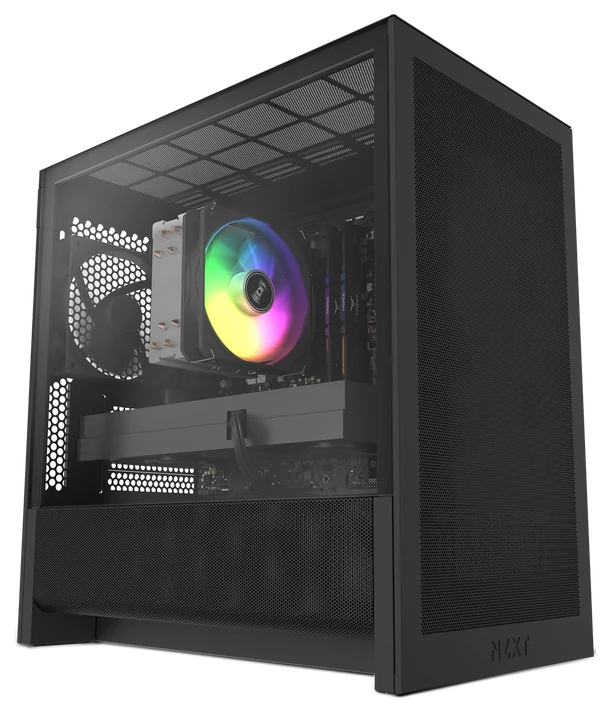
The cleanest build here and the one backed by a real two-year warranty, though its RTX 5060 keeps it a 1080p machine.
NZXT Player OneNo. 1 · ~$1,440
Check priceThe rest, ranked
Every differenceNo. 3 · Cheapest worth buying
WIWB Gaming PC
The absolute floor that’s still worth buying
~$850–900
View on AmazonNo. 4 · Most PC per dollar
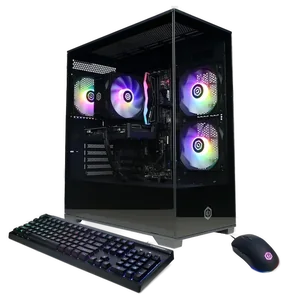
CyberPowerPC Gamer Supreme
Most PC per dollar
~$1,300–1,600 depending on config
View on Amazon
We compared PC Gamer’s and GamesRadar’s benchmark testing against the manufacturer specs and verified buyer reviews rather than bench-testing these machines ourselves, and we link the primary testing wherever test data matters. How we chose How we verify Corrections logged publicly
What changed2 dated notes · latest 25 September 2026
This guide’s short answer recommended the NZXT Player One, but its ranking put the Novatech Titan Pro first. The NZXT Player One now leads the ranking, so the two agree. No product or price changed.
NZXT retired its BLD Starter, Streaming and Creator tiers, so the BLD Starter Plus this guide recommended no longer exists. The slot now holds NZXT’s current entry prebuilt, the Player One — a different machine at a different tier (RTX 5060, 1080p, ~$1,440, sold direct). Buyers set on 1440p should read the CyberPowerPC and MSI entries instead.
Dated notes already published on this page, newest first. Every correction we make is logged on the corrections page.
Every difference, all seven
| Differences | No. 1NZXT Player One | No. 2Novatech Titan Pro | No. 3WIWB Gaming PC | No. 4CyberPowerPC Gamer Supreme | No. 5MSI Aegis | No. 6Alienware Aurora R16 | No. 7Corsair One i600 |
|---|---|---|---|---|---|---|---|
| Price range | ~$1,440 | ~$1,050 | ~$850–900 | ~$1,300–1,600 depending on config | ~$1,500–2,200 | ~$1,500–2,300 | ~$2,600+ |
| Best for | Worry-free buying, 1080p | 1080p high-refresh gaming | First setups, esports only | Sale hunters and spec-sheet readers | First PCs, warranty peace of mind | Showpiece desks | 4K gaming on small desks |
| GPU class | RTX 5060 | RTX 5060 | RTX 3050 8GB | Up to RTX 5070 class | Configurable, whole-stack MSI | RTX 5070 and up recommended | RTX 5080/5090 |
| Standout | Built and tested by NZXT, 2-year warranty | No spec-sheet traps in the parts list | Real discrete GPU at the floor | Most silicon per dollar | One-brand build, one warranty | Distinctive design plus Dell support | Whisper-quiet liquid cooling |
| Current price | ~$1,440 | ~$1,050 | ~$850–900 | ~$1,300–1,600 depending on config | ~$1,500–2,200 | ~$1,500–2,300 | ~$2,600+ |
From each pick’s review below. We compared maker specs and listings, not readings we took.
Pick 1 of 7: No. 1 · Best worry-free buy
NZXT Player One
The prebuilt that behaves like an appliance
~$1,440Estimated price
Check priceGet it ifyou want a machine you can buy without homework, from a builder that answers the phone for two years.
Skip it ifyou game at 1440p or chase maximum silicon per dollar — the CyberPowerPC and MSI picks below trade polish for hardware.
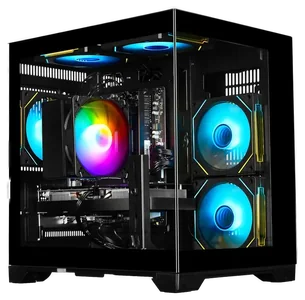
NZXT retired its BLD Starter line in a lineup shake-up, and the Player One is what stands in its place: the company’s current entry prebuilt, sold direct rather than through Amazon. The config is a Core i5-14400F, an RTX 5060 with 8GB, 16GB of DDR5 in two sticks, and a 1TB NVMe drive in NZXT’s own H3 Flow case — every machine assembled and tested before it ships, with a two-year warranty behind it.
What you are paying for is the absence of asterisks. The parts are name-brand, the cabling is done by someone who cared, and the memory comes properly dual-channel — though note the DDR5 runs at its full 5200MHz only after you enable XMP in the BIOS, a one-time thirty-second job NZXT documents. The catch is the tier: an RTX 5060 is a 1080p-high card, and $1,440 buys more raw silicon from the volume builders below if you are willing to read their spec sheets line by line.
Strengths
- Assembled and tested by NZXT, with a two-year warranty and real support behind it
- Name-brand components and clean cabling in the H3 Flow case
- Proper dual-channel DDR5 and a 1TB NVMe drive
- The no-research option: nothing on the spec sheet needs decoding
Tradeoffs
- RTX 5060 with 8GB is a 1080p card — this is not a 1440p machine at a 1440p price
- 16GB of memory where similarly priced rivals fit 32GB
- Sold direct at nzxt.com only, so no Amazon buyer protections or sale-day pricing
- Memory needs XMP enabled once in BIOS to hit its rated speed
Pick 2 of 7: No. 2 · Best budget
Novatech Titan Pro
Best under $1,000
~$1,050Estimated price
View on AmazonGet it ifyou game at 1080p and want the savings for games.
Skip it ifyou own or plan to buy a 1440p monitor.
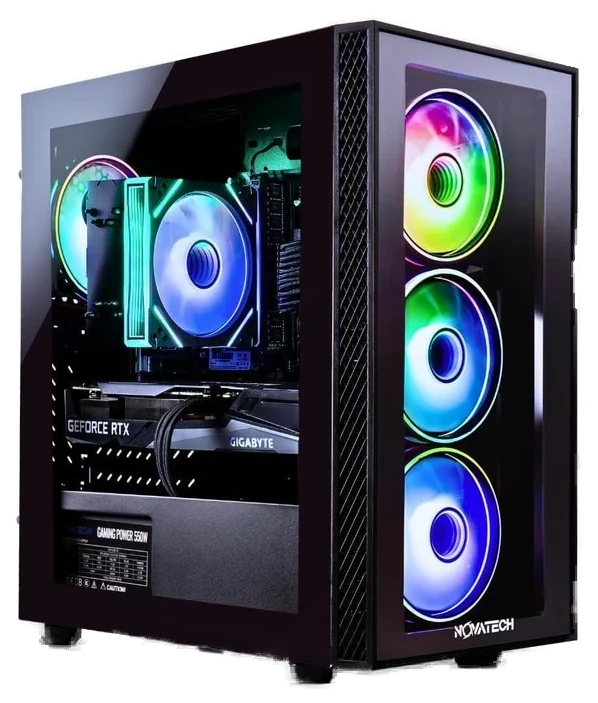
The budget tier is where prebuilts hide their sins: no-name power supplies, a single stick of RAM, DDR4 dressed up as high performance. The Novatech Titan Pro is the config reviewers keep flagging as the exception, with a current-gen RTX 5060, dual-channel memory and a real NVMe SSD, at a price that undercuts building it yourself once you count the Windows license. Newegg’s 2026 buyer’s guide gave it a perfect rating, which is rare for a sub-$1,000 machine.
That RTX 5060 means esports titles at high refresh rates and story-driven AAA at 1080p high with ray tracing on the table thanks to DLSS. Dual-channel memory alone buys it 10 to 15% over the single-stick builds it competes with, a range TechSpot’s single-stick benchmarking lands squarely inside. The catch is that this is a 1080p machine and no settings menu changes that, so anyone eyeing a 1440p monitor should read the CyberPowerPC entry below. At around $1,050 at Amazon it leaves real budget for the games.
Strengths
- Current-gen RTX 5060 under $1,000
- Dual-channel RAM and NVMe SSD, no spec traps
- Perfect rating in Newegg’s 2026 buyer’s guide
- Cheaper than DIY once you count Windows
Tradeoffs
- Strictly a 1080p machine
- Basic case with little visual flair
- Limited headroom for future GPU upgrades
Pick 3 of 7: No. 3 · Cheapest worth buying
WIWB Gaming PC
The absolute floor that’s still worth buying
~$850–900Estimated price
View on AmazonGet it ifyou are buying a first setup for esports at 1080p.
Skip it ifyou have AAA ambitions or a 1440p monitor.
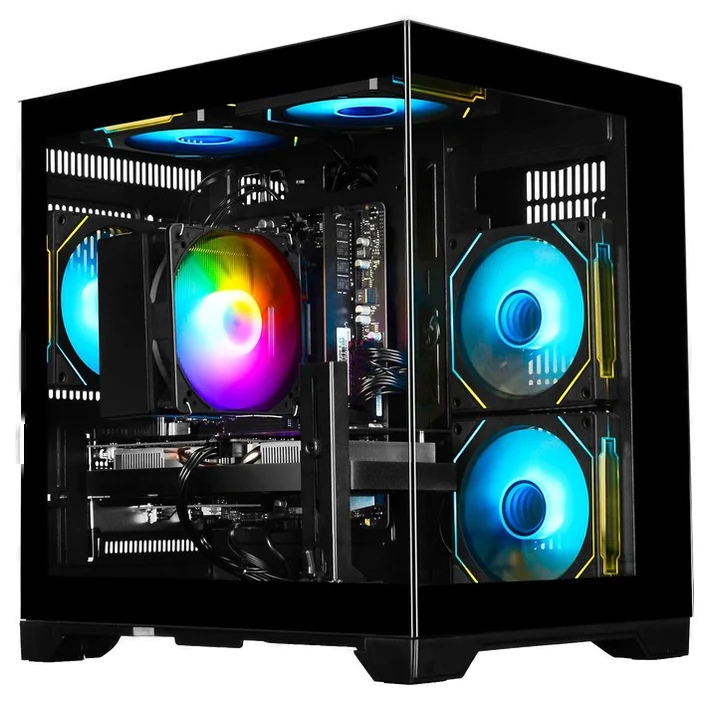
Below $800 most gaming PCs are office towers with RGB fans bolted on. The WIWB Gaming PC keeps a real discrete GPU, an RTX 3050 with the full 8GB of VRAM. Check that number, because cut-down 6GB versions exist and perform noticeably worse. It handles Fortnite, Valorant and Minecraft at high refresh rates, and AAA titles at medium.
It is a two-generation-old card and there is no point pretending otherwise. It makes the list because everything else at this price is worse in ways the spec sheet hides: integrated graphics with gamer branding, single-channel RAM, mystery power supplies. Skip it if you have a 1440p monitor or AAA ambitions, since the Titan Pro is worth the extra $200. For a first setup or an esports machine, the WIWB is the genuine floor.
Strengths
- Real discrete GPU with full 8GB VRAM
- High refresh in Fortnite, Valorant, Minecraft
- Cheapest machine here worth buying
Tradeoffs
- RTX 3050 is two generations old
- Spec trap: the desktop 6GB RTX 3050 is a cut-down card, roughly 20% slower in Tom’s Hardware testing. Confirm the listing says 8GB
- Medium settings territory in AAA titles
- No business driving a 1440p monitor
Pick 4 of 7: No. 4 · Most PC per dollar
CyberPowerPC Gamer Supreme
Most PC per dollar
~$1,300–1,600 depending on configEstimated price
View on AmazonGet it ifyou check spec sheets, chase sales and want maximum performance.
Skip it ifyou want a curated purchase with zero homework.
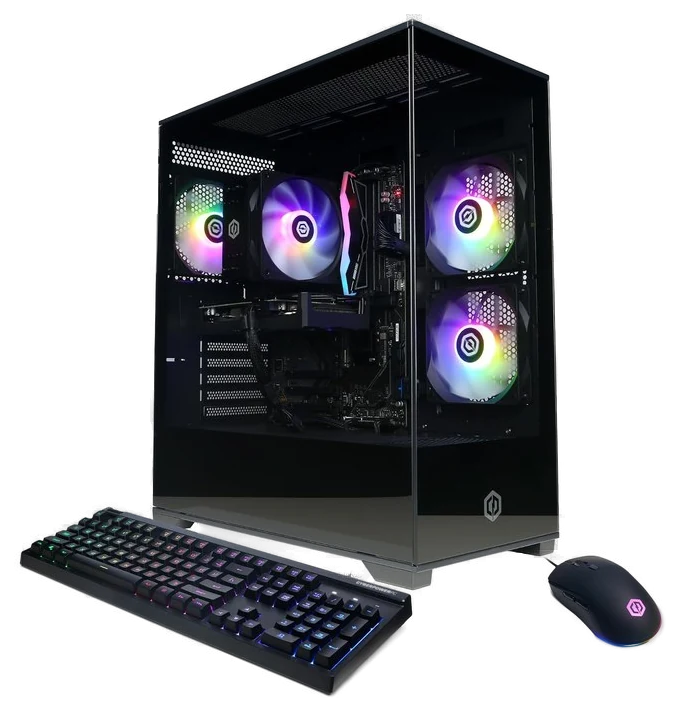
CyberPower’s business model is stuffing more silicon into the box than anyone else at the price, and the Gamer Supreme is where that works best. Configs in this line routinely carry a GPU a tier above what the price suggests, which is the single most important place extra money can go.
The tradeoff is fit and finish, consistent across years of reviews: a generic power supply brand, cabling that is tidy rather than beautiful, bundled peripherals headed for a drawer. Owners report the machines run fine, so the corners cut are cosmetic rather than functional. If you check spec sheets and chase sales, this is how you land RTX 5070-class performance on a 5060 budget, since ~$1,300–1,600 configs at Amazon regularly dip well below list during sale events.
Strengths
- GPU a tier above the price, routinely
- Holiday discounts run large
- Wide range of configs to pick over
Tradeoffs
- Spec trap: generic PSU brands in some configs, and a listing that names no model has answered the question
- Cabling and finish trail NZXT
- You must read the spec sheet carefully
Pick 5 of 7: No. 5 · Safest big brand
MSI Aegis
The safe big-brand pick
~$1,500–2,200Estimated price
View on AmazonGet it ifyou want a machine that just works, under one warranty.
Skip it ifyou plan to upgrade parts yourself over time.
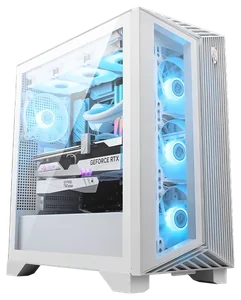
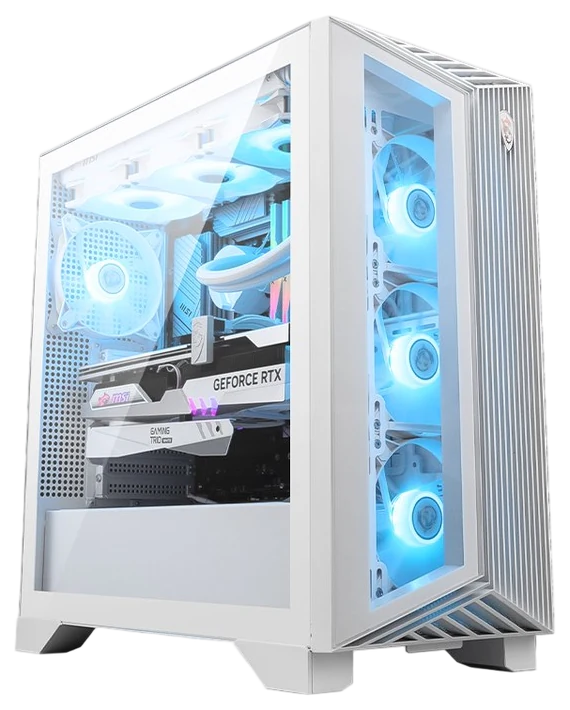
The MSI Aegis earns its spot structurally rather than on the spec sheet: MSI builds nearly every component in the machine, including the motherboard, GPU, cooling and case. When one company owns the whole stack, the compatibility gremlins that plague mixed-vendor builds mostly do not happen, and warranty service does not involve three vendors pointing at each other.
This is the pick for someone who will never open the case. Support runs through one company and MSI’s service network is infrastructure boutique builders do not have. You pay a modest premium for that integration, and tinkerers will find the proprietary touches limiting at upgrade time. The $1,500–2,200 configurations at Amazon span strong 1440p to entry-level 4K depending on the GPU you pick at checkout.
Strengths
- One brand builds the whole machine
- Single warranty, single support line
- Configs span strong 1440p to entry 4K
Tradeoffs
- Modest premium for the integration
- Proprietary touches limit upgrade paths
- Styling is safe rather than striking
Pick 6 of 7: No. 6 · Best looking
Alienware Aurora R16
The design object that games
~$1,500–2,300Estimated price
View on AmazonGet it ifyou want a showpiece with big-company support behind it, configured at RTX 5070 or above.
Skip it ifyour budget only reaches an entry GPU here. That config wastes the chassis, and performance per dollar lives elsewhere.
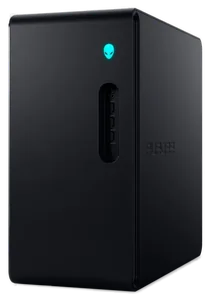
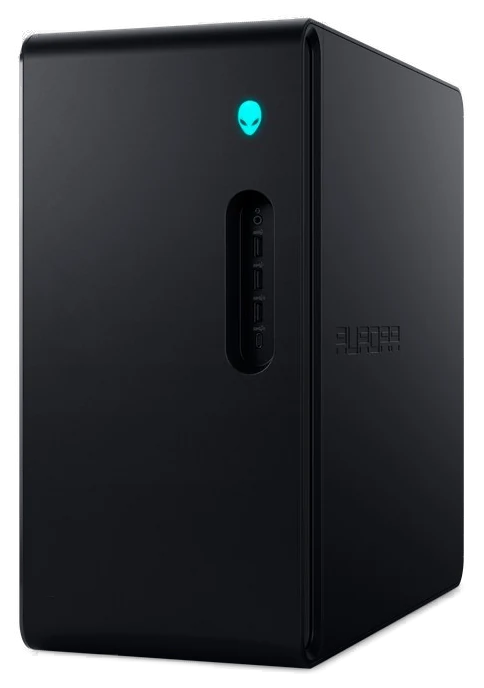
The Alienware Aurora R16 line fixed its old worst problem, thermals, with redesigned interiors Tom’s Hardware measured running cool under stress, a 49°C CPU package and 68°C on the GPU, and much quieter than the design it replaced. The current numberless Aurora carries that into RTX 50-series configurations. It keeps the design-object presence, the machine people put on a desk where guests can see it, without the old acoustic penalty.
The Dell connection cuts both ways. You get financing, support and a parts network boutique builders cannot match, but you pay Dell margins at list price and the interior trails a standard ATX build for upgradability. One firm rule, ours rather than a reviewer’s: configure it with an RTX 5070 or above, because entry GPUs waste a chassis this capable.
PCWorld read the same split across the Aurora laptops, calling the RTX 5060 model budget specs at a mid-tier price and the RTX 5070 version genuine value. The $1,500–2,300 sale range at Amazon is what a design statement that games properly costs, with Dell’s frequent cuts doing the heavy lifting and RTX 5070 configs seen at $1,479.
Strengths
- Redesigned interior runs cooler and quieter
- A design piece you display, not hide
- Dell financing and support infrastructure
Tradeoffs
- Dell margins at list price
- Upgradability trails a standard ATX build
- Entry GPU configs waste the chassis
Pick 7 of 7: No. 7 · Money no object
Corsair One i600
Money no object
~$2,600+Estimated price
View on AmazonGet it ifyou want 4K everything, quietly, in minimal desk space.
Skip it ifvalue per dollar factors into your decision at all.
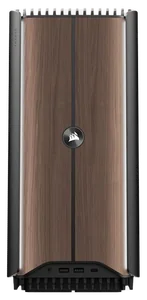
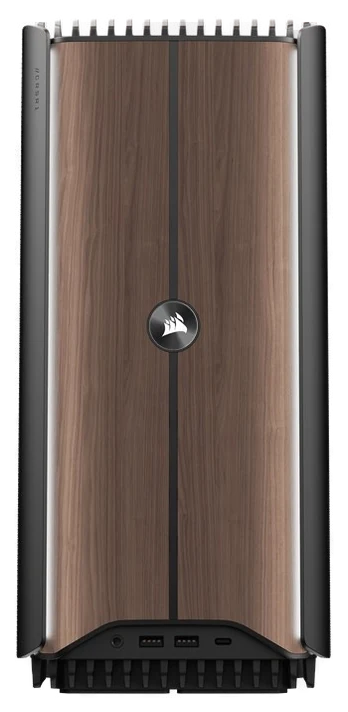
The Corsair One i600 is what happens when the answer to every engineering question is yes regardless of cost. Flagship parts, RTX 5070 and 5080 configs on Intel Core Ultra chips, with a Ryzen 9 a600 sibling above them, live in a wood-panelled tower the size of a shoebox, cooled by a liquid loop reviewers call the best thermal engineering in the business.
It also does this quietly. Small cases with big GPUs usually mean jet-engine acoustics, and measured testing on the One line keeps finding the opposite. Nothing about it is rational per dollar, since a full tower with the same GPU costs hundreds less and upgrading inside this chassis is a specialist job. If you read $2,600 to $5,000 at Amazon with interest rather than alarm, you were never buying the budget pick.
Strengths
- RTX 5080-class in a console-sized case
- Best-in-business liquid cooling, per reviewers
- Whisper-quiet even under 4K loads
Tradeoffs
- Hundreds more than a full tower, same GPU
- Internal upgrades are a specialist job
- Rational per-dollar it is not
The box matters less than what’s inside it. Match the parts to the games and resolution you play, then make sure you can get in and upgrade it later.
- GPU first: The graphics card sets your frame rate more than anything else. For 1440p, look for something around the RTX 5070 tier, and don’t let a build pair a strong CPU with a weak GPU.
- Match it to your monitor: A 240Hz-capable build is wasted on a 60Hz screen, and 4K needs far more GPU than 1080p. Buy the PC and the display as a pair.
- Room to upgrade: Check for a standard motherboard, spare slots, and a power supply with headroom, so in two years you can swap the graphics card instead of the whole machine.
- The common mistake: Paying for RGB and a flashy case over cooling and a good PSU. Airflow and a quality power supply are what keep your frame rates and your parts alive.
- Lenovo Legion Tower 5 — a strong-value, easy-to-upgrade build, but the configs and stock rotate so fast that the exact machine you see changes month to month.
- HP Omen 45L — the CryoChamber cooling is good, but you’re paying flagship money for looks and thermals most players don’t need.
- Skytech Chronos — a decent budget entry, but these often cut corners on the power supply or RAM speed, so plan on a part swap or two down the line.
Still deciding between two?
Pick any two of the seven. Rows that match say so once; the rest sit side by side, as each review states them.
Price range
~$1,440
~$1,050
Best for
Worry-free buying, 1080p
1080p high-refresh gaming
GPU class
Same on bothRTX 5060
Standout
Built and tested by NZXT, 2-year warranty
No spec-sheet traps in the parts list
Current price
~$1,440
~$1,050
Gaming PC buying FAQs
6 common questions, answered.
What matters most when buying a prebuilt gaming PC?
The GPU, which is about 80% of the purchase. A gaming PC with a weak graphics card and a monster CPU is a workstation in costume. Decide your target resolution first, pick the GPU class that matches, then compare CPUs, RAM and storage. Nearly every disappointing prebuilt traces back to a flashy processor paired with a card two tiers too weak for the buyer’s monitor.
Which GPU do I need for 1080p, 1440p, or 4K?
1080p wants an RTX 5060-class card, 1440p wants a 5060 Ti or 5070, and 4K needs a 5080 or above. A tier below your monitor means dropping settings forever; a tier above buys a few years of headroom. If you are unsure which monitor you will own in two years, buy for where you are heading.
How much RAM does a gaming PC need in 2026?
16GB is the floor and 32GB is the buy, since most mid-range configs now ship with 32GB of DDR5 and the gap is small. It must be two sticks. Single-channel RAM quietly costs 10 to 15% of real-world performance and is one of the commonest tricks in cheap prebuilts, so check the listing for a matched pair.
Why does the power supply matter so much?
Because it is where budget builders hide the savings, and it is the one part that takes others with it when it dies. Search the exact model named in the listing, and if no model is named, treat that silence as the answer. A no-name 500W unit under a $1,500 build is a red flag.
Is it still cheaper to build your own PC?
Less often than the internet insists. Big builders buy GPUs at volume prices individuals cannot match, and once you add a Windows license and your time, a well-chosen prebuilt often comes out even or ahead at the budget and mid tiers. Building still wins if you enjoy it, want full part control or are reusing components, but it is a hobby choice now rather than a money one.
When is the best time to buy, and why do prices keep changing?
GPU current prices move week to week, so any number you read is a snapshot. The pattern holds though: Black Friday, back-to-school and holiday events bring large discounts, especially from volume builders. If you can wait for one of those windows, do. If not, the gap between a decent price and a perfect one is smaller than the cost of the wrong config.
Sources
Who the write-ups above lean on, and where each one is cited.
Cited for WIWB Gaming PC and Alienware Aurora R16.
Cited in the buying advice.
We compared PC Gamer’s and GamesRadar’s benchmark testing against the manufacturer specs and verified buyer reviews rather than bench-testing these machines ourselves, and we link the primary testing wherever test data matters. Current prices move constantly, so every button pulls the live listing.
How we rank
Published specifications, verified owner reviews, and independent safety or standards data where it applies — weighted the same for every pick, never sponsored placement.
Corrections on this guide
Correction, 18 August 2026: NZXT retired its BLD Starter, Streaming and Creator tiers, so the BLD Starter Plus this guide recommended no longer exists. The slot now holds NZXT’s current entry prebuilt, the Player One — a different machine at a different tier (RTX 5060, 1080p, ~$1,440, sold direct). Buyers set on 1440p should read the CyberPowerPC and MSI entries instead.
Every correction we’ve madeCorrection, 25 September 2026: This guide’s short answer recommended the NZXT Player One, but its ranking put the Novatech Titan Pro first. The NZXT Player One now leads the ranking, so the two agree. No product or price changed.
Every correction we’ve made
Where to go next.
The close calls side by side, then related guides.
- Head-to-headHyperX Cloud III vs. SteelSeries Arctis Nova 7 Gen 2: Is Wireless Worth Double?
- GuideThe Best Gaming PC Under $1,000, and the Spec Traps to Avoid
- GuideThe Best Game Controllers of 2026, From Budget Spares to Pro-grade Pads
- GuideThe Best Gaming Handhelds for 2026: Steam Deck, Windows and Mobile
- GuideThe Best Gaming Chairs: Racing Style Against True Ergonomics
- GuideThe Best Gaming Headsets for 2026: Where Comfort and Mic Quality Diverge
- GuideThe Best Gaming Mice and Keyboards of 2026: What Pros Use vs. What You Need
- DepartmentEvery Gaming guide