The Best Gaming Handhelds for 2026:Steam Deck, Windows and Mobile
Handheld PC gaming went from curiosity to category. We compared the three ways to play your library on the couch, in bed or on a plane, and which libraries each one actually runs.
By the BYB Editorial Team
Published July 28, 2026 · Prices checked OctoberOct 5, 2026
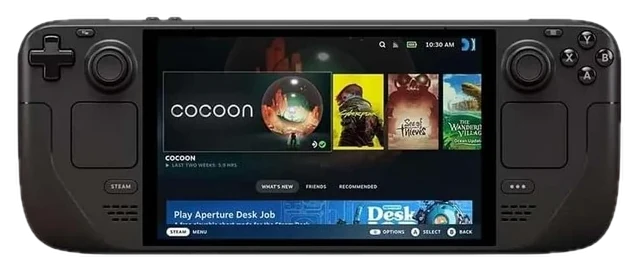
Steam Deck OLED$790–950The Steam Deck OLED, about $790–950 — if your library already lives on Steam; Valve’s 2026 price rise is baked into that number rather than a sale you can wait out.Check price
Need Game Pass and every launcher
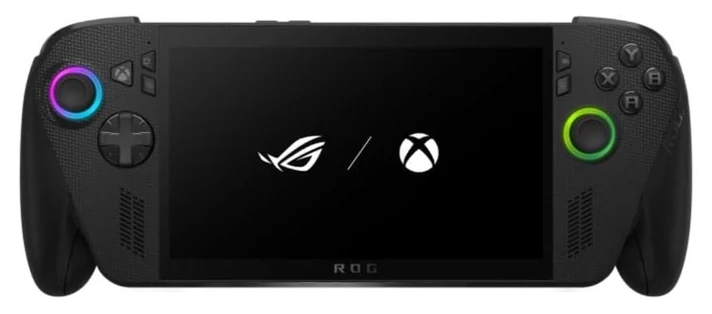
ASUS ROG Ally X$700–800ASUS ROG Ally X, $700–800 — runs Windows, at the cost of battery life and fiddling.Check price
Handheld PC gaming went from curiosity to category. We compared the three ways to play your library on the couch, in bed or on a plane, and which libraries each one actually runs.
How we choseWhat we compared, and how we rank
We compiled performance testing, battery benchmarks, and library-compatibility reports across handheld platforms. Prices are always moving, so every button and link pulls the live listing.
How we rank
Published specifications, verified owner reviews, and independent safety or standards data where it applies — weighted the same for every pick, never sponsored placement.
The OLED revision turned a great device into the category benchmark: the Steam Deck OLED pairs a gorgeous HDR screen with meaningfully better battery, quieter cooling, and the thing Windows rivals still chase. SteamOS’s console-simple sleep-and-resume that makes 20-minute sessions effortless.
The Verified program does the compatibility homework for you: thousands of Steam titles tagged playable-or-better, and the real-world result owners report is backlogs finally getting cleared: couches, commutes, and beds turn out to be where unplayed libraries go to be finished.
Its limits are honest: demanding new AAA releases need settings humility, and non-Steam launchers take tinkering. If that tinkering is the appeal, the Ally X exists. Valve sells the Deck OLED directly for $549 (512GB) and $649 (1TB), but doesn’t stock Amazon itself; Tom’s Guide’s ongoing inventory tracking confirms Amazon listings come from third-party sellers charging a premium above those prices, which is why the range quoted here runs higher. At $790–950 at Amazon, the Deck OLED is the default answer, full stop.
Strengths
HDR OLED screen lifts everything
Sleep/resume Windows can’t match
Verified catalog removes guesswork
Best efficiency in class
Tradeoffs
AAA titles need settings humility
Non-Steam stores take tinkering
Bulky in bags
Pick 2 of 5: No. 2Most powerful
2
ASUS ROG Ally X
Most powerful
The Windows powerhouse
Get it if you want maximum power and every launcher, natively, at $700–800.
Skip it if you want couch-console simplicity. That’s the Deck.
The ROG Ally X answers the Deck’s two limits directly: more raw performance for demanding games, and full Windows 11: meaning Game Pass, Epic, Battle.net, emulators, mods, everything, natively and without workarounds.
The X revision fixed the original’s real flaws: double the battery, more RAM, a better d-pad, and a repositioned SD slot after the infamous heat placement. Push settings the Deck can’t hold, run the launchers the Deck resists, and the 120Hz screen keeps up.
The cost is Windows itself: small text, sleep quirks, an OS that never forgets it’s a desktop. Power users happily pay that tax for the freedom; everyone else should hold the Deck. At $700–800 at Amazon, it’s the enthusiast’s handheld.
Strengths
Strongest performance in class
Native Game Pass and every store
120Hz screen, big battery
Fixed every gen-one complaint
Tradeoffs
Windows clumsiness on a handheld
Premium price
Shorter battery under full load
Pick 3 of 5: No. 3Best phone-grip pick
3
Backbone Pro Controller
Best phone-grip pick
The handheld you already own
Get it if commutes and cloud gaming fit your life, or budget rules — $170 is a fraction of the rest of this list.
Skip it if your backlog is on Steam. That needs a Deck.
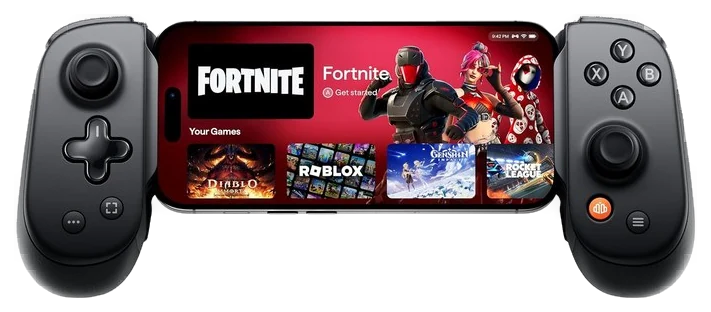
The Backbone reframes the whole question: your phone already carries a great screen and a fast chip. It needs real controls. Snap it around the phone and Game Pass cloud streaming, PS Remote Play, and the deep mobile-native catalog become couch-grade handheld gaming.
The connection is wired-direct so latency stays honest, the capture button feeds clips, and the whole thing weighs less than a paperback and disappears into any bag: the commuter profile the 700-gram handhelds above can’t match.
Set expectations correctly: cloud streaming needs solid internet, and this plays your phone’s catalog, not your Steam backlog. As a first handheld, a kid’s starter, or a travel companion, it delivers most of the experience at $170 on Amazon, about a fifth of a Deck.
Strengths
Uses the phone you already own
Pocket-sized
Wired-direct low latency
Tenth of a Deck’s price
Tradeoffs
Cloud gaming needs good internet
Doesn’t play a PC library natively
Case removal often required
Also on the shortlist
Two more, in brief
Pick 4 of 5: No. 4Best for exclusives
4
Nintendo Switch 2
Best for exclusives
The only handheld here with games you cannot get anywhere else
Get it if you want Nintendo’s exclusives and a handheld that turns into a TV console at night, and $450–500 buys the only ticket in.
Skip it if your library lives on Steam. None of it runs here.
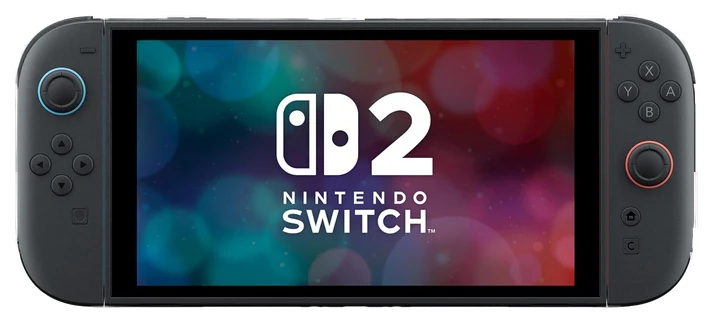
Every other pick here plays PC games. None of them plays Mario. The Switch 2 is the only handheld in this guide with a library you cannot get anywhere else, and it is the only one whose dock is in the box, so it becomes a living room console the same evening. That is a different job from the one the Steam Deck was built for.
Nintendo’s spec sheet lists a 7.9-inch 1080p screen with variable refresh up to 120Hz, 256GB of UFS storage, and battery life of roughly 2 to 6.5 hours depending on what you play. Docked, it outputs up to 3840×2160 at 60fps. The card slot accepts both Switch 2 and original Switch cartridges, so an existing Switch collection carries over without a second purchase.
That battery range is wide for a reason. Nintendo says the figure depends on the game, and the bottom of its own estimate sits near two hours, so a long flight needs a power bank. The US price also rises from $449.99 to $499.99 on September 1, 2026. If you want a large, cheap game library instead of exclusives, the Steam Deck OLED is the better spend.
Strengths
Only handheld here that plays Nintendo’s exclusive library
Docks to a TV and outputs up to 3840×2160 at 60fps
7.9-inch 1080p screen with variable refresh up to 120Hz
Accepts original Switch game cards, so an older collection carries over
256GB of internal storage from the box
Tradeoffs
Nintendo’s own battery estimate bottoms out near two hours on demanding games
US price rises from $449.99 to $499.99 on September 1, 2026
LCD screen, so black levels trail the Steam Deck OLED
Closed platform: no Steam library, no mods, no sideloading
Storage expansion uses microSD Express cards, sold separately
Pick 4 of 5: No. 4Best for exclusives
Nintendo Switch 2
The only handheld here with games you cannot get anywhere else
Get it if you want Nintendo’s exclusives and a handheld that turns into a TV console at night, and $450–500 buys the only ticket in.
Skip it if your library lives on Steam. None of it runs here.
Every other pick here plays PC games. None of them plays Mario. The Switch 2 is the only handheld in this guide with a library you cannot get anywhere else, and it is the only one whose dock is in the box, so it becomes a living room console the same evening. That is a different job from the one the Steam Deck was built for.
Read the full case
Nintendo’s spec sheet lists a 7.9-inch 1080p screen with variable refresh up to 120Hz, 256GB of UFS storage, and battery life of roughly 2 to 6.5 hours depending on what you play. Docked, it outputs up to 3840×2160 at 60fps. The card slot accepts both Switch 2 and original Switch cartridges, so an existing Switch collection carries over without a second purchase.
That battery range is wide for a reason. Nintendo says the figure depends on the game, and the bottom of its own estimate sits near two hours, so a long flight needs a power bank. The US price also rises from $449.99 to $499.99 on September 1, 2026. If you want a large, cheap game library instead of exclusives, the Steam Deck OLED is the better spend.
Strengths
Only handheld here that plays Nintendo’s exclusive library
Docks to a TV and outputs up to 3840×2160 at 60fps
7.9-inch 1080p screen with variable refresh up to 120Hz
Accepts original Switch game cards, so an older collection carries over
256GB of internal storage from the box
Tradeoffs
Nintendo’s own battery estimate bottoms out near two hours on demanding games
US price rises from $449.99 to $499.99 on September 1, 2026
LCD screen, so black levels trail the Steam Deck OLED
Closed platform: no Steam library, no mods, no sideloading
Storage expansion uses microSD Express cards, sold separately
Pick 5 of 5: No. 5Best retro handheld~$70–100
5
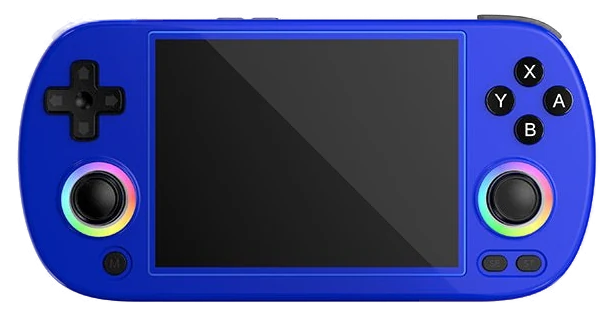
ANBERNIC RG40XX H
Budget pickBest retro handheld
An actual pocket console for under a hundred dollars
Get it if your nostalgia stops around the PS1 era and you want a real pocket console for under $100.
Skip it if you want to play anything released this decade.
Below the Steam Deck this guide drops straight to a phone clip. The RG40XX H fills that hole with an actual console, a small Linux handheld built for retro emulation and priced under a hundred dollars. Nothing else here targets Game Boy, Mega Drive and PS1 libraries, and its 4:3 screen matches the shape those games were originally drawn for. It is a commute machine, not a couch machine.
Anbernic lists a 4-inch 640×480 IPS panel, an Allwinner H700 quad-core chip with 1GB of RAM, and a 3,200mAh battery rated for up to six hours. The unit weighs 208g and measures 163 by 79 by 16mm. Two microSD slots let you keep the supplied card and add your own. Base price is $69.99, with larger card options above that.
The ceiling is real. N64, Dreamcast and demanding PSP titles drop frames, the sticks have limited travel, and the Linux front end is bare text on black. Anbernic suspended shipments from China to the US in April 2025 and pointed buyers at its US warehouse, so Amazon stock is the simpler route. If you want modern games portable, buy the Steam Deck.
Strengths
Base model starts at $69.99, the cheapest standalone console in this guide
3,200mAh battery rated for up to six hours
4:3 640×480 IPS panel suits pre-widescreen games without stretching them
Two microSD slots, so the bundled card can stay put
208g and 16mm thick, so it fits a coat pocket
Tradeoffs
Dreamcast and demanding PSP games drop frames
Analog sticks have limited travel and are not Hall effect
Linux interface is plain text on a black background and awkward to navigate
Anbernic suspended China-to-US shipping in April 2025, and now ships US orders from its own warehouse
Listings advertising thousands of preloaded games are not selling you licensed software
Pick 5 of 5: No. 5Best retro handheld~$70–100
ANBERNIC RG40XX H
An actual pocket console for under a hundred dollars
Get it if your nostalgia stops around the PS1 era and you want a real pocket console for under $100.
Skip it if you want to play anything released this decade.
Below the Steam Deck this guide drops straight to a phone clip. The RG40XX H fills that hole with an actual console, a small Linux handheld built for retro emulation and priced under a hundred dollars. Nothing else here targets Game Boy, Mega Drive and PS1 libraries, and its 4:3 screen matches the shape those games were originally drawn for. It is a commute machine, not a couch machine.
Read the full case
Anbernic lists a 4-inch 640×480 IPS panel, an Allwinner H700 quad-core chip with 1GB of RAM, and a 3,200mAh battery rated for up to six hours. The unit weighs 208g and measures 163 by 79 by 16mm. Two microSD slots let you keep the supplied card and add your own. Base price is $69.99, with larger card options above that.
The ceiling is real. N64, Dreamcast and demanding PSP titles drop frames, the sticks have limited travel, and the Linux front end is bare text on black. Anbernic suspended shipments from China to the US in April 2025 and pointed buyers at its US warehouse, so Amazon stock is the simpler route. If you want modern games portable, buy the Steam Deck.
Strengths
Base model starts at $69.99, the cheapest standalone console in this guide
3,200mAh battery rated for up to six hours
4:3 640×480 IPS panel suits pre-widescreen games without stretching them
Two microSD slots, so the bundled card can stay put
208g and 16mm thick, so it fits a coat pocket
Tradeoffs
Dreamcast and demanding PSP games drop frames
Analog sticks have limited travel and are not Hall effect
Linux interface is plain text on a black background and awkward to navigate
Anbernic suspended China-to-US shipping in April 2025, and now ships US orders from its own warehouse
Listings advertising thousands of preloaded games are not selling you licensed software
These trade power for portability, and the right one depends on what you want to play and which store your games already live in.
Where your games are: A big Steam library? A Steam Deck or SteamOS device just works. Game Pass and PC launchers? A Windows handheld. Retro ROMs? A cheap emulation handheld does the job for less.
Screen and battery: A brighter OLED panel and a bigger battery matter more day to day than raw specs. Check real-world battery life on demanding games, not the best-case number on the box.
Weight and grip: You hold this the entire time you play. Heavier handhelds get tiring fast, so weigh the size and grip against how long your sessions run.
The common mistake: Chasing the most powerful chip and ignoring the software. Windows handhelds still need fiddling to feel right; SteamOS is smoother but doesn’t fit every library.
Lenovo Legion Go S — the SteamOS version is a comfy, big-screen handheld, but make sure you get that model; the earlier Windows version ran rough and we’d skip it.
MSI Claw 8 AI+ — quiet cooling and great battery life, but it’s expensive and Windows on a handheld still needs tinkering to feel right.
PlayStation Portal — a nice screen for the price, but it only streams from your own PS5, so it isn’t a standalone handheld like the rest of this list.
Handheld FAQs
6 common questions, answered.
Steam Deck or ROG Ally?
Deck for Steam-centric libraries and the smoothest handheld experience; Ally for Game Pass, more power, and Windows flexibility. The honest tiebreaker: if you don’t know which you need, you want the Deck. Its polish is what makes handheld PC gaming pleasant.
Can these replace a console or gaming PC?
For many people, functionally yes, modern handhelds run the vast majority of libraries at good settings on their screens, and dock to TVs. Competitive shooters at high refresh and 4K showcase titles remain desktop territory.
Is phone-plus-controller any good?
Better than skeptics expect: cloud streaming on decent Wi-Fi feels near-native, Remote Play turns your PS5 into a house-wide handheld, and controllers like the Backbone eliminate touch controls. The actual thing that makes mobile gaming feel bad.
How long do handheld batteries last?
Depends entirely on the game. The Steam Deck OLED manages three to six hours in moderate indie and older titles but closer to ninety minutes to two hours in demanding AAA games; the Ally X’s bigger cell stretches those numbers at equivalent settings. Frame caps and TDP limits, both easy to set, are the real battery features. Treat quoted maximums as airplane-mode indie numbers.
Can I connect a handheld to my TV?
Yes, both the Deck and Ally X output to TVs through USB-C docks (official or generic), pair with Bluetooth controllers, and become credible living-room consoles for indie and mid-weight games. Demanding AAA titles reveal the handheld chip at TV resolutions. The Backbone flips the equation: your phone streams to the TV via AirPlay or cast while it acts as the controller.
Should I wait for the next generation of handhelds?
The category is iterating fast, but waiting has a cost: the current Deck OLED is a mature, polished product with a huge verified-games catalog, while first-generation revisions of anything new bring first-generation problems. Buy when your backlog justifies it; handhelds clear backlogs like nothing else. The classic play: current-gen hardware, sale pricing, zero regrets.
Prices on this page are re-checked weekly — see the full Gaming price index for every product we cover.
Keep reading
Where to go next.
Related guides, then every guide in the department.
New guides, re-ranked picks and the month's notable changes. No weekly filler, ever.
Unsubscribe any time. Your address goes to our newsletter provider and nowhere else — see our privacy policy.
Manage Consent
To provide the best experiences, we use technologies like cookies to store and/or access device information. Consenting to these technologies will allow us to process data such as browsing behavior or unique IDs on this site. Not consenting or withdrawing consent, may adversely affect certain features and functions.
Functional
Always active
The technical storage or access is strictly necessary for the legitimate purpose of enabling the use of a specific service explicitly requested by the subscriber or user, or for the sole purpose of carrying out the transmission of a communication over an electronic communications network.
Preferences
The technical storage or access is necessary for the legitimate purpose of storing preferences that are not requested by the subscriber or user.
Statistics
The technical storage or access that is used exclusively for statistical purposes.The technical storage or access that is used exclusively for anonymous statistical purposes. Without a subpoena, voluntary compliance on the part of your Internet Service Provider, or additional records from a third party, information stored or retrieved for this purpose alone cannot usually be used to identify you.
Marketing
The technical storage or access is required to create user profiles to send advertising, or to track the user on a website or across several websites for similar marketing purposes.