Gift finderFind a gift in three tapsNot sure this list fits? Say who it’s for and what you want to spend.OpenClose
Gift finder
Find a gift in three taps
Say who it is for and what you want to spend. You get three to six picks from our gift guides, each with the guide’s own reason.
The short answer
For most people
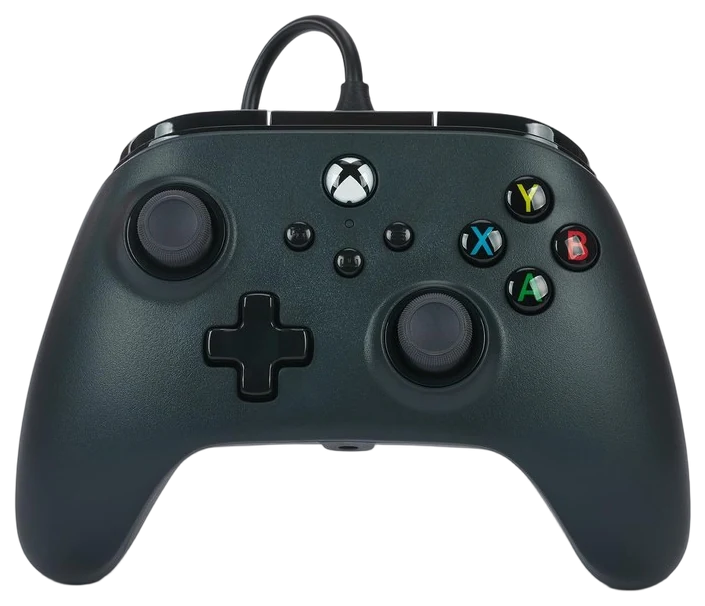
PowerA Wired Controller$25–40A PowerA wired controller, $25–40 — a spare pad is the one thing a gamer won’t already own, which makes it the safest gift in this category.Check price
Bigger budget
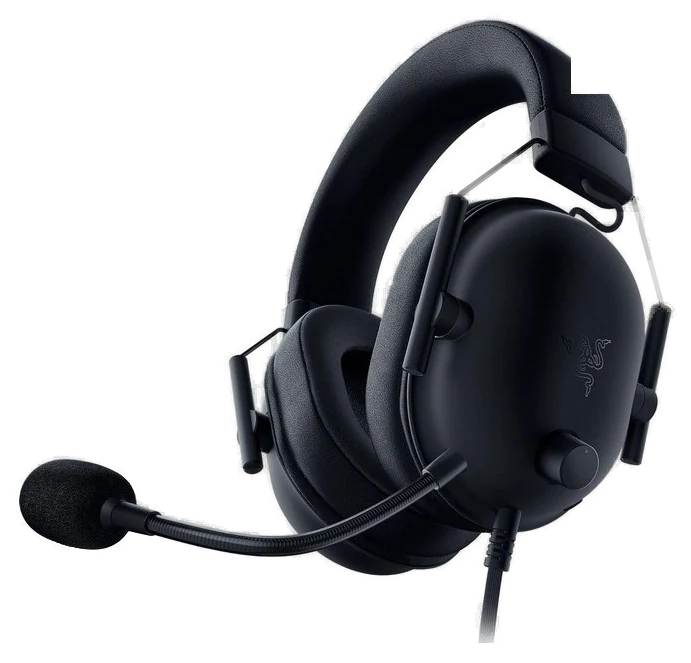
Razer BlackShark V2 X$40–60Razer BlackShark V2 X, $40–60 — the budget headset that doesn’t sound budget.Check price
Watch for
Duplicates — buy platform-agnostic, or buy the thing nobody owns two of.
Gaming is the category where a gift is most likely to duplicate something they own or be for the wrong platform. These six sidestep both problems.
How we choseWhat we compared, and how we rank
Every pick here already earned a recommendation in our gaming guides. For a gift list we applied a second filter: does it work regardless of which console or PC they own, and is it something a gamer is unlikely to already have two of, and if their budget stretches further than an accessory, see our guide to a full gaming PC build under $1,200, the budget alternative to a $2,000+ rig. Ordered by price, because that is the constraint people shop with. Prices are always moving, so every button and link pulls the live listing.
How we rank
Published specifications, verified owner reviews, and independent safety or standards data where it applies — weighted the same for every pick, never sponsored placement.
Each bar is an estimated price range, on one scale from ~$25 to ~$170.
Pick 1 of 6: No. 1Best under $50
1
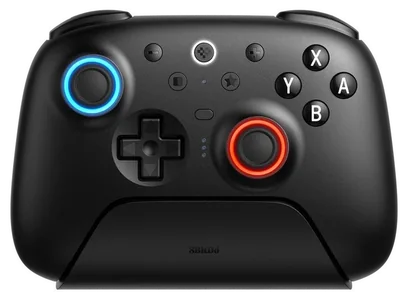
PowerA Wired Controller
Top pickBest under $50
The player-two pad that costs less than dinner
Get it if they have exactly one controller and people who visit. It is the cheapest thing on this page and the one most likely to get used the same week it is opened.
Skip it if they play on PlayStation or Switch, where it will not work.
Every couch needs a second pad that cost less than dinner, and PowerA wired controllers are the licensed answer: legitimate build quality, officially certified compatibility, and mappable back buttons that the price tier has no business including. As a gift it solves a real problem, because almost nobody buys themselves a spare controller until the moment a guest arrives and there is not one.
Wired is the feature here rather than the compromise. Nothing to charge, nothing to die mid-boss, and nothing to hunt for between couch cushions, because the cable always knows where it is. For kids, guests and backup duty those are exactly the right properties, and a flat battery has ended more sessions than any hardware fault. The limits are what you would expect at the price: the sticks and triggers are decent rather than exceptional, and a long cable has opinions about where the coffee table goes. Neither matters much for the job it is bought to do.
Strengths
Officially licensed, not a grey-market clone
Mappable back buttons at this price
Nothing to charge, so it always works
Tradeoffs
Sticks and triggers are decent rather than great
The cable is a trip hazard across a living room
Xbox and PC, so not a universal answer
Pick 2 of 6: No. 2Best budget headset
2
Razer BlackShark V2 X
Best budget headset
The best cheap headset that does not feel cheap
Get it if you do not know which platform they mainly play on. One 3.5mm cable makes the question disappear, and this is the cheapest way to make it disappear.
Skip it if they want wireless, or active noise cancelling rather than the passive kind.
The BlackShark V2 X strips the esports formula to its essentials: 240 grams, earcups whose passive isolation blocks a noisy room, and TriForce drivers tuned so footsteps and callouts sit forward of cinematic boom. That tuning is the point rather than a side effect, and it is why it keeps being ranked the best isolating headset under $60.
For gifting, the wired 3.5mm connection is the quiet advantage. It works on every platform and every controller ever made, which removes the single biggest way a gaming gift goes wrong, and it needs no pairing, no dongle and no charging. The mic is unremarkable but communicates clearly, which is all a team chat asks. The build is functional plastic and the cable is not detachable, because at this price something has to give. It also shows up under $40 at every major sale, so it is worth timing if you are not in a hurry.
Strengths
Genuine passive isolation for a noisy room
Wired 3.5mm, so it works on every platform
240 grams, light enough for long sessions
Tradeoffs
Functional plastic build
Cable is not detachable
Mic is clear but unremarkable
Pick 3 of 6: No. 3Best all-round mouse
3
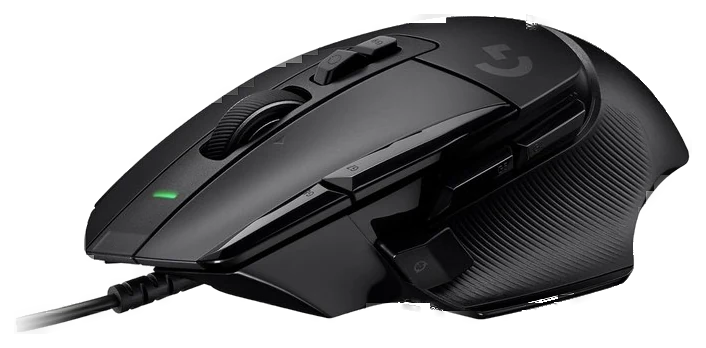
Logitech G502 X
Best all-round mouse
Thirteen buttons, and the mouse that survives the workday too
Get it if they play on PC and use a mouse that came free
Skip it if they play competitive shooters and want the lightest mouse
The G502 has outsold everything in gaming mice for a decade, and the G502 X is the refresh that fixed the old complaints. Thirteen programmable buttons, an infinite-scroll metal wheel, and a sculpted shape owners describe with genuine affection. PCWorld’s review landed on the same thing, calling it the best button configuration on a gaming mouse. Every ability bind, every macro and every shortcut has somewhere to live, which is why it suits MMOs and strategy games specifically.
The refresh matters more than a spec bump. Weight dropped meaningfully, and the switches went hybrid optical-mechanical, which makes them faster to actuate and immune to the double-click failure that eventually killed a lot of older G502s. Tom’s Hardware, testing the same Lightforce switches, described them as solid, premium clicks and reported none of the double-click trouble.
That failure mode is the reason to buy the current one rather than a cheap older stock unit. Be clear about who it is wrong for: it is the wrong shape for claw-grip flick aiming and it is no featherweight, so a competitive shooter player wants something lighter. For everything else, including the workday after, it is the best all-round mouse at the price.
Strengths
Thirteen programmable buttons for MMOs and strategy
Hybrid switches immune to the old double-click failure
Doubles as a solid work mouse
Tradeoffs
Wrong shape for claw-grip flick aiming
Not a lightweight competitive mouse
PC only, so useless to a console-only player
Also on the shortlist
Three more, in brief
Pick 4 of 6: No. 4Best headset overall
4
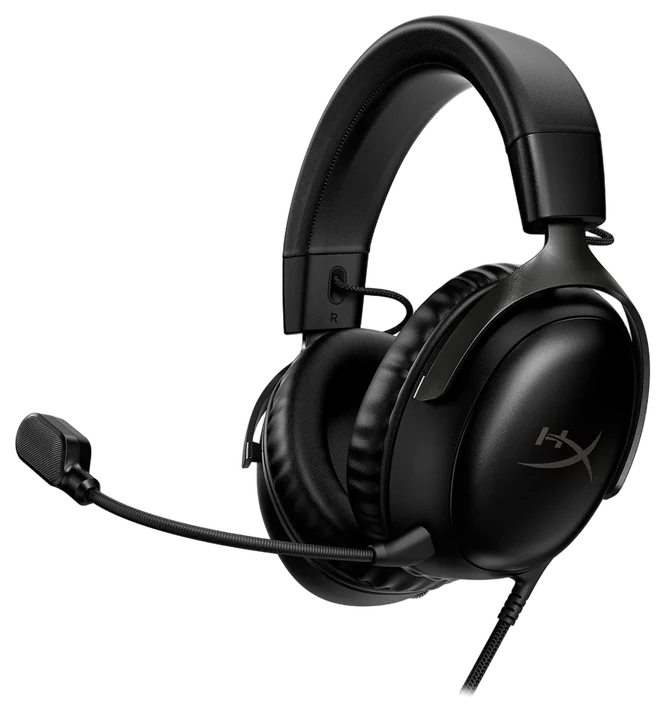
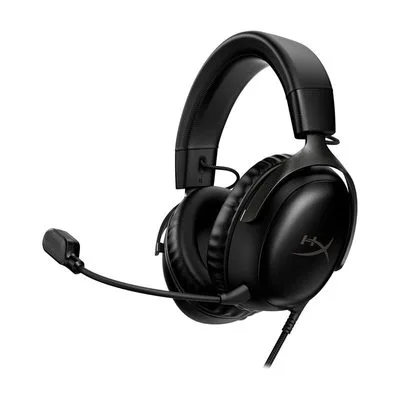
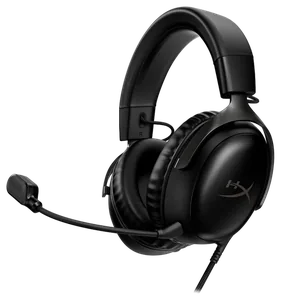
HyperX Cloud III
Best headset overall
The default recommendation, for years, for good reasons
Get it if they play long sessions at a desk
Skip it if they want one headset for gaming and commuting
The HyperX Cloud III has been the default recommendation in this category for years and the reason has not changed: it does the important things as well as headsets costing twice as much. The 53mm drivers produce a clear, slightly warm sound with enough separation that positional audio works rather than turning into a wall of noise.
Comfort is the other half of its reputation, and it is the half that decides whether a headset gets used. Memory foam pads and a well-judged clamping force mean it stays comfortable through a four-hour session, which is exactly where cheaper headsets fail and where expensive ones often do too. PC Gamer reaches the same conclusion and puts it more bluntly: if comfort is the thing being optimized for, this is the pick, and the sound is a modest step rather than a leap.
Being wired, it also has nothing to charge and nothing to pair. The limitation is the cable, and how much it matters is entirely situational: you are tethered to the desk, and the cable will eventually be the part that fails, though it is replaceable. There is no active noise cancelling and no Bluetooth for music.
Strengths
Positional audio that works
Comfortable through a four-hour session
Nothing to charge or pair
Tradeoffs
Tethered to the desk
The cable is the part that eventually fails
No Bluetooth, so it is not a music headset
Pick 4 of 6: No. 4Best headset overall
HyperX Cloud III
The default recommendation, for years, for good reasons
Skip it if they want one headset for gaming and commuting
The HyperX Cloud III has been the default recommendation in this category for years and the reason has not changed: it does the important things as well as headsets costing twice as much. The 53mm drivers produce a clear, slightly warm sound with enough separation that positional audio works rather than turning into a wall of noise.
Read the full case
Comfort is the other half of its reputation, and it is the half that decides whether a headset gets used. Memory foam pads and a well-judged clamping force mean it stays comfortable through a four-hour session, which is exactly where cheaper headsets fail and where expensive ones often do too. PC Gamer reaches the same conclusion and puts it more bluntly: if comfort is the thing being optimized for, this is the pick, and the sound is a modest step rather than a leap.
Being wired, it also has nothing to charge and nothing to pair. The limitation is the cable, and how much it matters is entirely situational: you are tethered to the desk, and the cable will eventually be the part that fails, though it is replaceable. There is no active noise cancelling and no Bluetooth for music.
Strengths
Positional audio that works
Comfortable through a four-hour session
Nothing to charge or pair
Tradeoffs
Tethered to the desk
The cable is the part that eventually fails
No Bluetooth, so it is not a music headset
Pick 5 of 6: No. 5Best for commuters
5
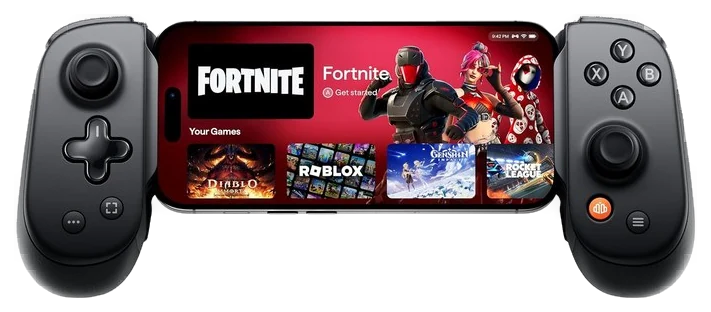
Backbone Pro Controller
Best for commuters
Turns the phone they already carry into a handheld
Get it if they commute and already own a decent phone
Skip it if they want to play their PC library on the move
The Backbone Pro reframes the whole question. Their phone already carries a great screen and a fast chip, and what it lacks is real controls. Snap this around it and Game Pass cloud streaming, PS Remote Play and the deep mobile-native catalog all become playable with sticks and triggers instead of thumbs on glass.
Handheld mode clamps the phone in and connects over USB-C, which is the lower-latency of its two modes and the thing that makes or breaks this category. The Pro also plays wirelessly over Bluetooth on its own battery, rated at about 40 hours, so the same pad pairs with a tablet, a PC or a TV when the phone is not the screen.
A capture button feeds clips, and the whole assembly weighs less than a paperback and disappears into any bag, which is the commuter profile a 700-gram handheld cannot match. Set expectations correctly when you give it: cloud streaming needs solid internet to be pleasant, and this plays their phone’s catalog and their streams, not their Steam library sitting on a PC at home. As a first handheld, a starter for a kid, or a travel companion, it delivers most of the experience for a fraction of the price.
Strengths
Uses the phone they already own
Wired USB-C for latency, or Bluetooth for ~40h wireless
Packs smaller and lighter than any handheld
Tradeoffs
Cloud streaming needs solid internet
Plays the phone catalog, not a Steam library
Phone case usually has to come off
Pick 5 of 6: No. 5Best for commuters
Backbone Pro Controller
Turns the phone they already carry into a handheld
Get it if they commute and already own a decent phone
Skip it if they want to play their PC library on the move
The Backbone Pro reframes the whole question. Their phone already carries a great screen and a fast chip, and what it lacks is real controls. Snap this around it and Game Pass cloud streaming, PS Remote Play and the deep mobile-native catalog all become playable with sticks and triggers instead of thumbs on glass.
Read the full case
Handheld mode clamps the phone in and connects over USB-C, which is the lower-latency of its two modes and the thing that makes or breaks this category. The Pro also plays wirelessly over Bluetooth on its own battery, rated at about 40 hours, so the same pad pairs with a tablet, a PC or a TV when the phone is not the screen.
A capture button feeds clips, and the whole assembly weighs less than a paperback and disappears into any bag, which is the commuter profile a 700-gram handheld cannot match. Set expectations correctly when you give it: cloud streaming needs solid internet to be pleasant, and this plays their phone’s catalog and their streams, not their Steam library sitting on a PC at home. As a first handheld, a starter for a kid, or a travel companion, it delivers most of the experience for a fraction of the price.
Strengths
Uses the phone they already own
Wired USB-C for latency, or Bluetooth for ~40h wireless
Packs smaller and lighter than any handheld
Tradeoffs
Cloud streaming needs solid internet
Plays the phone catalog, not a Steam library
Phone case usually has to come off
Pick 6 of 6: No. 6The big one~$790–950 at Steam
6
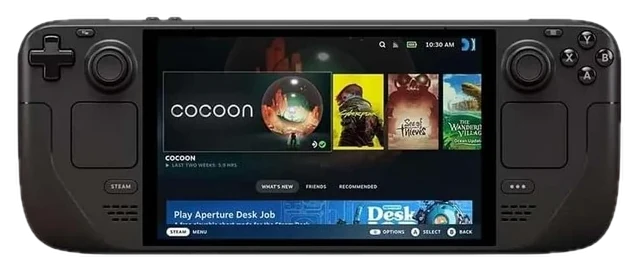
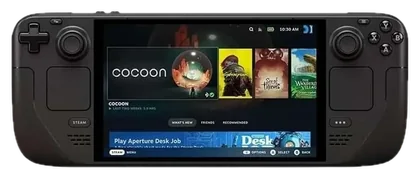
Steam Deck OLED
Upgrade pickThe big one
The category benchmark, and the backlog-clearing machine
Get it if they already buy games on Steam and never get through them. It is by far the biggest spend here, and the only pick that replaces a console rather than adding to one.
Skip it if they play mainly on console or mobile, where it duplicates what they already own.
The OLED revision turned a great device into the category benchmark. The Steam Deck OLED pairs a gorgeous HDR screen with meaningfully better battery and quieter cooling, plus the thing Windows-based rivals still chase, which is console-simple sleep and resume that just works when you pick it up.
The Verified program does the compatibility homework, and the scale of it is the part people underestimate: GamingOnLinux tracked Valve’s list past 25,000 titles rated Playable or better in January 2026, roughly a quarter of everything on Steam. The result owners report is backlogs finally getting cleared, because couches, commutes and beds turn out to be where unplayed games get played. As a gift it is unambiguous for anyone who already buys games on Steam.
Its limits are honest: demanding new AAA releases need some settings humility rather than running at maximum, and non-Steam launchers take tinkering. If that tinkering is itself the appeal, the ROG Ally X is the Windows alternative. Otherwise this is the default answer.
Strengths
HDR OLED screen and better battery than the original
Verified program does the compatibility work
Sleep and resume behaves like a console
Tradeoffs
New AAA releases need settings compromises
Non-Steam launchers take tinkering
Only worth it if they buy games on Steam
Pick 6 of 6: No. 6The big one~$790–950 at Steam
Steam Deck OLED
The category benchmark, and the backlog-clearing machine
Get it if they already buy games on Steam and never get through them. It is by far the biggest spend here, and the only pick that replaces a console rather than adding to one.
Skip it if they play mainly on console or mobile, where it duplicates what they already own.
The OLED revision turned a great device into the category benchmark. The Steam Deck OLED pairs a gorgeous HDR screen with meaningfully better battery and quieter cooling, plus the thing Windows-based rivals still chase, which is console-simple sleep and resume that just works when you pick it up.
Read the full case
The Verified program does the compatibility homework, and the scale of it is the part people underestimate: GamingOnLinux tracked Valve’s list past 25,000 titles rated Playable or better in January 2026, roughly a quarter of everything on Steam. The result owners report is backlogs finally getting cleared, because couches, commutes and beds turn out to be where unplayed games get played. As a gift it is unambiguous for anyone who already buys games on Steam.
Its limits are honest: demanding new AAA releases need some settings humility rather than running at maximum, and non-Steam launchers take tinkering. If that tinkering is itself the appeal, the ROG Ally X is the Windows alternative. Otherwise this is the default answer.
Strengths
HDR OLED screen and better battery than the original
Verified program does the compatibility work
Sleep and resume behaves like a console
Tradeoffs
New AAA releases need settings compromises
Non-Steam launchers take tinkering
Only worth it if they buy games on Steam
Gaming gifts go wrong when you guess at things you can’t see, so play it safe.
Match their platform first: know whether they’re on PC, PlayStation, Xbox, or Switch before you buy anything, because accessories aren’t interchangeable.
Don’t buy games: their digital library is invisible to you, and there’s a real chance they already own it.
Safe accessories over risky hardware: a headset or controller works no matter their setup; niche upgrades are easy to get wrong.
A spare controller is the safe bet: it’s the one thing almost no gamer already has a backup of.
Actual games: you can’t see their backlog, so buying a title is a coin flip on whether they already own it.
RGB desk decorations: the light strips and glowing trinkets look great in ads and clutter a real desk.
Gaming chairs: comfort is personal, they’re a pain to ship and return, and a bad fit is worse than the old chair.
Razer Kraken Kitty headset: fun to look at, but a plainer headset is comfier over the long sessions that matter.
Gamer gifting questions
6 common questions, answered.
What is the safest gaming gift if I do not know their platform?
A wired 3.5mm headset. Both headsets on this list work on every console, every PC and every controller ever made, with no pairing, no dongle and no compatibility question. Almost everything else in gaming is platform-specific, which is why headsets dominate gift guides in this category.
How do I avoid buying a game they already own?
Do not buy games. Digital libraries are invisible from the outside, refunds are awkward and most gamers have a backlog already. If you want to give games, a gift card to the store they use is the version that cannot go wrong, and it is not a cop-out in this category.
Is a gaming chair a good gift?
Rarely, for the same reason a desk chair is a hard gift: fit depends on their height and build, the good ones are expensive, and the cheap ones are worse than a decent office chair. If a bad chair is the actual problem, our office chair guide is the more useful place to start than the gaming aisle.
Should I buy accessories for a console they might upgrade?
Check the generation before buying anything console-specific. Controllers, charging docks and storage expansions are frequently tied to one generation, and a gift for the previous console is unusable rather than merely disappointing. The picks here that avoid this are the headsets and the phone controller.
What about a handheld for a younger player?
The phone controller is the better first step by a wide margin. It costs a fifth of a dedicated handheld, uses a device they already have, and there is nothing extra to lose or break. A dedicated handheld makes sense once you know they will use it, not as the opening move.
When does gaming gear discount?
Peripherals discount hard from late November through Cyber Monday, and the budget headset regularly appears under $40 in those windows. Handhelds discount far less and far later, so waiting for a big cut on one is usually a wasted month. Controllers and mice sit somewhere in between with frequent smaller cuts.
Sources
Who the write-ups above lean on, and where each one is cited.
PC GamerCited for HyperX Cloud III, and in the buying advice.
Tom’s HardwareCited for Logitech G502 X.
Prices on this page are re-checked weekly — see the full Gaming price index for every product we cover.
Keep reading
Where to go next.
The close calls side by side, then related guides.
New guides, re-ranked picks and the month's notable changes. No weekly filler, ever.
Unsubscribe any time. Your address goes to our newsletter provider and nowhere else — see our privacy policy.
Manage Consent
To provide the best experiences, we use technologies like cookies to store and/or access device information. Consenting to these technologies will allow us to process data such as browsing behavior or unique IDs on this site. Not consenting or withdrawing consent, may adversely affect certain features and functions.
Functional
Always active
The technical storage or access is strictly necessary for the legitimate purpose of enabling the use of a specific service explicitly requested by the subscriber or user, or for the sole purpose of carrying out the transmission of a communication over an electronic communications network.
Preferences
The technical storage or access is necessary for the legitimate purpose of storing preferences that are not requested by the subscriber or user.
Statistics
The technical storage or access that is used exclusively for statistical purposes.The technical storage or access that is used exclusively for anonymous statistical purposes. Without a subpoena, voluntary compliance on the part of your Internet Service Provider, or additional records from a third party, information stored or retrieved for this purpose alone cannot usually be used to identify you.
Marketing
The technical storage or access is required to create user profiles to send advertising, or to track the user on a website or across several websites for similar marketing purposes.