The Best Smart Lighting of 2026:Bulbs, Strips and Lamps, Compared
Smart lighting is the gateway drug of home automation, and the category where a $25 purchase can outperform a $200 one. We compared ecosystems, reliability and light quality to pick five setups worth installing.
By the BYB Editorial Team
Published July 28, 2026 · Prices checked OctoberOct 5, 2026
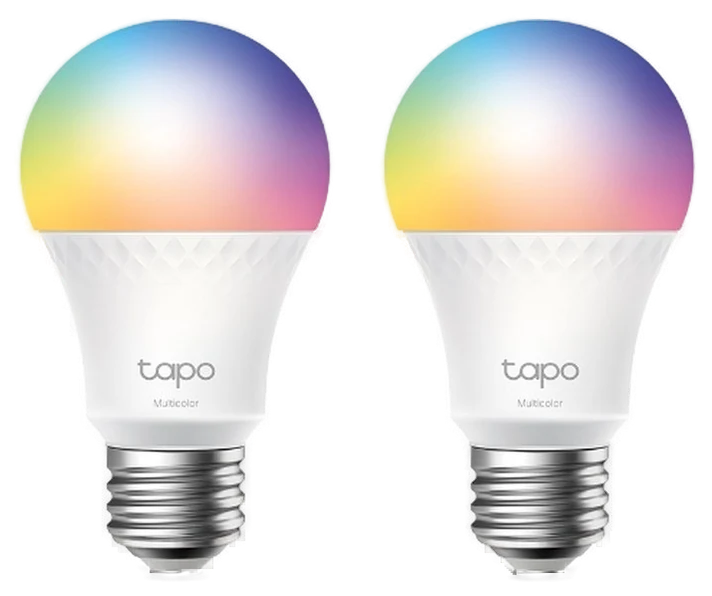
Tapo Smart Bulbs$19–25Start with the Tapo smart bulbs (2-pack), $19–25 — no hub, no bridge, and enough to find out whether you’ll use schedules or just leave the lights on like before.Check price
Graduating
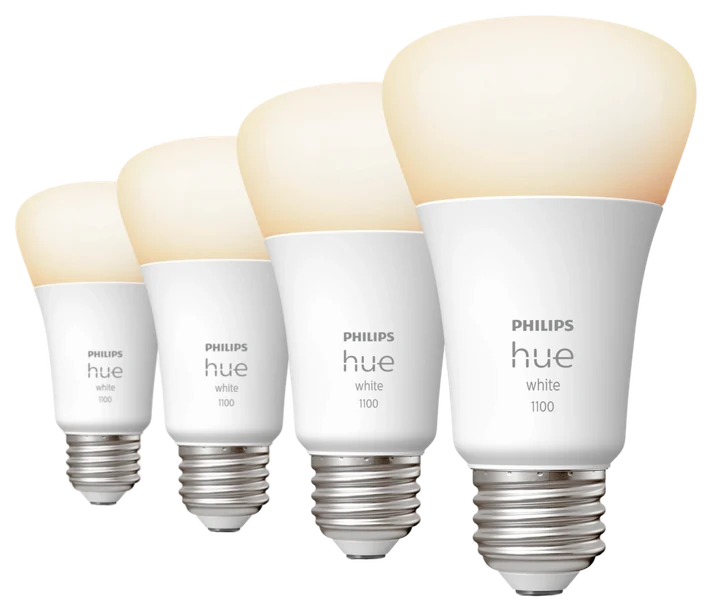
Philips Hue Starter Kit$100–200Philips Hue starter kit, $100–200 — the bridge buys range and reliability once your bulb count climbs past a handful.Check price
Smart lighting is the gateway drug of home automation, and the category where a $25 purchase can outperform a $200 one. We compared ecosystems, reliability and light quality to pick five setups worth installing.
How we choseWhat we compared, and how we rank
We compiled reliability testing, ecosystem compatibility checks, and long-term owner reviews across the major platforms. Prices are always moving, so every button and link pulls the live listing.
How we rank
Published specifications, verified owner reviews, and independent safety or standards data where it applies — weighted the same for every pick, never sponsored placement.
TP-Link retired the old Kasa color bulbs this guide used to name, and its Tapo L535E is the direct replacement: screw in, join the Wi-Fi, done, with no hub and no subscription. A two-pack runs about $19 against a $24.99 list.
Each bulb puts out 1,055 lumens, roughly a 75-watt equivalent and brighter than the 800-lumen bulbs it replaces, across 16 million colors and white from a warm 2,500K to a cold 6,500K. Trusted Reviews’ test of the L535E measured rich, saturated color output and priced it at roughly a third of what a comparable Hue color bulb costs. It is Matter-certified, so Alexa, Google Home and Apple’s Home app all work.
The trade-offs are the ones every cheap Wi-Fi bulb carries. They join 2.4GHz networks only, which trips up phones that hide the band, the Tapo app wants an account before it will do anything, and owner reviews of this bulb family include the familiar complaint of a unit that eventually stops reconnecting after a router change. They also lose power like any bulb when someone flips the wall switch. None of that stops them being the cheapest sensible way to find out whether you want smart lighting, and the Hue ecosystem is where to graduate if the habit sticks.
Strengths
No hub, no subscription, no fuss
1,055 lumens, brighter than before
Matter-certified across ecosystems
Under $10 a bulb
Tradeoffs
2.4GHz Wi-Fi only
App requires a Tapo account
Dies when the wall switch flips
Pick 2 of 5: No. 2The gold standard
2
Philips Hue Starter Kit
The gold standard
The ecosystem worth committing to
Get it if reliability across a whole house matters more than saving money on individual bulbs.
Skip it if you’re still testing the waters — the Tapo bulbs above teach the same lesson for $25.
Hue costs more because the ecosystem cashes the check: the Zigbee Bridge makes every bulb respond instantly and reliably, router outages don’t kill scenes, and a decade of accessories, gradient strips, outdoor lines, and TV-sync entertainment features all work together, spanning what Philips’ own Hue compatibility page lists as 150-plus products across bulbs, strips and fixtures.
PCWorld’s editors, who’ve used Hue bulbs for years, report they have yet to see a serious failure, and rank Philips’ lineup as the deepest and broadest lighting ecosystem in the category — bulbs, strips and fixtures in nearly every shape. Automations fire off the Bridge without cloud lag, every voice assistant is supported including HomeKit, and the entertainment sync that paints the wall behind a screen remains the category’s best party trick.
The tax is real: a starter kit runs $100–200 at Amazon, and each additional bulb costs what a Kasa two-pack does. If lighting becomes your whole-home project, this is the platform that won’t strand you. That’s what the premium buys.
Strengths
Decade-proven instant reliability
Deepest accessory ecosystem in lighting
TV/game entertainment sync
Works with every assistant incl. HomeKit
Tradeoffs
Premium per-bulb pricing
Bridge adds a box to the router shelf
Overkill for one-room curiosity
Pick 3 of 5: No. 3Best statement piece
3
Govee RGBIC Floor Lamp
Best statement piece
The room-changer
Get it if you want the biggest visible mood swing a lamp-sized budget can buy, and an obviously smart-home-y look doesn’t bother you.
Skip it if you want lighting that disappears into a minimalist room — the Hue Starter Kit’s accent bulbs do that instead.
Govee owns the ambient-lighting value tier, and the RGBIC floor lamp is its best trick: segmented LEDs paint a wall with animated gradients (sunsets, auroras, fireplace flickers) instead of one flat color, transforming a room’s mood for the price of an ordinary lamp.
The TikTok ubiquity is annoying; the effect in person holds up. How-To Geek’s review of Govee’s RGBIC floor lamp line found the music-sync mode fun, with the lights breathing, dancing and pulsing along with whatever’s playing, and confirmed the scene library goes well beyond stock rainbow presets. It doubles as a legitimate reading-corner lamp when you want warm white.
Build quality is lamp-tier rather than furniture-tier, and How-To Geek’s review flagged the same tradeoff, calling the pole wobbly enough to worry about a boisterous kid or dog knocking it over. The base is light, the plastic honest about the price. As a statement piece for the room where you host, at $65–100 on Amazon with near-constant coupons, nothing else delivers this much visible transformation per dollar.
Strengths
Animated gradients, not flat color
Transforms a room for lamp money
Convincing music sync
Doubles as a normal warm lamp
Tradeoffs
Lightweight lamp-grade build
App is busy with upsells
A statement, not subtle décor
Also on the shortlist
Two more, in brief
Pick 4 of 5: No. 4Best TV upgrade
4
Govee TV Backlight
Best TV upgrade
The movie-night upgrade
Get it if you want the immersive glow without shopping for a new TV, and occasional color hiccups in a bright room don’t bother you.
Skip it if a camera perched on the bezel would bug you daily, or frame-accurate color matters more than an easy install — Govee’s HDMI sync box is the pricier, more precise option.
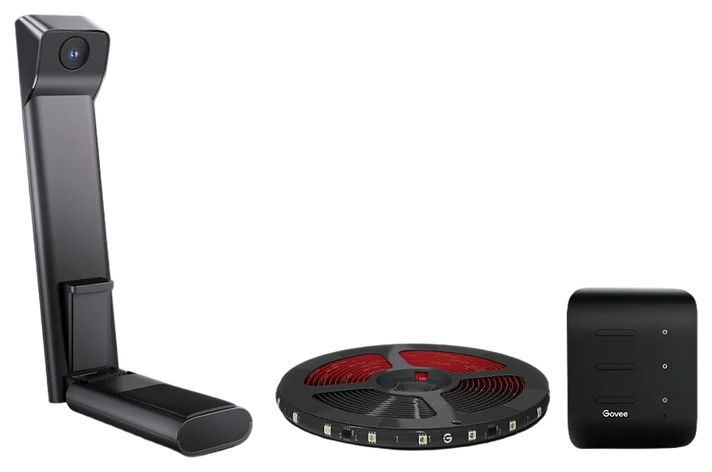
Bias lighting behind a TV reduces eye strain and makes blacks look deeper, established home-theater practice, and the Govee TV backlight adds the flourish: a small camera watches the screen and matches the strip’s colors to the picture in real time.
It’s the poor-man’s Ambilight, and it mostly works: explosions spill orange onto the wall, ocean scenes wash blue, and the screen reads bigger and punchier. Reviewed’s test of Govee’s dual-camera backlight found the color matching stayed consistent with on-screen content, with only the occasional hiccup in a brightly lit room — the expected tradeoff of a camera reading the screen instead of the source signal. Setup is a strip, a camera, and twenty minutes; Reviewed clocked the app calibration itself as quick and painless.
The camera sits visibly below the screen, and purists sometimes prefer a static neutral white, which this also does. Tom’s Guide notes that dedicated AV enthusiasts often skip camera-based kits like this one in favor of Govee’s pricier HDMI sync box, which reads the source signal directly instead of watching the screen — worth knowing if color accuracy matters more to you than an easy plug-and-play install. At $70–110 at Amazon, it upgrades movie night for a tenth of what a new TV costs, and it’s the accessory guests reliably ask about.
Get it if you want the immersive glow without shopping for a new TV, and occasional color hiccups in a bright room don’t bother you.
Skip it if a camera perched on the bezel would bug you daily, or frame-accurate color matters more than an easy install — Govee’s HDMI sync box is the pricier, more precise option.
Bias lighting behind a TV reduces eye strain and makes blacks look deeper, established home-theater practice, and the Govee TV backlight adds the flourish: a small camera watches the screen and matches the strip’s colors to the picture in real time.
Read the full case
It’s the poor-man’s Ambilight, and it mostly works: explosions spill orange onto the wall, ocean scenes wash blue, and the screen reads bigger and punchier. Reviewed’s test of Govee’s dual-camera backlight found the color matching stayed consistent with on-screen content, with only the occasional hiccup in a brightly lit room — the expected tradeoff of a camera reading the screen instead of the source signal. Setup is a strip, a camera, and twenty minutes; Reviewed clocked the app calibration itself as quick and painless.
The camera sits visibly below the screen, and purists sometimes prefer a static neutral white, which this also does. Tom’s Guide notes that dedicated AV enthusiasts often skip camera-based kits like this one in favor of Govee’s pricier HDMI sync box, which reads the source signal directly instead of watching the screen — worth knowing if color accuracy matters more to you than an easy plug-and-play install. At $70–110 at Amazon, it upgrades movie night for a tenth of what a new TV costs, and it’s the accessory guests reliably ask about.
Strengths
Screen-matched immersive glow
Cuts dark-room eye strain
Deepens perceived TV contrast
Cheap for the effect delivered
Tradeoffs
Visible camera on the bezel
One-time calibration required
Adhesive is semi-permanent
Pick 5 of 5: No. 5Best wall statement~$180–220 per kit
5
Nanoleaf Shapes
Upgrade pickBest wall statement
Lighting as wall art
Get it if the wall behind your desk or TV is begging for a centerpiece and you’ll plan the full layout before buying a single panel.
Skip it if you want to poke a panel and have it react instantly — touch control is the unreliable part, and any bulb above does actual room lighting better.
Nanoleaf Shapes are the only lighting here that’s also décor: modular hexagon panels arranged however your wall inspires, glowing in scenes that react to touch, music, or what’s on screen. They became the visual shorthand of every streaming setup for a reason.
The modularity is the hook. Layouts are yours, expansion is endless, and the music- and screen-sync scenes turn a wall into a toy. Touch control is the one soft spot: Trusted Reviews found double-tapping unreliable enough that panels needed a firm slap to register, so treat touch as a bonus, not the main event. Nanoleaf added Thread border-router support to Shapes in a firmware update, confirmed at the time by outlets including MacRumors, which keeps response snappy in modern Matter and Thread smart homes, and the scene community supplies infinite moods.
The knowns: panels are an investment at $180–220 per kit on Amazon, expansion packs are the famous budget trap, and adhesive mounting asks commitment from renters. Buy for the wall you look at most, one good kit outshines two scattered ones.
Strengths
Light that doubles as wall art
Touch, music, and screen reactivity
Endlessly rearrangeable layouts
Thread keeps response quick
Tradeoffs
Expansion habit gets expensive
Adhesive mounting tests renters
Per-lumen price is décor-tier
Pick 5 of 5: No. 5Best wall statement~$180–220 per kit
Get it if the wall behind your desk or TV is begging for a centerpiece and you’ll plan the full layout before buying a single panel.
Skip it if you want to poke a panel and have it react instantly — touch control is the unreliable part, and any bulb above does actual room lighting better.
Nanoleaf Shapes are the only lighting here that’s also décor: modular hexagon panels arranged however your wall inspires, glowing in scenes that react to touch, music, or what’s on screen. They became the visual shorthand of every streaming setup for a reason.
Read the full case
The modularity is the hook. Layouts are yours, expansion is endless, and the music- and screen-sync scenes turn a wall into a toy. Touch control is the one soft spot: Trusted Reviews found double-tapping unreliable enough that panels needed a firm slap to register, so treat touch as a bonus, not the main event. Nanoleaf added Thread border-router support to Shapes in a firmware update, confirmed at the time by outlets including MacRumors, which keeps response snappy in modern Matter and Thread smart homes, and the scene community supplies infinite moods.
The knowns: panels are an investment at $180–220 per kit on Amazon, expansion packs are the famous budget trap, and adhesive mounting asks commitment from renters. Buy for the wall you look at most, one good kit outshines two scattered ones.
Strengths
Light that doubles as wall art
Touch, music, and screen reactivity
Endlessly rearrangeable layouts
Thread keeps response quick
Tradeoffs
Expansion habit gets expensive
Adhesive mounting tests renters
Per-lumen price is décor-tier
Smart lighting covers everything from a single bulb to wall panels, and they don’t all solve the same problem. Sort out what you want lit up before you start filling a cart.
Bulb, strip, or panel: bulbs replace what you already have, strips add glow behind a TV or under cabinets, and panels are decor for a wall. Buy for the job, not the photos.
Hub or no hub: systems like Philips Hue use a bridge for rock-solid response and big setups, while Wi-Fi bulbs skip the box but can be flakier and clog your network in bulk. Pick based on how many lights you’re planning.
White versus color: color bulbs cost more and look great, but a lot of people only ever use warm and cool white. If that’s you, tunable-white bulbs are cheaper and equally useful.
The common mistake: mixing brands and expecting one app to run them all. Stick to one system per room, and check for Matter if you want different brands to eventually play together.
LIFX Color A19 — some of the brightest, most saturated bulbs you can buy with no bridge needed, but they’re pricey and the app has a reputation for being fussy.
WiZ Smart Bulbs — inexpensive color bulbs from Philips’ parent company, but they’re Wi-Fi only, so a house full of them leans hard on your router and the cloud.
Sengled Smart Bulbs — a genuine bargain at under $9 a bulb, but color accuracy and response time trail the pricier names, so they’re a value pick, not a showpiece.
Nanoleaf Lines — striking backlit light bars for a gaming or streaming wall, but they’re a decor splurge rather than everyday room lighting.
Smart lighting FAQs
6 common questions, answered.
Do smart bulbs need a hub?
Most now don’t, Wi-Fi bulbs like Kasa and Govee connect directly. Hubs (like the Hue Bridge) still win for large installs: faster response, no router congestion with 30 bulbs, and automations that run even when the internet is down.
Is Philips Hue worth the premium?
For a couple of lamps, no. Buy Kasa. For a whole-home build, usually yes: the ecosystem depth, reliability at scale, and entertainment sync features have no equal, and ten-year-old Hue bulbs still work with today’s Bridge.
Does smart lighting save energy?
Only a little: most of the win here is convenience and ambience, not energy savings. The pitch is convenience and ambience, with modest efficiency as a bonus.
What should my first smart lighting purchase be?
A two-pack of hub-free color bulbs in the room you use most evenings. That’s a $25 experiment that teaches you whether the habit sticks. If you find yourself using scenes and schedules daily within a month, expand room by room and consider the Hue platform for the long haul. If the novelty fades, you’re out a pizza’s worth of money. Never start with the $200 kit.
Can smart bulbs work with the wall switch?
This is the category’s one real gotcha: flip the wall switch off and any smart bulb goes dark and dumb, no app, no schedule, nothing. Households adapt with switch guards, by retraining habits, or by putting smart switches in the wall instead of smart bulbs in the socket. Color effects need bulbs; plain on-off-dim rooms with switch-flipping family members want switches.
Do color bulbs matter, or is white enough?
Tunable white does the daily heavy lifting, cool light for focus, warm for evenings; the circadian argument is real. Color earns its premium in the rooms where mood matters: living rooms, bedrooms, and anywhere a TV lives. The pragmatic split most households land on: color in the showpiece rooms, cheap tunable white everywhere else. Buy accordingly and the budget goes twice as far.
Sources
Who the write-ups above lean on, and where each one is cited.
Trusted ReviewsCited for Tapo Smart Bulbs (2-pack) and Nanoleaf Shapes, and in the buying advice.
Tom’s GuideCited for Govee TV Backlight, and in the buying advice.
MacRumorsCited for Nanoleaf Shapes, and in the buying advice.
Prices on this page are re-checked weekly — see the full Smart Home price index for every product we cover.
Keep reading
Where to go next.
The close calls side by side, then related guides.
New guides, re-ranked picks and the month's notable changes. No weekly filler, ever.
Unsubscribe any time. Your address goes to our newsletter provider and nowhere else — see our privacy policy.
Manage Consent
To provide the best experiences, we use technologies like cookies to store and/or access device information. Consenting to these technologies will allow us to process data such as browsing behavior or unique IDs on this site. Not consenting or withdrawing consent, may adversely affect certain features and functions.
Functional
Always active
The technical storage or access is strictly necessary for the legitimate purpose of enabling the use of a specific service explicitly requested by the subscriber or user, or for the sole purpose of carrying out the transmission of a communication over an electronic communications network.
Preferences
The technical storage or access is necessary for the legitimate purpose of storing preferences that are not requested by the subscriber or user.
Statistics
The technical storage or access that is used exclusively for statistical purposes.The technical storage or access that is used exclusively for anonymous statistical purposes. Without a subpoena, voluntary compliance on the part of your Internet Service Provider, or additional records from a third party, information stored or retrieved for this purpose alone cannot usually be used to identify you.
Marketing
The technical storage or access is required to create user profiles to send advertising, or to track the user on a website or across several websites for similar marketing purposes.