LG UltraGear vs. Samsung Odyssey G5:Is the Extra $150 Worth It?
The LG UltraGear costs $150 to $200 more than the Samsung Odyssey G5, and RTINGS' own testing shows what that gap buys: a Fast IPS panel that clears motion cleanly versus a VA panel RTINGS measured with slow response and terrible VRR flicker. We compared both to see which 1440p monitor is worth buying.
By the BYB Editorial Team
Published August 9, 2026 · Prices checked October 5, 2026
Get the LG UltraGear 27-inch QHD if you’re a fast shooter or your GPU’s frame rate wanders; the Samsung Odyssey G5 is still a legitimate budget pick for slower, story-driven games.
Best overall
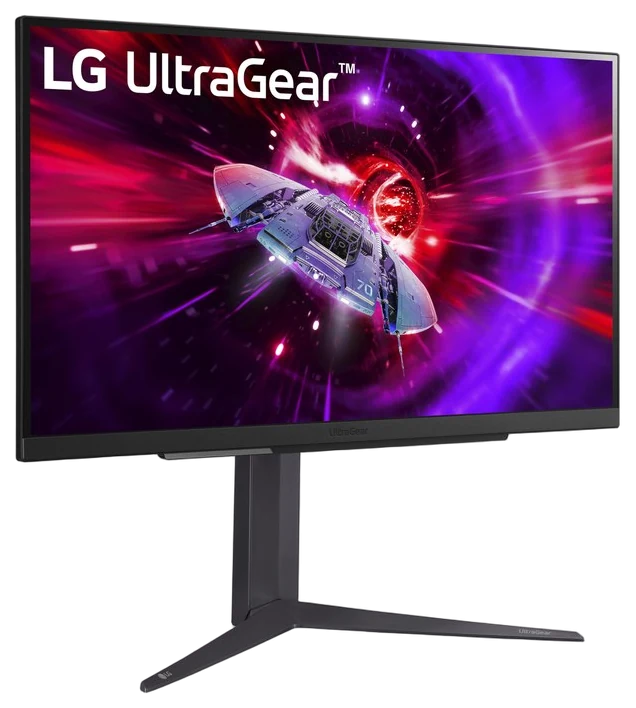
LG UltraGear 27″ QHD
~$300–450 by model
Get it if fast motion, competitive play, or doubling as a work monitor matter to you.
The price gap~$150–230 more for the LG UltraGear 27″ QHD
LG UltraGear 27″ QHD~$300–450
Samsung Odyssey G5~$150–220
Each bar is an estimated price range, on one scale from ~$150 to ~$450.
How we choseWe haven’t run either monitor on a bench ourselves.
We compared RTINGS’ lab-measured response-time and VRR-flicker results for both panel classes against current listings for each model, prioritizing measured motion performance over marketing refresh-rate claims. We haven’t run either monitor on a bench ourselves; the response-time and VRR-flicker figures come from RTINGS’ lab measurements, linked at the point each claim is made. Prices are always moving, so every button and link pulls the live listing.
How we rank
Published specifications, verified owner reviews, and independent safety or standards data where it applies — weighted the same for every pick, never sponsored placement.
RTINGS put the closest tested sibling in this lineup, the 27GP850-B, through its full motion suite and came away with an 8.5 out of 10, one of the stronger scores in the 1440p gaming category. The Nano IPS panel clears its pixel transitions fast enough that fast-moving edges stay sharp instead of trailing, and RTINGS measured input lag low enough to be imperceptible in competitive play. That’s the technical case for the whole UltraGear 27-inch line: it’s the Fast IPS family testers reach for as the 1440p benchmark.
Color accuracy is strong enough that the same panel doubles as a work monitor without a second display, and adaptive sync covers both G-Sync and FreeSync, so it’s not a gamble on which GPU you own now or buy next. Refresh options run as high as 240Hz depending on the specific model year, which is the one place LG makes this more complicated than it needs to be.
The line’s breadth is the real trap: model numbers proliferate every year, and pricing swings from $300 to $450 at Amazon depending on refresh tier and vintage. Buy the highest refresh rate inside your budget and don’t chase the newest model number for its own sake. Budget-first buyers should compare the Odyssey G5 below before paying the premium.
Strengths
RTINGS-tested 8.5/10 motion performance
Fast/Nano IPS clears transitions cleanly
Color quality doubles for work use
Adaptive sync for both GPU brands
Tradeoffs
Costs $150–200 more than the G5
Confusing model-number sprawl
HDR is nominal, as with most IPS
Best value~$150–220
2
Samsung Odyssey G5
Best value
1440p at a 1080p price, with one RTINGS-documented catch
Get it if you want the most 1440p per dollar and mostly play slower-paced games.
Skip it if competitive motion clarity or VRR matters to your games. Go Fast IPS.
The Samsung Odyssey G5 exists to make 1440p at 165Hz cheap, and on price alone it delivers: it’s the panel that anchors every “budget 1440p” roundup, and Samsung’s sale cadence drops it under $200 routinely. The VA panel brings deeper blacks than the LG’s IPS layer, which single-player, dark-room gaming rewards, and FreeSync Premium covers tearing on AMD and compatible Nvidia cards alike.
The catch is real and RTINGS measured it directly. Their review of the G55A, the same VA generation sold under the current G5 name, found slow response times at every refresh rate, producing noticeable blur in motion, and rated the VRR flicker “terrible” as frame rates shift during actual play, worse than the panel’s already-soft baseline motion. That’s not a marketing footnote; it’s the specific weakness a competitive or fast-paced buyer needs to know about before they order one.
None of that erases the value case for the right buyer. At $150 to $220 on Amazon, it’s still 1440p and 165Hz for what many 1080p monitors cost, and slower-paced games rarely expose the motion issues RTINGS flagged. The UltraGear wins outright for anyone who plays competitively or games with VRR active.
Strengths
1440p/165Hz routinely under $200
VA contrast beats IPS rivals
FreeSync Premium standard
Constant sale availability
Tradeoffs
RTINGS measured slow response at every refresh rate
RTINGS rated its VRR flicker “terrible”
Narrower VA viewing angles
LG UltraGear vs Samsung Odyssey G5 FAQs
6 common questions, answered.
Which panel is faster, the UltraGear or the Odyssey G5?
The UltraGear, clearly. RTINGS scored its closest tested sibling, the 27GP850-B, 8.5 out of 10 overall, while its review of the Odyssey G5’s VA generation (the G55A) found slow response times at every refresh rate. Fast IPS is a quicker-clearing panel technology than the VA layer Samsung uses here.
Does the Samsung Odyssey G5 have flickering issues?
Yes, according to RTINGS’ testing. Their review of the same VA panel generation rated the VRR flicker “terrible” as frame rates change during gameplay, on top of an already slow baseline response time. It’s a real, measured weakness, not a rare complaint.
Is the extra cost of the LG UltraGear worth it for casual gaming?
For strictly casual or story-driven games, not necessarily. RTINGS’ flagged issues with the G5 show up most in fast, competitive motion; slower games rarely expose them. If your GPU also doesn’t push variable frame rates hard, the G5’s savings are easier to justify.
Do both monitors support G-Sync and FreeSync?
Both support adaptive sync, but the UltraGear is certified for NVIDIA G-Sync Compatible and AMD FreeSync alike, while the Odyssey G5 leans on FreeSync Premium. Either works with either GPU brand in practice, but check the specific model’s certification before buying if you want the official label.
What’s the real price gap between these two monitors?
Expect $150 to $200 depending on sales. The Odyssey G5 regularly drops to around $150, and the UltraGear line runs $300 to $450 depending on refresh tier and model year, so the gap moves with both monitors’ own promotions rather than staying fixed. Watch both listings for a week or two before buying if the timing isn’t urgent, since neither one holds a single price for long.
Which one should I buy for general desk work, not just gaming?
The UltraGear. Its IPS panel holds color and viewing angles more consistently than the G5’s VA layer, which matters more for documents, spreadsheets and photo work than it does for gaming, on top of the motion advantage it already has.
Prices on this page are re-checked weekly — see the full Gaming price index for every product we cover.
New guides, re-ranked picks and the month's notable changes. No weekly filler, ever.
Unsubscribe any time. Your address goes to our newsletter provider and nowhere else — see our privacy policy.
Manage Consent
To provide the best experiences, we use technologies like cookies to store and/or access device information. Consenting to these technologies will allow us to process data such as browsing behavior or unique IDs on this site. Not consenting or withdrawing consent, may adversely affect certain features and functions.
Functional
Always active
The technical storage or access is strictly necessary for the legitimate purpose of enabling the use of a specific service explicitly requested by the subscriber or user, or for the sole purpose of carrying out the transmission of a communication over an electronic communications network.
Preferences
The technical storage or access is necessary for the legitimate purpose of storing preferences that are not requested by the subscriber or user.
Statistics
The technical storage or access that is used exclusively for statistical purposes.The technical storage or access that is used exclusively for anonymous statistical purposes. Without a subpoena, voluntary compliance on the part of your Internet Service Provider, or additional records from a third party, information stored or retrieved for this purpose alone cannot usually be used to identify you.
Marketing
The technical storage or access is required to create user profiles to send advertising, or to track the user on a website or across several websites for similar marketing purposes.