The Best Kids Tech for 2026:Screens, Speakers and Parental Controls
Kids’ tech is really parental-controls tech. We compared durability, content controls, and thousands of parent reviews to find the four devices that survive both drops and arguments.
By the BYB Editorial Team
Published July 28, 2026 · Updated · Prices checked OctoberOct 5, 2026
Amazon Fire HD 10 Kids$140–190The Amazon Fire HD 10 Kids, $140–190 — it wins on the only spec that matters at this age: a warranty that assumes the tablet will be dropped and replaces it anyway.Check price
Older kid
Samsung Galaxy Tab A9+$150–270Samsung Galaxy Tab A9+, $150–270 by storage — the step up from a walled garden.Check price
The rule
Buy for how a device fails, not for how fast it is.
Kids’ tech is really parental-controls tech. We compared durability, content controls, and thousands of parent reviews to find the four devices that survive both drops and arguments.
How we choseWhat we compared, and how we rank
We compiled durability testing, parental-control comparisons, and verified parent reviews across the category. Prices are always moving, so every button and link pulls the live listing.
How we rank
Published specifications, verified owner reviews, and independent safety or standards data where it applies — weighted the same for every pick, never sponsored placement.
What changed2 dated notes · latest 28 September 2026
CorrectedThis guide listed the Echo Dot Kids at about $85–95 since it was published. It sells for about $40–55, and the price is corrected. The pick is unchanged.
CorrectedThe JLab JBuddies Studio 2 entry stated that the 95 dB volume-limit switch was one a child could reach. JLab places it inside the earcup for parent-only access. The entry also described wired use as useful on a plane, but wired mode on this model is USB-C only and airline seatback jacks are 3.5 mm. Both claims were corrected.
Dated notes already published on this page, newest first. Every correction we make is logged on the corrections page.
The Fire HD 10 Kids formula is unbeatable for young kids: a foam bumper that shrugs off drops, per-child profiles with hard time limits, and Amazon’s famous two-year warranty: they replace the tablet even if your child snaps it in half. Tom’s Guide’s review praised exactly that combination of screen quality, battery life and warranty coverage.
That warranty sentence decides the category for ages three to ten: the device is engineered around the assumption of destruction, and the Kids+ subscription year bundles age-flagged books, videos, and games in a walled garden parents can trust unattended.
The app selection trails full Android, a feature at six, a limitation at eleven, which is when the Samsung graduation happens. At $140–190 on Amazon, deeply cut every Prime Day, it’s the default first tablet.
Strengths
Break-it-anyway replacement warranty
Hard per-child time limits
Drop-proof bumper case
Kids+ walled garden included
Tradeoffs
Thin app store vs. Android
Case turns uncool by ten
Amazon ecosystem gravity
Pick 2 of 5: No. 2Best for older kids~$150–270 by storage
2
Samsung Galaxy Tab A9+
Upgrade pickBest for older kids
The grows-with-them tablet
Get it if a tween outgrew the bumper era but not the rules, and $150–270 buys real Android
Skip it if they’re under eight. The Fire’s warranty is unbeatable.
Around age eight the bumper-case tablet becomes embarrassing, and the Galaxy Tab A9+ is the graduation device: a real Android tablet for homework, browsers, and Minecraft, kept honest by Google Family Link.
Buy this one knowing it is on the way out. Samsung’s own product page for the Tab A9+ now redirects to the Tab A11+, which starts at $249.99, so the A9+ is retailer stock rather than a current line. Target still has it at $219.99 for 64GB and $269.99 for 128GB, and at those prices it is a fair buy; do not expect it to stay on shelves.
Family Link is the load-bearing feature: app installs route through parent approval, screen-time schedules enforce themselves, and location shows up on your phone. The 11-inch 90Hz screen and quad speakers outclass everything near the price, and Android Authority called it easy to recommend for exactly that reason: more powerful and more affordable than the tablet it replaced.
It’s a real tablet, so the controls are the guardrails. Determined teenagers test fences, and the case is now your job to add. At $150–270 on Amazon depending on storage, it’s the tweens’ answer that respects both them and the rules.
Strengths
Real Android without the kid stigma
Family Link approvals that hold
90Hz screen outclasses the price
Homework-capable
Tradeoffs
Case and screen protector on you
Fences get tested by teens
Update window shorter than iPad
Pick 3 of 5: No. 3Best screen-free
3
Echo Dot Kids
Best screen-free
The screen-free option
Get it if you want tech magic without another screen, and $40–55 is an easy yes
Skip it if no smart-speaker ecosystem exists or is wanted at home.
The most underrated kids’ device is a speaker: the Echo Dot Kids delivers audiobooks at bedtime, homework timers, music, and endless why-questions answered: with no screen attached to any of it.
The Kids edition filters explicit lyrics, answers in kid-appropriate mode, includes a year of Kids+ audio content, and gives parents full activity visibility. It’s the rare tech purchase that measurably reduces household screen time, and Tom’s Guide named it the best Alexa device for a household with kids in it. The intercom announcements (dinner is ready, broadcast to every room) become the family feature nobody expected to love.
Switch voice purchasing off in settings (the one setup gotcha) and expect the animal-fact phase to last months. At $40–55 on Amazon, routinely discounted. It’s the screen-free win of this list.
Strengths
Reduces net screen time
Bedtime audiobooks that stick
Lyric filtering + kid answers
Parent activity dashboard
Tradeoffs
Disable voice buying first
Alexa ecosystem assumed
Music service tie-ins
Also on the shortlist
Two more, in brief
Pick 4 of 5: No. 4Best for readers
4
Kindle Paperwhite Kids
Best for readers
The reading machine
Get it if a budding reader deserves a distraction-free push and $170–230 buys years of use
Skip it if reading enthusiasm hasn’t sparked yet, library first.
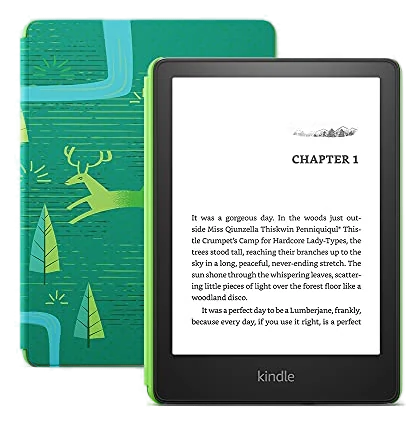
For a reader-in-training, the Kindle Paperwhite Kids removes every excuse: thousands of age-flagged books included for a year, a waterproof glare-free screen for pool and bath, and nothing else: no apps, no videos, no negotiation.
Parents report it’s the device that made reading stick: the vocabulary-builder and achievement badges gamify gently, and the two-year worry-free warranty covers the inevitable drop. It’s the adult Paperwhite plus a case, warranty, and content year: usually for less than buying those separately.
It only reads, the entire point, and the reason some kids initially side-eye it. At $170–230 on Amazon, it’s the calmest screen a kid can own.
Get it if a budding reader deserves a distraction-free push and $170–230 buys years of use
Skip it if reading enthusiasm hasn’t sparked yet, library first.
For a reader-in-training, the Kindle Paperwhite Kids removes every excuse: thousands of age-flagged books included for a year, a waterproof glare-free screen for pool and bath, and nothing else: no apps, no videos, no negotiation.
Read the full case
Parents report it’s the device that made reading stick: the vocabulary-builder and achievement badges gamify gently, and the two-year worry-free warranty covers the inevitable drop. It’s the adult Paperwhite plus a case, warranty, and content year: usually for less than buying those separately.
It only reads, the entire point, and the reason some kids initially side-eye it. At $170–230 on Amazon, it’s the calmest screen a kid can own.
Strengths
Reading with zero distractions
Year of age-flagged books included
Waterproof, warrantied, cased
Cheaper than adult version + extras
Tradeoffs
Does nothing but read (the point)
Needs a reading-curious kid
Amazon library lock-in
Pick 5 of 5: No. 5Best headphones~$25–35
5
JLab JBuddies Studio 2 Wireless
Budget pickBest headphones
The accessory every other pick in this guide needs
Get it if you are handing a kid any screen in this guide and want the volume capped without an argument, and $25–35 is the easiest add-on here
Skip it if your child is a teenager, has larger ears, or needs noise cancelling for flights
Every other pick in this guide plays audio, and none of them comes with a way to cap how loud that audio gets. The JBuddies Studio 2 is JLab’s on-ear kids’ headphone, rated for ages 6 and up, and it is the only thing in this guide that costs less than an Echo Dot Kids. It works over Bluetooth, or wired over USB-C.
A switch inside the earcup, placed where a parent flips it rather than the kid, sets the ceiling at 85 dB or 95 dB, the higher setting intended for louder places. JLab rates wireless playtime at 65 hours or more per charge, and Wireless Share pairs a second set to the same tablet so two kids can watch one thing. The warranty runs two years, and they fold down for a backpack.
The cups run small. Reviewers with older kids report they sit on top of the ear instead of around it, which lets outside noise in, and there is no noise cancelling to make up for it. For a kid who only listens at home, the Echo Dot Kids covers that already and these are optional.
Strengths
Volume capped at 85 dB by default, with a 95 dB option behind a parent-only switch inside the earcup
JLab rates 65 hours or more of wireless playtime per charge
Falls back to a wired USB-C connection when the battery dies
Wireless Share pairs a second set to the same tablet
Two-year warranty
Tradeoffs
Earcups run small and sit on top of older kids’ ears rather than around them
No noise cancelling, so a classroom or a car still leaks in
Wired mode runs over USB-C only, so an airline seatback jack needs an adapter that is not in the box
Plastic build and no carrying case included
Pick 5 of 5: No. 5Best headphones~$25–35
JLab JBuddies Studio 2 Wireless
The accessory every other pick in this guide needs
Get it if you are handing a kid any screen in this guide and want the volume capped without an argument, and $25–35 is the easiest add-on here
Skip it if your child is a teenager, has larger ears, or needs noise cancelling for flights
Every other pick in this guide plays audio, and none of them comes with a way to cap how loud that audio gets. The JBuddies Studio 2 is JLab’s on-ear kids’ headphone, rated for ages 6 and up, and it is the only thing in this guide that costs less than an Echo Dot Kids. It works over Bluetooth, or wired over USB-C.
Read the full case
A switch inside the earcup, placed where a parent flips it rather than the kid, sets the ceiling at 85 dB or 95 dB, the higher setting intended for louder places. JLab rates wireless playtime at 65 hours or more per charge, and Wireless Share pairs a second set to the same tablet so two kids can watch one thing. The warranty runs two years, and they fold down for a backpack.
The cups run small. Reviewers with older kids report they sit on top of the ear instead of around it, which lets outside noise in, and there is no noise cancelling to make up for it. For a kid who only listens at home, the Echo Dot Kids covers that already and these are optional.
Strengths
Volume capped at 85 dB by default, with a 95 dB option behind a parent-only switch inside the earcup
JLab rates 65 hours or more of wireless playtime per charge
Falls back to a wired USB-C connection when the battery dies
Wireless Share pairs a second set to the same tablet
Two-year warranty
Tradeoffs
Earcups run small and sit on top of older kids’ ears rather than around them
No noise cancelling, so a classroom or a car still leaks in
Wired mode runs over USB-C only, so an airline seatback jack needs an adapter that is not in the box
Plastic build and no carrying case included
Start with your kid’s age and how much screen you want in the house, then pick the device that fits, not the one with the most features.
Match the age: a 3-year-old needs a bumper case and locked-down content; a 10-year-old is closer to a real tablet. Buying “ahead” usually means paying for stuff they can’t use yet.
Check the parental controls before you buy: you want time limits, content filters, and an easy way to approve apps. If the controls are an afterthought, you’ll be fighting the device every day.
For headphones, look for a real volume cap: a hard limit around 85 dB protects young ears in a way a “turn it down” reminder never will. It’s the one spec that matters here.
The common mistake: paying extra for “kids” branding on a device your child will outgrow in a year. Sometimes the cheaper size, or a screen-free audio player, is the smarter buy.
Yoto Mini — a screen-free, card-based audio player with no camera, mic, or ads. Great for travel and younger kids, but you buy content cards over time, so it’s not a one-and-done cost.
Toniebox 2 — a soft, tap-a-figurine audio player simple enough for a toddler to run alone. We left it off because the content is locked to Tonies characters you keep adding, which adds up.
Amazon Fire HD 8 Kids — the smaller, cheaper sibling of our Fire HD 10 pick with the same case and warranty. Fine if you want to spend less and don’t need the bigger screen.
Puro Sound Labs BT2200 Plus — volume-limited headphones with noticeably better sound and build than our budget pick. They cost a lot more, which is why they’re here and not up top.
Kids’ tech FAQs
6 common questions, answered.
Fire tablet or iPad for kids?
Under ten, the Fire wins on price, case, and warranty. A destroyed $150 tablet is replaceable in a way a $350 iPad is not. Over ten, the Tab A9+ or a hand-me-down iPad makes more sense as app needs grow.
Are the parental controls effective?
Amazon Kids+ and Google Family Link both enforce hard time limits and app approvals at the account level, kids cannot uninstall their way around them. The consistent parent complaint is setup friction, not enforcement.
What about kids’ smartwatches?
For location peace-of-mind before a phone, kids’ GPS watches work but reviews are mixed on battery and build. We left them out until a clear category leader emerges.
What screen-time rules work with these devices?
The setup that survives contact with real children: hard device-level limits (Fire profiles and Family Link both enforce them, the device says no, so you don’t have to), screens that live in common rooms, and a charging spot outside bedrooms overnight: the American Academy of Pediatrics calls this the single highest-impact rule. Content limits beat time limits for younger kids; earned time works better than unlimited-until-revoked for older ones. The devices here make the rules enforceable; the consistency part remains a parent job.
What age fits each of these devices?
The realistic ladder: Echo Dot Kids from age three (audio needs no reading), Fire HD Kids from three to about nine (the bumper case era), Kindle Kids from six or whenever reading takes hold, and the Galaxy Tab from eight-plus when the kid case becomes socially fatal. The overlap is intentional, many households run the Dot and a tablet in parallel, covering ears and eyes separately. Resist buying up an age tier; kids grow into devices badly but out of them fast.
How do I keep purchases and downloads locked down?
Each ecosystem’s honest answer: Fire tablets sandbox kids into Amazon Kids+ content with purchases absent from the profile; Family Link on the Samsung routes every install through a parent-phone approval (mercifully asynchronous); the Kindle Kids store is curated and card-free by design; and the Dot needs voice purchasing switched off once in settings, the one gotcha in the set. The universal insurance: no payment method stored where a kid profile can reach it, and PIN-lock the parent profile.
Sources
Who the write-ups above lean on, and where each one is cited.
Tom’s GuideCited for Amazon Fire HD 10 Kids and Echo Dot Kids.
Android AuthorityCited for Samsung Galaxy Tab A9+.
1Aug 2026Correction, 1 August 2026The JLab JBuddies Studio 2 entry stated that the 95 dB volume-limit switch was one a child could reach. JLab places it inside the earcup for parent-only access. The entry also described wired use as useful on a plane, but wired mode on this model is USB-C only and airline seatback jacks are 3.5 mm. Both claims were corrected.Every correction we’ve made ›
28Sep 2026Correction, 28 September 2026This guide listed the Echo Dot Kids at about $85–95 since it was published. It sells for about $40–55, and the price is corrected. The pick is unchanged.Every correction we’ve made ›
Prices on this page are re-checked weekly — see the full Baby & Kids price index for every product we cover.
Keep reading
Where to go next.
Related guides, then every guide in the department.
New guides, re-ranked picks and the month's notable changes. No weekly filler, ever.
Unsubscribe any time. Your address goes to our newsletter provider and nowhere else — see our privacy policy.
Manage Consent
To provide the best experiences, we use technologies like cookies to store and/or access device information. Consenting to these technologies will allow us to process data such as browsing behavior or unique IDs on this site. Not consenting or withdrawing consent, may adversely affect certain features and functions.
Functional
Always active
The technical storage or access is strictly necessary for the legitimate purpose of enabling the use of a specific service explicitly requested by the subscriber or user, or for the sole purpose of carrying out the transmission of a communication over an electronic communications network.
Preferences
The technical storage or access is necessary for the legitimate purpose of storing preferences that are not requested by the subscriber or user.
Statistics
The technical storage or access that is used exclusively for statistical purposes.The technical storage or access that is used exclusively for anonymous statistical purposes. Without a subpoena, voluntary compliance on the part of your Internet Service Provider, or additional records from a third party, information stored or retrieved for this purpose alone cannot usually be used to identify you.
Marketing
The technical storage or access is required to create user profiles to send advertising, or to track the user on a website or across several websites for similar marketing purposes.