


No. 2 · Best for readers
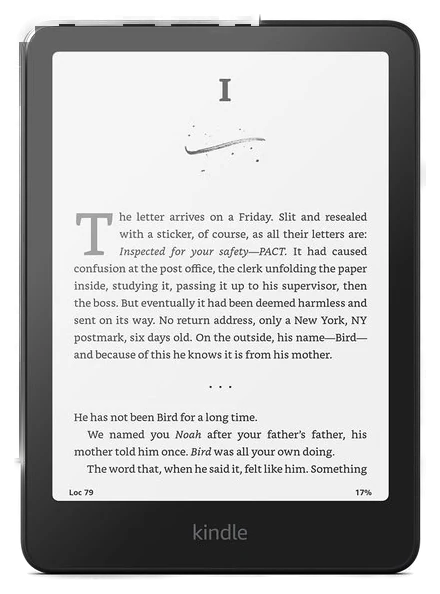
Kindle Paperwhite
Adjustable type size fixes the real problem with night reading
~$160–200
View on AmazonGrandparents already have plenty of things. What most of them are short on is something that solves a daily annoyance or keeps them connected to family, not another decoration for a shelf. These seven skip the kitschy and lean practical, sentimental, or both.
No. 1 · Our pickFor most people
Family sends photos straight from the app, so new pictures just show up, no account or login needed on the grandparent’s end.
Skylight FrameNo. 1 · ~$100–160
View on AmazonNo. 2 · Best for readers
Adjustable type size fixes the real problem with night reading
~$160–200
View on AmazonNo. 3 · Simplest gift
Answers questions or plays music without anyone touching a phone
~$50–80
View on AmazonNo. 4 · Best for video calls
A touchscreen for video calls and existing smart-home devices
~$150–180
View on AmazonNo. 5 · Best sleep upgrade
The hotel-bed pillow upgrade almost nobody buys for themselves
~$50–65
View on AmazonNo. 6 · Coziest gift
The blanket that gets used, not stored away
~$28–38
View on AmazonNo. 7 · Best small gift
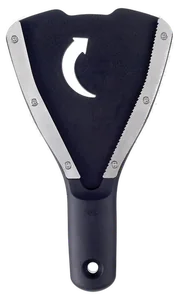
Solves the one kitchen annoyance nobody buys a fix for
~$12–18
View on AmazonWe compared published specs, manufacturer documentation and warranty terms across contenders, prioritizing picks that solve a specific daily friction over another gadget to learn. How we chose How we verify Corrections logged publicly
Our 28 September note said the Echo Dot sells for about $40–50 and that $75–85 was the price of the Echo Dot Max. Amazon's page for this Echo Dot read $79.99 on 20 October, with the Echo Dot Max at $89.99 on the same page, so its range here is now about $50–80. The pick, ranking and links are unchanged.
The Amazon Echo Hub was listed at about $90–180 here. Its range is now about $150–180, the same as in our smart-hubs guide; the Amazon listing read $179.99 on 5 October.
Our 23 September note said the current Echo Dot costs about $75–85. That was the price of the Echo Dot Max. The Echo Dot itself sells for about $40–50, and its price and links here are corrected.
The Sivio sherpa throw this guide named isn't sold on Amazon, so the pick is now the Bedsure Sherpa Fleece Throw at about $28–38. The Echo Dot pick now covers the current model, which costs about $75–85 rather than $30–50.
Dated notes already published on this page, newest first. Every correction we make is logged on the corrections page.
| Differences | No. 1Skylight Frame | No. 2Kindle Paperwhite | No. 3Echo Dot (newest model) | No. 4Echo Hub | No. 5Beckham Hotel Collection pillows | No. 6Bedsure sherpa fleece throw blanket | No. 7OXO Good Grips jar opener |
|---|---|---|---|---|---|---|---|
| Price rangeon one $12–200 scale | ~$100–160 | ~$160–200 | ~$50–80 | ~$150–180 | ~$50–65 | ~$28–38 | ~$12–18 |
| Best for | Staying current with family photos | Readers who want bigger, adjustable text | Hands-free questions, music and reminders | Video calls and existing smart devices | A bedding upgrade, no size to guess | A cozy add for a favorite chair | A small, practical kitchen fix |
From each pick’s review below. We compared maker specs and listings, not readings we took.
Pick 1 of 7: No. 1 · Best overall
Grandkid photos that show up without anyone printing them
~$100–160Estimated price
View on AmazonGet it ifgrandkids live far enough that photos usually arrive late or not at all.
Skip it ifthe household already shares photos through a family group chat everyone checks.
Most grandparents see only a fraction of grandkid photos, whatever someone remembers to text or print. The Skylight Frame fixes that: anyone can send a photo from the Skylight phone app, and it shows up on the frame within minutes, no account or login required on the grandparent’s end beyond the initial Wi-Fi connection.
The touchscreen sits on a countertop or shelf like a regular picture frame, cycling through whatever photos have come in, no memory card or printing required. Existing photos keep displaying even if the Wi-Fi drops, so a router hiccup doesn’t mean a blank frame. It needs a wall outlet, since it doesn’t run on battery, and it does one job: show photos as they arrive, not serve as a general-purpose tablet.
As a gift it clears the biggest risk in this category: a device too complicated to bother with. There’s a setup step at unboxing, best done together or by whoever is nearby, but after that the grandparent’s only job is looking at it while everyone else does the sending. It’s the most expensive pick here, but also the one most likely to get checked daily, the real measure of whether a gift like this gets used.
Strengths
Tradeoffs
Pick 2 of 7: No. 2 · Best for readers
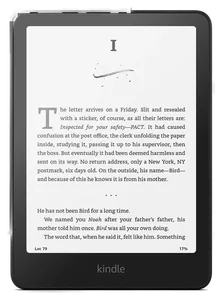
Adjustable type size fixes the real problem with night reading
~$160–200Estimated price
View on AmazonGet it ifthey read regularly and have mentioned small print or heavy books being a strain.
Skip it ifthey’ve said they prefer physical books and aren’t interested in switching.
A physical book has one font size, which becomes a real limitation once reading in dim light or holding a book at arm’s length gets uncomfortable. The Kindle Paperwhite solves that with a screen that adjusts type size at a tap, a warm, adjustable front light instead of a bright backlit glare, and an e-ink display that reads like paper in full sun rather than washing out the way a phone or tablet screen does.
Battery life is measured in weeks, not hours, since e-ink only draws power when the page changes, and it’s waterproof enough for a splash in the bath or by the pool without a case. Loading books takes a few extra steps the first time, buying from the Kindle store or borrowing titles through a library app like Libby, worth walking through together once. After that it works the same way every time: turn it on, pick up where you left off.
It suits someone who already reads paperbacks or library books and would rather not squint, more than someone hoping to start a reading habit from scratch. The one thing to get right before buying is confirming they’d use an e-reader instead of physical books; for a devoted reader who’s mentioned tired eyes or heavy hardcovers, it removes both problems at once.
Strengths
Tradeoffs
Pick 3 of 7: No. 3 · Simplest gift
Answers questions or plays music without anyone touching a phone
~$50–80Estimated price
View on AmazonGet it ifyou want the simplest, least intimidating piece of smart tech to give.
Skip it ifthe household has spotty or no home Wi-Fi.
A smartphone puts every feature behind a screen, tricky for people who didn’t grow up with one. The Amazon Echo Dot (newest model) skips the screen: say a wake word, ask a question, request a song or set a reminder, and it answers out loud. There’s no app or menu to find once it’s set up, one of the least intimidating pieces of tech to give.
Setup itself takes a companion phone and a Wi-Fi connection, best handled by whoever’s giving the gift rather than left as an assembly step. After that, it sits on a counter or nightstand and listens for its name. It can also call a phone number added to the Alexa contacts list, which turns it into a hands-free way to check in with a grandchild.
It’s an assistant, not a smart-home hub on its own, so a grandparent without connected devices will use it mostly for questions, music, weather and reminders, which for many people is enough. This newest Echo Dot is built around Amazon’s Alexa+ assistant, but the voice questions, music and reminders here work without a subscription; Alexa+’s extra features need Prime or a separate plan. Wi-Fi drops disable it, since it needs an internet connection.
Strengths
Tradeoffs
Pick 4 of 7: No. 4 · Best for video calls
A touchscreen for video calls and existing smart-home devices
~$150–180Estimated price
View on AmazonGet it ifvideo calls with grandkids are already a habit, or the house has smart devices.
Skip it ifthere’s no smart-home gear and video calls already work fine on a phone.
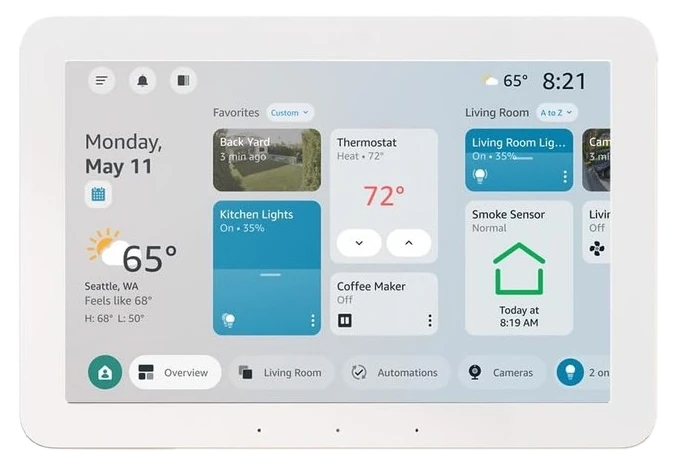
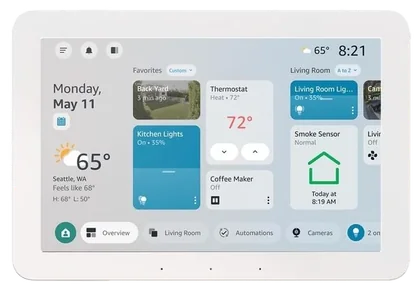
The Amazon Echo Hub is a step up from a speaker-only device: an 8-inch touchscreen built to mount on a wall or sit on a counter, made to answer video calls and show a grandchild’s face at a tap rather than requiring a phone to be found, unlocked and dialed first. A call can come in and display right there, which removes several steps that trip people up on a phone.
It also acts as a control panel for any smart-home devices already in the house, lights, locks, thermostats, security cameras, showing them all on one screen instead of scattered across separate apps. That’s the caveat worth knowing upfront: the Hub controls what’s already connected, it doesn’t add smart-home capability on its own, so its value depends heavily on whether the household already has, or plans to add, a few compatible devices.
For a grandparent who already keeps in touch by video call, or whose family wants to add that habit, the larger screen and simpler tap-to-answer flow is a real improvement over a phone screen. It needs a wall outlet and, ideally, a fixed spot to mount or set it, and it’s priced high enough on the low end to sit above the pillows or blanket for a bigger single gift rather than a stocking-size one.
Strengths
Tradeoffs
Pick 5 of 7: No. 5 · Best sleep upgrade
The hotel-bed pillow upgrade almost nobody buys for themselves
~$50–65Estimated price
View on AmazonGet it ifyou know their bed size and want a low-risk, practical upgrade.
Skip it ifthey’ve already replaced their pillows recently or prefer a flatter fill.
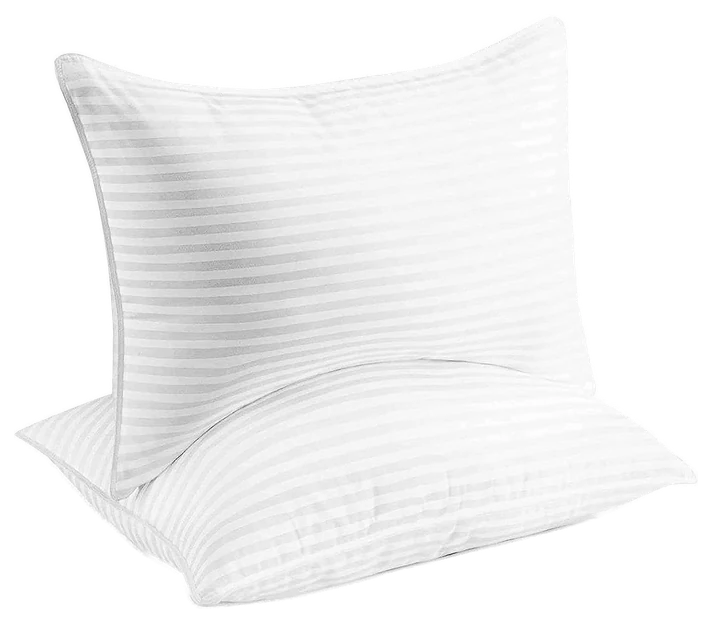
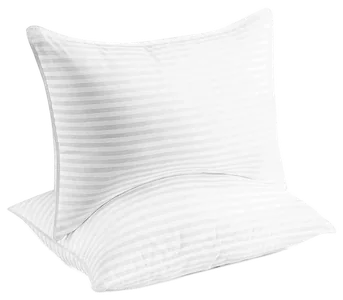
Pillows are one of those things almost everyone keeps far longer than they should, mostly because replacing them never feels urgent enough to prioritize. The Beckham Hotel Collection pillows come as a two-pack with a gel-fiber fill designed to mimic the plush, slightly firm feel of a hotel bed, arriving compressed and expanding to full size once unpacked.
There’s no size or shade to guess, since they’re one standard fill sold across queen and king sizing, and no assembly or setup beyond putting them on a bed. That makes them one of the easiest gifts on this list to give without knowing much beyond which bed size the recipient sleeps on. The fill sits on the firmer, fuller side rather than a flat memory-foam feel, which suits back and side sleepers better than someone who prefers a flat pillow.
As a practical gift it works because it replaces something already worn out rather than adding something new to find room for, and it pairs naturally with the throw blanket on this list for a bedding-focused gift instead of a single item. The trade-off is that it’s an unglamorous thing to unwrap on its own, better suited to pairing with something else or presenting as a practical, useful upgrade rather than a surprise centerpiece.
Strengths
Tradeoffs
Pick 6 of 7: No. 6 · Coziest gift
The blanket that gets used, not stored away
~$28–38Estimated price
View on AmazonGet it ifthey have a favorite chair or couch spot they use most evenings.
Skip it ifthey specifically want a heated or weighted blanket instead.
A throw blanket is a low-stakes gift with a high hit rate, and the Bedsure Sherpa Fleece Throw is built for the chair someone already sits in every evening. One side is shaggy plush fleece and the other sherpa, reversible depending on the season, and it’s machine washable on a cold, gentle cycle, which matters for a blanket used daily rather than kept folded on a shelf.
It comes in a range of sizes, from a 50×60 throw up to a 108×90 king, and multiple colors, so it fits a single recliner or a full couch, and there’s no assembly involved beyond taking it out of the packaging. As gifts go it’s about as low-risk as this list gets: no size to measure, no tech to learn, no subscription waiting behind it.
The limit is that it’s a modest gift on its own, more of a nice addition than a centerpiece, which is why it pairs well with the pillows above or the reading light already near a favorite chair. For someone who spends winter evenings reading or watching TV in one spot, it’s the kind of small comfort upgrade reached for nightly rather than admired once and forgotten.
Strengths
Tradeoffs
Pick 7 of 7: No. 7 · Best small gift
Solves the one kitchen annoyance nobody buys a fix for
~$12–18Estimated price
View on AmazonGet it ifthey’ve mentioned struggling to open jars or bottles.
Skip it ifyou want a single standalone gift rather than a practical add-on.
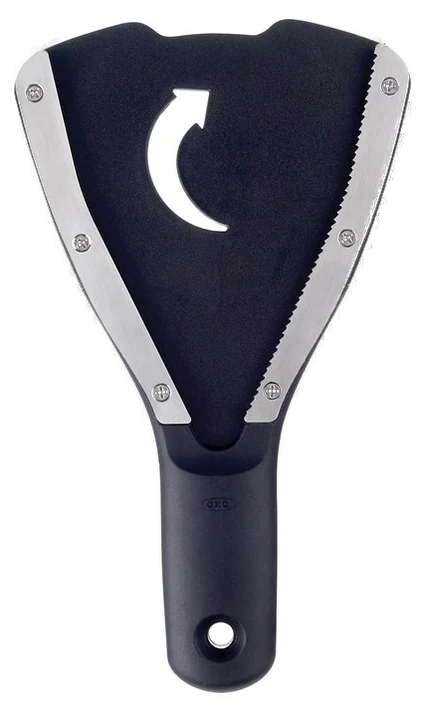
Grip strength changes with age in a way that shows up first on stuck jar lids, and it’s the kind of small daily annoyance most people never think to buy a fix for. The OXO Good Grips jar opener is a hand-held rubber opener that grips around a lid and turns with far less twisting force than bare hands need, built into OXO’s familiar soft, non-slip handle.
It works across a range of lid sizes rather than one fixed diameter, so it handles everything from a small spice jar to a large sauce jar without swapping tools, and it needs nothing beyond a drawer to live in between uses. There’s no setup, no charging and no learning curve: pick it up, wrap it around the lid, and turn.
It’s the least expensive and least glamorous pick on this list, more of a useful stocking-size add than a standalone present, which is exactly why it pairs well with almost anything else here. For someone who’s mentioned struggling to open a jar, or who quietly avoids buying anything that comes sealed tight, it’s a small fix for a real, recurring annoyance rather than a novelty kitchen gadget.
Strengths
Tradeoffs
6 common questions, answered.
Look for something that solves a small daily annoyance instead of adding decor: a jar opener for weaker grip strength, an e-reader with adjustable text size, or a photo frame that keeps them current on grandkids without anyone needing to print or mail pictures. Practical and sentimental both outperform novelty in this category.
There’s no fixed rule, and the picks here range from about $12 to $180. A small, useful item like a jar opener or a throw blanket works well paired with something else, while a photo frame or e-reader works as a single larger gift. Usefulness matters more than the price tag.
The setup step, connecting to Wi-Fi, is easiest done together when the gift is opened. After that, a frame like the Skylight requires no ongoing action from the person receiving it: family sends photos from a phone app, and they appear. The daily use is passive, which is what makes it work well for someone wary of new tech.
Skip the touchscreen picks and lean toward the throw blanket, the pillows or the jar opener, all of which need zero setup and no app. The Echo Dot is the gentlest tech option since it works by voice alone with no screen or menu to navigate once it’s connected.
It’s a better fit for someone who already reads paperbacks or library books regularly and has mentioned small print or heavy hardcovers being a strain. For someone who’s never shown interest in reading, it’s unlikely to change that; the value here is removing friction from an existing habit, not starting a new one.
Late November through Cyber Monday is the deepest discount window across smart speakers, e-readers and photo frames, with the softer bedding and kitchen picks seeing smaller, more frequent price dips year-round. Check for a listed discount or on-page coupon before ordering any of these.
We compared published specs, manufacturer documentation and warranty terms across contenders, prioritizing picks that solve a specific daily friction over another gadget to learn. Updated September 2026. Prices are always moving, so every button and link pulls the live listing.
How we rank
Published specifications, verified owner reviews, and independent safety or standards data where it applies — weighted the same for every pick, never sponsored placement.
Correction, 23 September 2026: The Sivio sherpa throw this guide named isn’t sold on Amazon, so the pick is now the Bedsure Sherpa Fleece Throw at about $28–38. The Echo Dot pick now covers the current model, which costs about $75–85 rather than $30–50.
Every correction we’ve made
Correction, 28 September 2026: Our 23 September note said the current Echo Dot costs about $75–85. That was the price of the Echo Dot Max. The Echo Dot itself sells for about $40–50, and its price and links here are corrected.
Every correction we’ve made
Correction, 7 October 2026: The Amazon Echo Hub was listed at about $90–180 here. Its range is now about $150–180, the same as in our smart-hubs guide; the Amazon listing read $179.99 on 5 October.
Every correction we’ve made
Correction, 20 October 2026: Our 28 September note said the Echo Dot sells for about $40–50 and that $75–85 was the price of the Echo Dot Max. Amazon’s page for this Echo Dot read $79.99 on 20 October, with the Echo Dot Max at $89.99 on the same page, so its range here is now about $50–80. The pick, ranking and links are unchanged.
Every correction we’ve made
Related guides, then every guide in the department.