Kindle Paperwhite vs. Kobo Clara BW: Amazon Store or Library Card?
Our verdict
Get the Kindle Paperwhite unless your reading starts at the library catalog — then the Kobo Clara BW is the real exception, not merely an alternative.
Best overall
~$160–200Estimated price
View on AmazonBest for library readers
~$140–160Estimated price
View on Amazon
Side by side
Best for
Amazon buyers, biggest catalog
Library borrowers, EPUB files
Screen
6.8-inch
6-inch
The price gap: The two ranges overlap.
Which one fits you
Best overall
Kindle Paperwhite
Get it ifyou already buy most of your books, want the biggest catalog, and can wait for one of Amazon’s routine 20–30% discounts rather than paying list.
Skip it iflibrary borrowing is your main reading diet, or the ad-removal fee pushes it past what you meant to spend. The Kobo ships ad-free.
Best for library readers
Kobo Clara BW
Get it iflibrary books make up a real share of your reading, and you would rather pay less up front for a reader that never shows you an ad.
Skip it ifyou’re already invested in a Kindle library of purchased books, or you want the bigger screen and the deeper store.
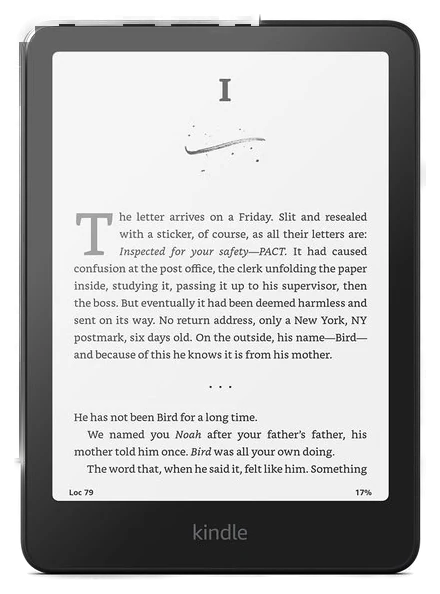
Pick 1 of 2: Best overall
Kindle Paperwhite
The default pick if you buy your books from Amazon
~$160–200Estimated price
View on AmazonThe Kindle Paperwhite wins the spec sheet in nearly every column Amazon controls directly. Its 6.8-inch screen is noticeably larger than the Clara’s 6 inches, though the speed gap buyers expect mostly is not there. The eBook Reader ran the two devices side by side and called page turns “basically neck and neck,” crediting the Clara BW’s newer Carta 1300 panel for closing a gap earlier Kobos could not. Where that same comparison does put the Paperwhite ahead is the frontlight, which it found more evenly lit than the Kobo’s, and the build quality around it.
The bigger advantage is the store behind it. Amazon’s ebook catalog is the deepest available, Kindle Unlimited exists only here, and buying a book takes one tap from inside the device. Pocket-lint’s comparison called out the Paperwhite’s ecosystem convenience as the deciding factor for readers who already buy most of their books rather than borrow them.
The trade-offs are the ones that come with any closed ecosystem: the base model ships with lock-screen ads (removable for an extra fee), and library borrowing works through Amazon’s own system rather than a direct OverDrive connection, which several reviewers, including Pocket-lint, flagged as clunkier than Kobo’s native integration. At $160–200, it also happens to be one of the more reliably discounted devices Amazon sells, routinely dropping 20 to 30 percent below list at every major sales event.
Strengths
- Larger 6.8-inch screen with a more evenly lit frontlight
- The deepest ebook store and Kindle Unlimited access
- One-tap buying from inside the device
- Reliably discounted 20–30% at every major sale
Tradeoffs
- Lock-screen ads on the base model
- Library borrowing is clunkier than Kobo’s native system
- Locked to the Amazon ecosystem
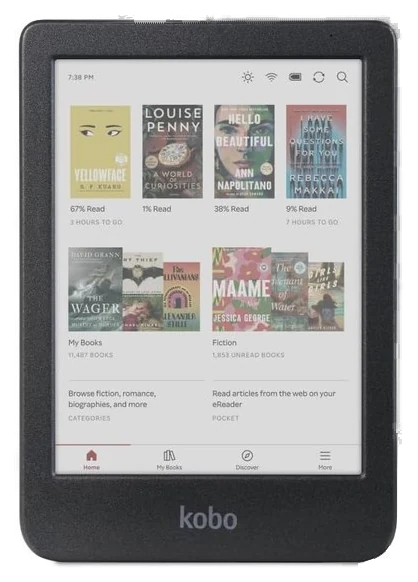
Pick 2 of 2: Best for library readers
Kobo Clara BW
No account, no ads, and a library card built in
~$140–160Estimated price
View on AmazonThe Kobo Clara BW makes its case with one feature Amazon has no reason to build: one-tap public library borrowing through OverDrive and Libby, built directly into the device. Browse a library’s catalog, borrow, and start reading, no computer, no sideloading, no workaround. For anyone whose reading budget runs through a library card, this single feature can decide the purchase on its own.
The rest of the hardware holds up its end. The 6-inch body is genuinely one-handed in a way the larger Paperwhite isn’t, native EPUB support means files from outside the Kobo store just work, and there are no lock-screen ads and no Amazon account required, ever.
The eBook Reader’s side-by-side reached the same conclusion about the panels themselves, that neither screen looks better than the other, which leaves the ecosystem rather than the hardware doing the actual separating. Android Police, writing as a Libby user, is blunter: for borrowing, Kobo is the best E Ink platform going, because the borrow-and-read loop never leaves the device.
What Kobo doesn’t have is Amazon’s scale. Its own store carries a thinner catalog, there’s no equivalent to Kindle Unlimited, and the accessory and case ecosystem is smaller. Discounts also arrive less often than the Paperwhite’s aggressive sale-season drops. At $140–160 at Amazon, it undercuts the Paperwhite slightly on sticker price too, on top of the library advantage.
Strengths
- Native one-tap library borrowing via OverDrive/Libby
- No ads, no Amazon account required
- Open EPUB support, not locked to one store
- Compact 6-inch body is easier to hold one-handed
Tradeoffs
- Smaller bookstore than Amazon’s
- No Kindle Unlimited equivalent
- Discounted less often than the Paperwhite
Is the Kindle Paperwhite worth it on its own?
Worth it if you buy more books than you borrow. ~$160–200 at list buys the 6.8-inch screen, a frontlight The eBook Reader found more evenly lit than the Kobo’s, weeks of battery, one-tap buying and the deepest catalog an e-reader gets, plus Kindle Unlimited, which runs only on Amazon’s hardware. Amazon discounts it 20–30 percent at every major sale, so list is the wrong price to pay. The catch is the ecosystem, not the hardware: lock-screen ads on the base model cost extra to remove, and library borrowing routes through the Libby app rather than connecting directly.
Swipe the table sideways for the rest of the columns →
| Situation | Our call |
|---|---|
| Buy it if | you already own a Kindle library, buy most of your books, or want Kindle Unlimited. |
| Skip it if | library books are your main reading diet or the ad-removal fee pushes it past budget. The Kobo Clara BW borrows natively, ships ad-free and costs slightly less. |
| Wait if | no sale is on. The Paperwhite drops 20–30 percent below list at every major sales event, one of the most reliable discounts of any device. |
E-reader FAQs
7 common questions, answered.
Kindle or Kobo: which should I buy?
Let library habits decide it. If you borrow ebooks from a public library even occasionally, the Kobo’s native OverDrive/Libby integration is meaningfully easier than the workaround Kindle requires. If you mostly buy books, or already own a Kindle library, the Paperwhite’s bigger screen and deeper store make it the safer pick.
Can I borrow library books on a Kindle at all?
Yes, but not natively on the device the way Kobo does it. Kindle users typically borrow through the Libby app on a phone or computer first, then send the book to their Kindle, an extra step that several independent reviews flag as the Paperwhite’s clearest weak point against Kobo.
Do I need to pay to remove the lock-screen ads on a Kindle?
On the base “with ads” configuration, yes, Amazon charges extra for an ad-free version. The Kobo Clara BW has no ad-supported tier at all; every unit ships ad-free by default, which is worth factoring into a direct price comparison.
How long does an e-reader battery last?
Both are measured in weeks rather than hours under normal reading habits, typically several weeks per charge with the frontlight on a moderate setting and wireless off between syncs. That’s the core appeal of e-ink over a tablet: nothing about the screen itself draws meaningful power between page turns.
Is the bigger Paperwhite screen worth it?
For most readers, it’s a genuine but modest upgrade rather than a deciding factor: fewer page turns per session and a slightly more book-like reading experience. Readers who prioritize one-handed portability over screen size tend to prefer the Kobo’s more compact 6-inch body instead.
When do these go on sale?
The Kindle Paperwhite is one of Amazon’s most reliably discounted devices, routinely dropping 20 to 30 percent below list during major sales events. The Kobo Clara BW discounts less aggressively and less often, so timing a Kobo purchase around a sale takes more patience.
Is the Kindle Paperwhite worth it at list price?
Rarely. It is one of the most reliably discounted devices Amazon sells, dropping 20–30 percent below its ~$160–200 list at every major sales event. Unless you need one this week, the discounted Paperwhite is the version worth buying; at full list, the ad-free Kobo Clara BW at ~$140–160 is the better-value reader for anyone who borrows.
How we chose
We haven’t read on either device ourselves.
We compared published screen and battery specifications, library-lending mechanics, and independent side-by-side reviews, weighed against the price ranges we publish for both readers. We haven’t read on either device ourselves; the screen and battery figures come from each brand’s published specs and the independent side-by-side reviews we cite. Prices are always moving, so every button and link pulls the live listing.
How we rank
Published specifications, verified owner reviews, and independent safety or standards data where it applies — weighted the same for every pick, never sponsored placement.
Where to go next.
The close calls side by side, then related guides.