The Best Webcams and Microphones:Streaming-grade Without a Studio
Five years into remote work, camera-and-mic quality is professional presentation. We compared the streaming-grade flagship, the value classics, and the audio that matters more than any lens.
By the BYB Editorial Team
Published July 28, 2026 · Updated · Prices checked OctoberOct 5, 2026
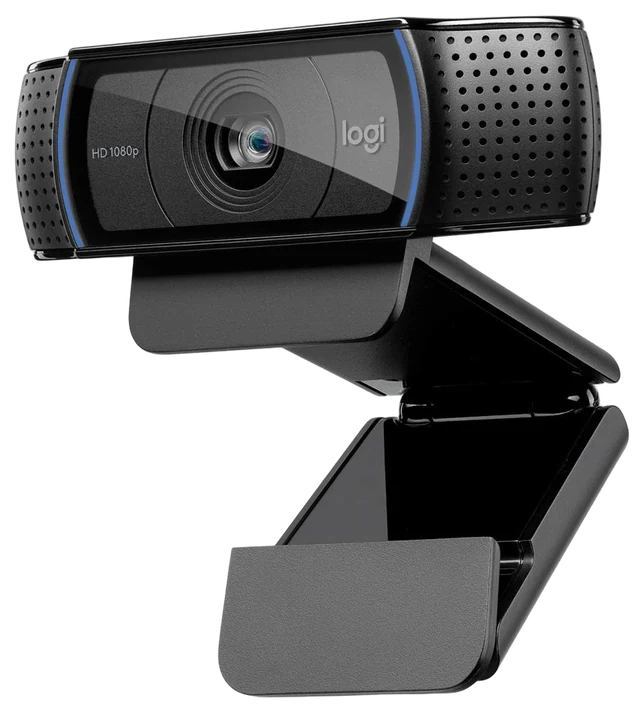
Logitech C920s$50–70The Logitech C920s, $50–70 — it still refuses to die, and it’s the right first camera because audio outranks video: people forgive soft pixels, never echo.Check price
Budget mic
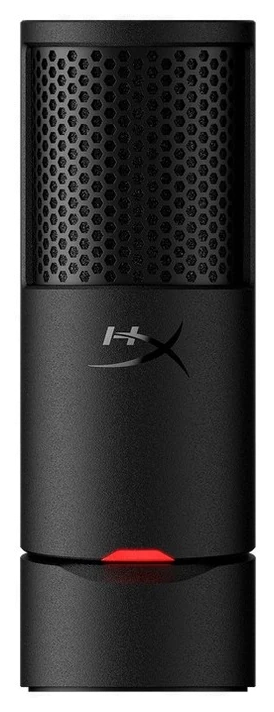
HyperX SoloCast 2$45–60HyperX SoloCast 2, $45–60 — does most of what the Yeti does.Check price
Spend on the mic first
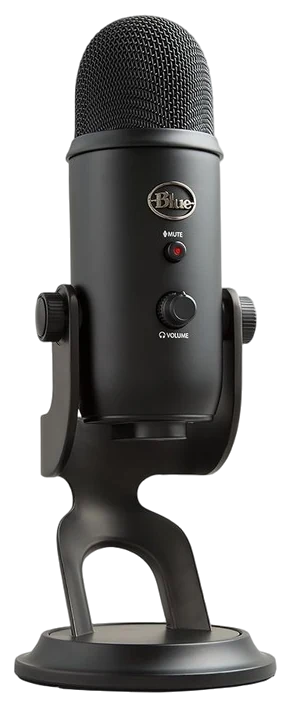
Logitech G Yeti, $90–130 — covers calls, podcasts and streams alike.
Skip
The Elgato Facecam, if your calls are meetings rather than broadcasts.
Five years into remote work, camera-and-mic quality is professional presentation. We compared the streaming-grade flagship, the value classics, and the audio that matters more than any lens.
Not sure which fits you? Answer two questions
Right for you?
Which pick is right for you?
Two quick questions. The answer is the guide’s own reason for one of its picks.
How we choseWhat we compared, and how we rank
We compiled image-quality testing, low-light performance, and audio measurements across the desk-setup category. Prices are always moving, so every button and link pulls the live listing.
How we rank
Published specifications, verified owner reviews, and independent safety or standards data where it applies — weighted the same for every pick, never sponsored placement.
CorrectedThe Elgato Facecam MK.2 write-up said it costs around $150, and that the Logitech C920s saves $100. The price range on the card is about $100–130 (the Amazon listing read $119.99 on 5 October), and the text now says that, with the C920s saving about $50.
Dated notes already published on this page, newest first. Every correction we make is logged on the corrections page.
The Logitech C920s has now outlived several generations of self-declared webcam killers, and the reason is boring in the best way: it nails the actual job. Sharp, color-accurate 1080p, dependable autofocus, and instant recognition by every OS and meeting app ever shipped: no drivers, no firmware ritual. For meetings, which is what the overwhelming majority of webcams do all day, Tom’s Guide keeps landing on the same conclusion in its own testing: spending more buys surprisingly little. A decade on, it’s still the default.
The details hold up under scrutiny. Autofocus locks onto a face and stays put, exposure adjusts gracefully as afternoon light shifts, and the built-in dual mics make a serviceable backup if your real microphone dies mid-call. The physical privacy shutter, the s in C920s, closes over the lens, which beats trusting an indicator LED. Owners report these things surviving years of daily calls, multiple laptops, and at least one office move without a hiccup.
The limits: 1080p tops out at 30 frames, low-light performance is middling, and the image tuning looks dated next to modern sensors. If your face is the product, the Elgato Facecam is the real upgrade. But if your camera exists for stand-ups and check-ins, this is the rational buy. It usually sells around $50–70 at Amazon, dips further on sale, and covers roughly all the webcam most people will ever need.
Strengths
Sharp, accurate 1080p every app recognizes instantly
Physical privacy shutter over the lens
A decade of proven daily-driver reliability
Regularly discounted below its usual range
Tradeoffs
30fps ceiling, no 60fps option
Low-light image gets noisy fast
Image tuning looks dated beside newer sensors
Pick 2 of 5: No. 2Best premium~$100–130
2
Elgato Facecam MK.2
Upgrade pickBest premium
The streaming-grade upgrade
Get it if you stream, record, or appear on camera professionally.
Skip it if your camera only does stand-ups. The C920s saves about $50.
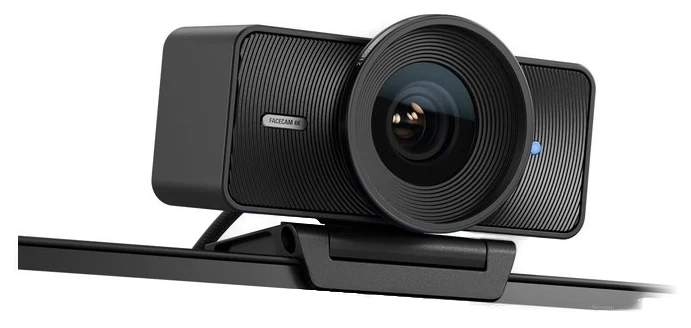
Elgato built the Facecam for people whose face is part of the product, and it shows everywhere reviewers point a measurement chart. A genuine Sony sensor, uncompressed video output, and fixed-focus optics tuned to keep a person at desk distance tack sharp. No autofocus hunting mid-sentence. This is the point where webcams stop looking like webcams and start looking like a camera, which is exactly what streamers, course creators, and on-camera professionals have been waiting for.
Camera Hub software is the quiet star: DSLR-style manual control over exposure, ISO, white balance, and framing, with settings stored on the camera itself so they survive reboots and machine swaps. Windows Central’s review singled out Camera Hub as the standout, pointing specifically to its HDR handling and settings that persist across reboots and machine swaps. And depending on the model, the line runs from the 1080p60 original up to 4K, you’re buying recording headroom and punch-in framing flexibility that meeting-grade webcams don’t have.
The catches: there’s no built-in microphone at all (a statement of intent, but it means you’ll need a real mic) and fixed focus is tuned for desk distance, so holding objects up close goes soft. At around $100–130 at Amazon, it’s meaningful money for a camera. If you’re only doing stand-ups, save the difference; if you’re on camera for a living, this is where the professional tier starts.
Strengths
Genuine Sony sensor, visibly better image
Settings stored on-camera survive reboots
Best-in-class Camera Hub control software
Uncompressed video for recording work
Tradeoffs
No built-in microphone at all
Fixed focus only sharp at desk distance
Overkill money for basic meetings
Pick 3 of 5: No. 3Best all-round mic
3
Logitech G Yeti (formerly Blue Yeti)
Best all-round mic
The microphone that made USB audio
Get it if you want one mic for calls, podcasts, and interviews.
Skip it if you work in a loud, echoey space, condensers hear it all.
The Blue Yeti is the microphone that made USB audio a category, and years later it’s still the gateway to sounding good. Rich, warm condenser sound that embarrasses every headset and laptop mic ever made, plug-in-and-go simplicity with zero drivers, and four pickup patterns covering solo calls, two-person interviews across a desk, and whole-room capture. Wirecutter has named it a top USB mic pick since 2013, and reviewers keep returning to the same verdict: nothing at this price is this versatile and this forgiving at the same time.
The hardware controls are the underrated part, a physical mute button and a gain knob right on the body, where software should have put them all along. Technique matters more than settings: position it close and slightly off-axis so plosives miss the capsule, and it delivers the podcast-grade sound half the internet was built on. Owners report Yetis surviving a decade of daily use; it’s dense, all-metal, and essentially unkillable sitting on a desk.
The catch is sensitivity: as a condenser, it hears everything (keyboard clatter, the HVAC, the dog two rooms over) so an untreated, echoey room will show up in your recordings. It’s also large and heavy for a crowded desk. It typically runs $90–130 at Amazon, and since audio upgrades your perceived competence more than any camera, it’s the highest-leverage purchase in this guide for most people.
Strengths
Four pickup patterns, solo to interview
Hardware mute and gain on the body
Zero-driver plug-and-play on any OS
Warm, forgiving sound beats any headset mic
Tradeoffs
Condenser picks up keyboards and room noise
Big and heavy for a crowded desk
Needs close, off-axis positioning to shine
Also on the shortlist
Two more, in brief
Pick 4 of 5: No. 4Best for calls
4
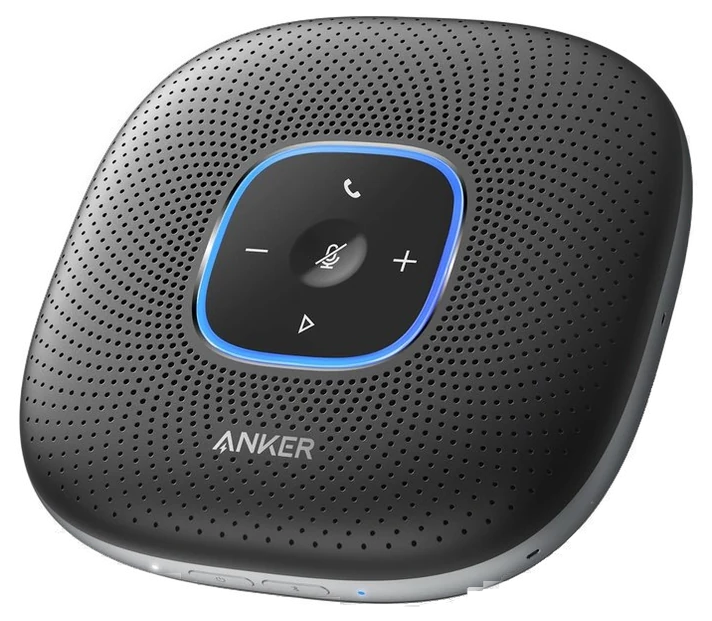
Anker PowerConf
Best for calls
The meeting-room puck
Get it if your day is back-to-back calls and headphones get old fast.
Skip it if you record anything. A real microphone is the answer.
For call-heavy days where a mic-and-headphones rig feels like overkill, the Anker PowerConf is the civilized answer. It’s a 360-degree speakerphone puck that lets you lean back, gesture, and pace instead of hovering over a capsule, with echo cancellation that reviewers report cancels: none of the half-duplex walkie-talkie effect cheap speakerphones inflict. Certified for Zoom and the other platforms you live in, it’s the home office’s conference room, shrunk to something that fits in a laptop bag.
The practical touches add up. It connects over USB or Bluetooth, a built-in battery covers a full day of meetings away from an outlet, and voice pickup stays consistent whether you’re centered over it or a few feet off to the side: which is the whole point. Owners report it moonlighting as the family video-call device on the kitchen table, and as the thing that finally makes two-people-one-room hybrid meetings stop being awful.
The limits: speakerphone audio is engineered for clarity, not richness. Nobody will mistake it for a condenser, and it’s the wrong tool for recording or podcasting. In a shared space, open audio also means everyone nearby hears your meeting. But as a calls-first device it typically sells for $90–130 at Amazon, and if your day is back-to-back meetings rather than content, it may be the most comfortable upgrade in this entire guide.
Get it if your day is back-to-back calls and headphones get old fast.
Skip it if you record anything. A real microphone is the answer.
For call-heavy days where a mic-and-headphones rig feels like overkill, the Anker PowerConf is the civilized answer. It’s a 360-degree speakerphone puck that lets you lean back, gesture, and pace instead of hovering over a capsule, with echo cancellation that reviewers report cancels: none of the half-duplex walkie-talkie effect cheap speakerphones inflict. Certified for Zoom and the other platforms you live in, it’s the home office’s conference room, shrunk to something that fits in a laptop bag.
Read the full case
The practical touches add up. It connects over USB or Bluetooth, a built-in battery covers a full day of meetings away from an outlet, and voice pickup stays consistent whether you’re centered over it or a few feet off to the side: which is the whole point. Owners report it moonlighting as the family video-call device on the kitchen table, and as the thing that finally makes two-people-one-room hybrid meetings stop being awful.
The limits: speakerphone audio is engineered for clarity, not richness. Nobody will mistake it for a condenser, and it’s the wrong tool for recording or podcasting. In a shared space, open audio also means everyone nearby hears your meeting. But as a calls-first device it typically sells for $90–130 at Amazon, and if your day is back-to-back meetings rather than content, it may be the most comfortable upgrade in this entire guide.
Strengths
360-degree pickup, move freely while talking
Echo cancellation that holds up on calls
USB or Bluetooth with all-day battery
Zoom-certified, plug-and-play setup
Tradeoffs
Clarity-focused audio, not recording quality
Open audio is awkward in shared spaces
Wrong tool for podcasts or content
Pick 5 of 5: No. 5Best budget mic~$40–60
5
HyperX SoloCast 2
Budget pickBest budget mic
The first real microphone
Get it if your voice still comes through a webcam mic.
Skip it if you record in a noisy room, a dynamic mic suits better.
The HyperX SoloCast 2 fills this guide’s budget-microphone slot: a 14mm cardioid condenser that Cubed3 scored 8 out of 10, describing the sound as clean, with depth and warmth, straight out of the box. The formula is deliberate simplicity: one polar pattern, a tap-to-mute cap with an LED status light, an internal shock mount and built-in pop filter the original SoloCast lacked, and both 3/8-inch and 5/8-inch threads for a boom arm. HyperX lists it at $59.99, it commonly sells for $40 to $60, and either way it sits well under the guide’s Blue Yeti.
The corners cut are the right ones for a first microphone: there is no physical gain knob, so level changes route through HyperX’s NGENUITY software, which is Windows-only, and reviewers still recommend a separate boom arm, because the built-in stand passes along keyboard clatter and desk bumps despite the shock mount.
NGENUITY’s AI noise reduction splits reviewers, and Cubed3’s advice is to leave it off. What you keep is the part that matters, a clean 24-bit, 96kHz vocal sound over USB-C for calls, streams and voiceover, and on a desk that already has a webcam from this guide, it is the cheapest way to stop sounding like a laptop.
Get it if your voice still comes through a webcam mic.
Skip it if you record in a noisy room, a dynamic mic suits better.
The HyperX SoloCast 2 fills this guide’s budget-microphone slot: a 14mm cardioid condenser that Cubed3 scored 8 out of 10, describing the sound as clean, with depth and warmth, straight out of the box. The formula is deliberate simplicity: one polar pattern, a tap-to-mute cap with an LED status light, an internal shock mount and built-in pop filter the original SoloCast lacked, and both 3/8-inch and 5/8-inch threads for a boom arm. HyperX lists it at $59.99, it commonly sells for $40 to $60, and either way it sits well under the guide’s Blue Yeti.
Read the full case
The corners cut are the right ones for a first microphone: there is no physical gain knob, so level changes route through HyperX’s NGENUITY software, which is Windows-only, and reviewers still recommend a separate boom arm, because the built-in stand passes along keyboard clatter and desk bumps despite the shock mount.
NGENUITY’s AI noise reduction splits reviewers, and Cubed3’s advice is to leave it off. What you keep is the part that matters, a clean 24-bit, 96kHz vocal sound over USB-C for calls, streams and voiceover, and on a desk that already has a webcam from this guide, it is the cheapest way to stop sounding like a laptop.
Strengths
Clean 24-bit/96kHz sound, cheap
Internal shock mount and pop filter
Tap-to-mute with LED status
Boom-arm threads included
Tradeoffs
No physical gain control
Software is Windows-only
Stand passes desk noise, arm it
On a call people forgive a soft picture but not bad sound, so put your money on the microphone before the camera.
Fix the audio first: the common mistake is buying a 4K webcam and keeping the tinny laptop mic; a decent mic does more for how you come across than any camera.
Match the mic to your room: a dynamic mic ignores a noisy or echoey space, while a condenser picks up everything, so choose for the room you’re in.
Judge webcams on light, not megapixels: how a camera handles your real lighting and how wide it sees matter far more than a big resolution number.
Mind the connection: USB mics and cameras are plug-and-play, while XLR needs an interface; and for webcams, reliable autofocus beats a spec sheet.
Shure MV7+ — a broadcast-grade USB and XLR dynamic mic, but it’s more mic than most people upgrading from a laptop need.
Insta360 Link 2 — a slick AI-tracking 4K webcam, left off because the gimbal tracking is a novelty most desk users end up switching off.
Logitech Brio 4K — sharp and reliable, but you rarely see the 4K benefit on calls that cap at 1080p, so the cheaper C920s wins.
Audio-Technica ATR2100x-USB — a great budget USB and XLR dynamic, but it overlaps closely with the SoloCast 2 we already recommend for beginners.
Webcam & mic FAQs
6 common questions, answered.
Why does audio matter more than video on calls?
Human tolerance research and every meeting you’ve attended agree: people happily watch soft video but check out instantly at choppy, echoey audio. A $100 mic upgrades your perceived competence more than a $300 camera. Spend in that order.
Is 4K worth it in a webcam?
For meetings, no. Platforms compress to 1080p or below anyway. 4K sensors earn their price via better low-light performance, digital punch-in framing, and recording headroom, which is why they make sense for creators and not for stand-ups.
How do I instantly sound better on my current mic?
Distance and environment beat gear: get the mic within a forearm’s length, slightly off-axis from your mouth, in a room with soft surfaces. Those three free changes improve more than most hardware swaps, then the Yeti makes it effortless.
Will these work with a Mac, Windows PC, and Chromebook?
Yes. Everything here is class-compliant USB, which means it’s recognized instantly with no drivers on Mac, Windows, ChromeOS, and Linux. The one nuance is the Elgato Facecam: it works everywhere as a plain webcam, but its DSLR-style manual controls live in the Camera Hub app, which runs on Mac and Windows only. The PowerConf adds Bluetooth on top of USB, so it also pairs with phones and tablets for calls away from the desk.
When is the best time to buy this gear?
This category discounts on a predictable rhythm: Prime Day, Black Friday, and back-to-school season reliably knock 20–30% off the classics, and the C920s and Yeti in particular have been around long enough that sale pricing comes up every few months. None of these are fresh releases with a price still settling, so there’s no penalty for waiting for a dip, but if a call-heavy month is starting now, the difference rarely justifies weeks of sounding worse.
Is the Elgato Facecam worth the extra over the C920s?
Only if people watch you rather than meet with you. Meeting platforms compress video hard enough that the Facecam’s superior sensor mostly evaporates by the time it reaches your coworkers’ screens. That’s the C920s’s whole argument. The Facecam earns its price when you record or stream, where uncompressed output, manual exposure control, and low-light headroom reach the audience. Rule of thumb: camera-on meetings, save the money; content, spend it.
Sources
Who the write-ups above lean on, and where each one is cited.
Tom’s GuideCited for Logitech C920s.
Windows CentralCited for Elgato Facecam MK.2.
WirecutterCited for Blue Yeti.
7Oct 2026Correction, 7 October 2026The Elgato Facecam MK.2 write-up said it costs around $150, and that the Logitech C920s saves $100. The price range on the card is about $100–130 (the Amazon listing read $119.99 on 5 October), and the text now says that, with the C920s saving about $50.Every correction we’ve made ›
Prices on this page are re-checked weekly — see the full Office price index for every product we cover.
Keep reading
Where to go next.
Related guides, then every guide in the department.
New guides, re-ranked picks and the month's notable changes. No weekly filler, ever.
Unsubscribe any time. Your address goes to our newsletter provider and nowhere else — see our privacy policy.
Manage Consent
To provide the best experiences, we use technologies like cookies to store and/or access device information. Consenting to these technologies will allow us to process data such as browsing behavior or unique IDs on this site. Not consenting or withdrawing consent, may adversely affect certain features and functions.
Functional
Always active
The technical storage or access is strictly necessary for the legitimate purpose of enabling the use of a specific service explicitly requested by the subscriber or user, or for the sole purpose of carrying out the transmission of a communication over an electronic communications network.
Preferences
The technical storage or access is necessary for the legitimate purpose of storing preferences that are not requested by the subscriber or user.
Statistics
The technical storage or access that is used exclusively for statistical purposes.The technical storage or access that is used exclusively for anonymous statistical purposes. Without a subpoena, voluntary compliance on the part of your Internet Service Provider, or additional records from a third party, information stored or retrieved for this purpose alone cannot usually be used to identify you.
Marketing
The technical storage or access is required to create user profiles to send advertising, or to track the user on a website or across several websites for similar marketing purposes.