Best Smart Plugs and Switches:A $30 Starting Point for 2026
Plugs and switches are the unglamorous infrastructure of home automation, and where reliability matters most. We compared the plug standard, the switch upgrade, the luxury dimmer and the budget fleet option.
By the BYB Editorial Team
Published July 28, 2026 · Prices checked OctoberOct 5, 2026
Plugs and switches are the unglamorous infrastructure of home automation, and where reliability matters most. We compared the plug standard, the switch upgrade, the luxury dimmer and the budget fleet option.
How we choseWhat we compared, and how we rank
We compiled reliability histories, ecosystem compatibility, and electrician commentary on the wired picks. Prices are always moving, so every button and link pulls the live listing.
How we rank
Published specifications, verified owner reviews, and independent safety or standards data where it applies — weighted the same for every pick, never sponsored placement.
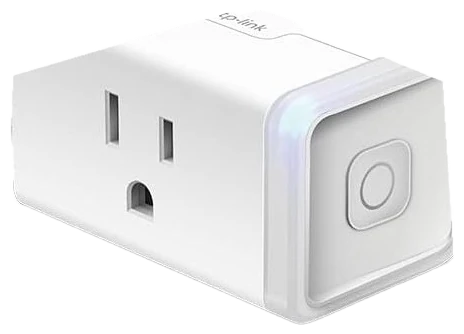
The Kasa four-pack remains the category answer and the smart home’s best first purchase: plugs that pair painlessly, survive router changes, and run schedules for years without a second thought: a reliability record the budget tier rarely matches. Wirecutter’s smart-plug testing calls Kasa’s plugs fuss-free and reliable from installation onward, the same reputation this four-pack is built on.
Lamps on sunset schedules, fans on timers, holiday lights that handle themselves, the iron you worry about from the car: four sockets of automation for pizza money. Alexa and Google integration is instant, and the compact shape doesn’t block the second outlet.
No energy monitoring on the base model (specific Kasa variants add it) and no hub means Wi-Fi-only depth. But at $25–35 for four on Amazon, this is the lowest-risk, highest-habit purchase in the entire smart home.
Strengths
Years-long set-and-forget reliability
Four sockets for pizza money
Painless Alexa/Google pairing
Compact, outlet-friendly shape
Tradeoffs
Base model skips energy monitoring
Wi-Fi only, no hub depth
2.4GHz network required
Pick 2 of 5: No. 2Best switch value~$15–25 each
2
Kasa Smart Light Switch
Budget pickBest switch value
The permanent upgrade
Get it if daily-use rooms deserve permanent, family-proof smarts for $15–25 each.
Skip it if your walls lack neutrals, Lutron solves that.
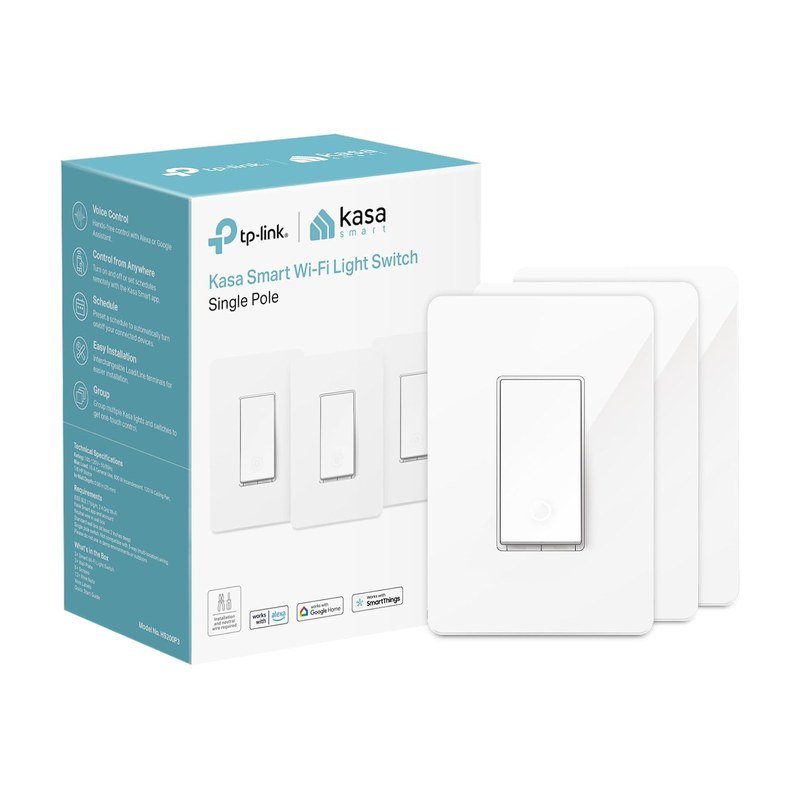
Smart bulbs die the moment someone flips the wall switch; the Kasa smart switch fixes the problem at the source. The fixture itself becomes controllable, schedulable, and voice-ready: with ordinary cheap bulbs installed and the switch working like a switch.
At $15–25 each on Amazon, Kasa’s are the value standard: reliable Wi-Fi, clean app scheduling, and a wiring job that a careful first-timer completes in twenty minutes per switch with the breaker off.
The requirement to check first: a neutral wire in the box. Most homes wired after the 1980s have one; many older homes don’t, which is exactly where the Lutron below earns its premium. Porch lights, kitchens, and hallways convert first for a reason.
Strengths
Solves the wall-switch problem
Works with ordinary bulbs
$20 per permanently smart room
DIY-friendly install
Tradeoffs
Neutral wire required
Breaker-off wiring job
No dimming on base model
Pick 3 of 5: No. 3Most reliable~$92–120 starter kit
3
Lutron Caséta Dimmer
Upgrade pickMost reliable
The electrician’s choice
Get it if you want lighting infrastructure, not a gadget experiment, and $92–120 buys a decade of it.
Skip it if budget-first and your wiring has neutrals, Kasa suffices.
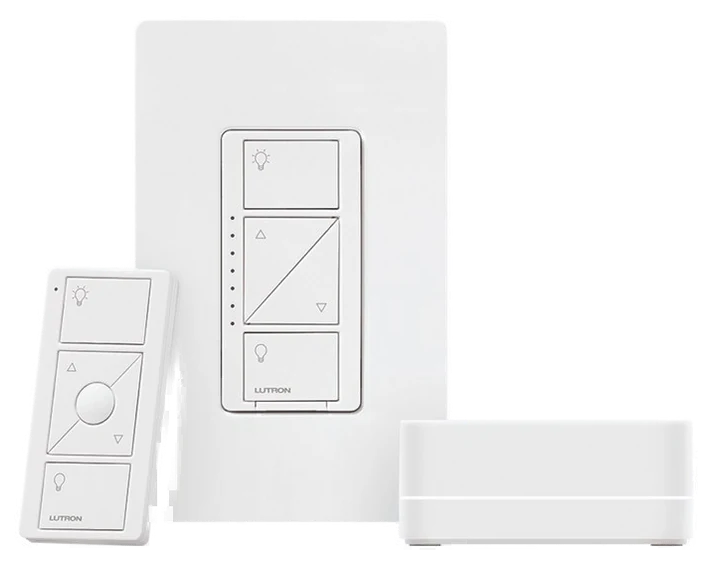
Ask electricians which smart switch they install in their own homes and Lutron Caséta wins by a landslide: its dedicated radio, deliberately not Wi-Fi, never misses, with a reliability record professional installers treat as the category ceiling. The Smart Cave’s review of the system calls it the reliable lighting solution electricians still recommend in 2026, Matter logo or not.
Dimming is flicker-free across bulb brands (a quiet engineering feat), the Pico remotes stick anywhere and run for years on a coin cell, and, crucially, Caséta works in older no-neutral homes that disqualify every Wi-Fi switch on the market.
It costs roughly double Kasa, and the hub takes an outlet and an ethernet port. But for whole-home lighting you intend to trust for a decade, the starter kit at $92–120 on Amazon is the professional-grade foundation.
Strengths
Near-perfect reliability record
Works in no-neutral older homes
Flicker-free dimming, any bulb
Stick-anywhere Pico remotes
Tradeoffs
Double the per-switch cost
Requires its hub
Modest style options
Also on the shortlist
Two more, in brief
Pick 4 of 5: No. 4Best fleet expander
4
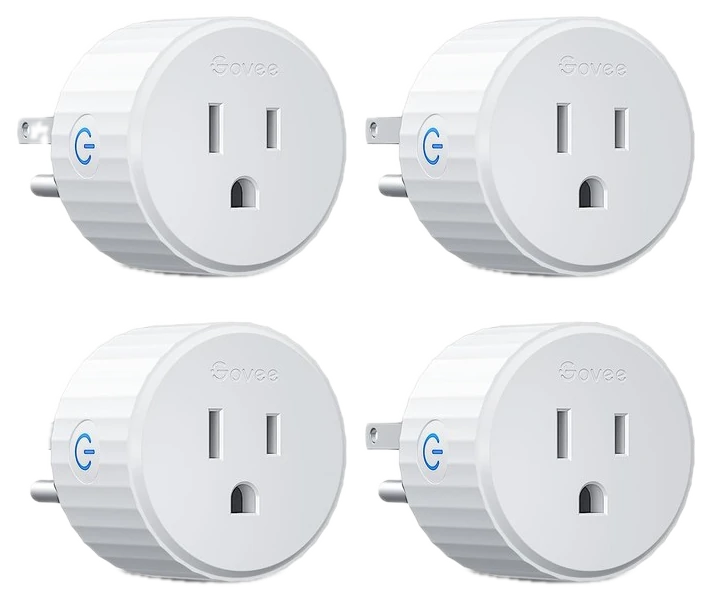
Govee Smart Plugs
Best fleet expander
The budget fleet expander
Get it if the fleet is growing and per-socket price now matters, at $20–30 for four.
Skip it if this is your first purchase. Start with Kasa’s record.
Once the automation habit takes hold, outlet count becomes the constraint, and Govee’s plugs expand the fleet at the lowest cost per socket, with solid scheduling, Alexa and Google support, and energy monitoring on select models. Android Police’s review found it does exactly what a plug needs to at the price, functional and reliable if unremarkable next to pricier rivals, the honest case for buying it as a second fleet rather than a first purchase.
They mix freely with Kasa, ecosystems this simple coexist without drama in the same app-per-brand arrangement most households tolerate fine, and Govee’s constant coupons make restocking cheap.
The app is busier than Kasa’s (Govee sells many product lines through it) and long-term track record is shorter. As the second four-pack once the first proved the habit, at $20–30 for four on Amazon, they’re exactly right.
Get it if the fleet is growing and per-socket price now matters, at $20–30 for four.
Skip it if this is your first purchase. Start with Kasa’s record.
Once the automation habit takes hold, outlet count becomes the constraint, and Govee’s plugs expand the fleet at the lowest cost per socket, with solid scheduling, Alexa and Google support, and energy monitoring on select models. Android Police’s review found it does exactly what a plug needs to at the price, functional and reliable if unremarkable next to pricier rivals, the honest case for buying it as a second fleet rather than a first purchase.
Read the full case
They mix freely with Kasa, ecosystems this simple coexist without drama in the same app-per-brand arrangement most households tolerate fine, and Govee’s constant coupons make restocking cheap.
The app is busier than Kasa’s (Govee sells many product lines through it) and long-term track record is shorter. As the second four-pack once the first proved the habit, at $20–30 for four on Amazon, they’re exactly right.
Strengths
Lowest cost per socket
Energy monitoring on some models
Mixes fine with Kasa fleets
Near-constant coupons
Tradeoffs
Busier app experience
Shorter track record than Kasa
2.4GHz-only, like the category
Pick 5 of 5: No. 5Best outdoor value
5
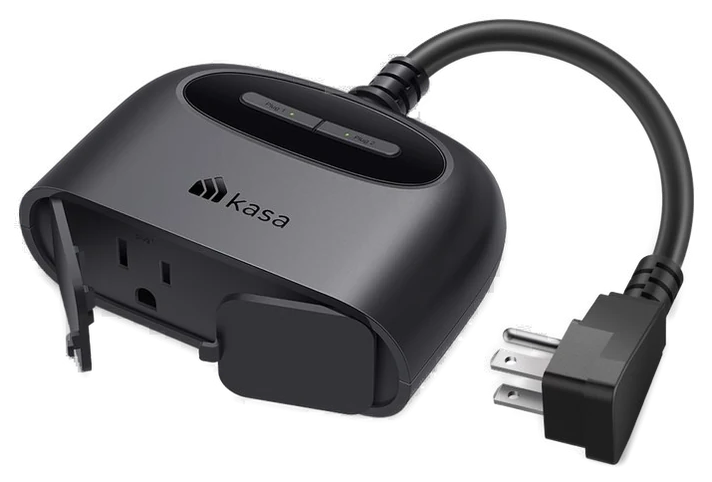
Kasa EP40 Outdoor Smart Plug
Best outdoor value
The yard joins the schedule
Get it if string lights and yard gear deserve schedules too, for $18–25.
Skip it if you run Apple Home, buy the EP40M Matter version.
The Kasa EP40 extends this guide’s Kasa backbone past the weatherstripping: an IP64-rated outdoor smart plug with two independently controlled outlets sharing a 15-amp budget, so string lights and a fountain pump can run separate schedules from one unit. It sells for $18.99 on Amazon against a $24.99 list, setup is the same Kasa app as the guide’s indoor plugs and switches, Alexa and Google work without a hub, and TP-Link rates the Wi-Fi for up to 300 feet with clear line of sight, which matters at the far end of a yard.
The body is a squat half-round with both outlets on the face under rubber flaps and a lit button per outlet on top, fed by a short built-in pigtail that helps it fit a crowded outdoor box.
The limits: TechHive’s early review liked the price but found those rubber flaps pop off too easily; it is a plug, not a dimmer; it lives on 2.4GHz Wi-Fi only; and Apple Home users need the EP40M, the $21.99 Matter version of the same hardware. For under $20 it makes every outdoor outlet as schedulable as the indoor ones, which is the point of the ecosystem this guide is built on.
Get it if string lights and yard gear deserve schedules too, for $18–25.
Skip it if you run Apple Home, buy the EP40M Matter version.
The Kasa EP40 extends this guide’s Kasa backbone past the weatherstripping: an IP64-rated outdoor smart plug with two independently controlled outlets sharing a 15-amp budget, so string lights and a fountain pump can run separate schedules from one unit. It sells for $18.99 on Amazon against a $24.99 list, setup is the same Kasa app as the guide’s indoor plugs and switches, Alexa and Google work without a hub, and TP-Link rates the Wi-Fi for up to 300 feet with clear line of sight, which matters at the far end of a yard.
Read the full case
The body is a squat half-round with both outlets on the face under rubber flaps and a lit button per outlet on top, fed by a short built-in pigtail that helps it fit a crowded outdoor box.
The limits: TechHive’s early review liked the price but found those rubber flaps pop off too easily; it is a plug, not a dimmer; it lives on 2.4GHz Wi-Fi only; and Apple Home users need the EP40M, the $21.99 Matter version of the same hardware. For under $20 it makes every outdoor outlet as schedulable as the indoor ones, which is the point of the ecosystem this guide is built on.
Strengths
Two independently switched outlets
IP64 weather sealing
300-ft line-of-sight Wi-Fi range
Same Kasa app as the indoor picks
Tradeoffs
Outlet flaps pop off easily
15 amps shared, on-off only
No HomeKit without the EP40M
Plugs and switches are the quiet workhorses of a smart home, so reliability matters more than flash. A few checks keep you from returning a box that won’t fit your wiring or your setup.
Match your ecosystem: make sure it works with Alexa, Google Home, or Apple Home the way you control everything else. If you want one plug that works everywhere, look for Matter on the box.
Switches usually need a neutral wire: most in-wall smart switches and dimmers need a neutral wire in the box, which older homes often lack. Check before you buy, and note whether you need a 3-way version for stairs and hallways.
Decide if you want energy monitoring: some plugs track how much power a device pulls, which is handy for finding energy hogs. If you don’t care, save a few dollars and skip it.
The common mistake: putting a smart plug on a space heater, AC unit, or anything high-draw, or on a device with its own power switch. Plugs have wattage limits, and a gadget that resets to “off” won’t turn back on from an app.
Amazon Smart Plug — dead simple if you live in Alexa, but it doesn’t work with Google Home or Apple Home, so it boxes you in.
Leviton Decora Smart Dimmer — a good-looking in-wall dimmer, but it costs more than our picks and needs a neutral wire, which many older homes don’t have.
Emporia Smart Plug — cheap and it tracks real wattage, but the energy data lives in Emporia’s own app, so it’s best if you’re already using their gear.
TP-Link Tapo P125M — a Matter plug that works across Alexa, Google, and Apple, but if you’re staying in one app the plain Kasa plugs do the job for less.
Plug & switch FAQs
6 common questions, answered.
What should I automate first with smart plugs?
The daily-ritual devices: lamps on sunset schedules, coffee maker on a weekday timer, fans, and holiday lighting. The sleeper hit is “away mode” randomizing lamps on vacation. The burglary deterrent that costs nothing extra.
Smart bulbs or smart switches?
Bulbs for color and per-lamp control; switches for any fixture people operate from the wall. The failure mode to avoid: smart bulbs on dumb switches get turned off at the wall and go offline. Rooms with multi-bulb fixtures are switch territory, always.
What is the neutral-wire problem?
In-wall smart switches need constant power, drawn from a neutral wire that pre-1980s homes often lack behind switch plates. Options: Lutron Caséta (works without), no-neutral-specific models, or an electrician pulling a neutral. Check before ordering. It’s the #1 returned-product cause.
Are smart plugs safe for heaters and high-power devices?
Check the amp rating before anything with a heating element: most smart plugs are rated 15A/1800W, and quality space heaters at max draw sit right at that line. Kasa’s plugs handle rated loads fine, but heaters deserve the extra caution of direct wall outlets unless the plug explicitly advertises heater duty. Lamps, fans, humidifiers, and holiday lights are all comfortably trivial loads.
Can smart plugs track how much energy something uses?
Models with energy monitoring, several Kasa and Govee variants, report real-time watts and monthly kilowatt-hours in the app, which turns vague suspicions about the old garage freezer into actual dollar figures. It’s the sleeper feature of the category: many owners discover one appliance paying for the entire plug fleet in identified waste. Check the specific model; not every plug includes it.
Do smart plugs and switches work without internet?
Schedules stored on the device keep firing through internet outages on quality models, and Lutron’s hub-based system barely notices, its dedicated radio doesn’t touch Wi-Fi. What always dies with the connection is remote access and voice control. If outage resilience matters (medical devices, aquariums), favor Lutron’s architecture or verify on-device scheduling before trusting anything critical.
Sources
Who the write-ups above lean on, and where each one is cited.
TechHiveCited for Kasa EP40 Outdoor Smart Plug, and in the buying advice.
WirecutterCited for Kasa Smart Plug (4-pack).
Prices on this page are re-checked weekly — see the full Smart Home price index for every product we cover.
Keep reading
Where to go next.
The close calls side by side, then related guides.
New guides, re-ranked picks and the month's notable changes. No weekly filler, ever.
Unsubscribe any time. Your address goes to our newsletter provider and nowhere else — see our privacy policy.
Manage Consent
To provide the best experiences, we use technologies like cookies to store and/or access device information. Consenting to these technologies will allow us to process data such as browsing behavior or unique IDs on this site. Not consenting or withdrawing consent, may adversely affect certain features and functions.
Functional
Always active
The technical storage or access is strictly necessary for the legitimate purpose of enabling the use of a specific service explicitly requested by the subscriber or user, or for the sole purpose of carrying out the transmission of a communication over an electronic communications network.
Preferences
The technical storage or access is necessary for the legitimate purpose of storing preferences that are not requested by the subscriber or user.
Statistics
The technical storage or access that is used exclusively for statistical purposes.The technical storage or access that is used exclusively for anonymous statistical purposes. Without a subpoena, voluntary compliance on the part of your Internet Service Provider, or additional records from a third party, information stored or retrieved for this purpose alone cannot usually be used to identify you.
Marketing
The technical storage or access is required to create user profiles to send advertising, or to track the user on a website or across several websites for similar marketing purposes.