Gift finderFind a gift in three tapsNot sure this list fits? Say who it’s for and what you want to spend.OpenClose
Gift finder
Find a gift in three taps
Say who it is for and what you want to spend. You get three to six picks from our gift guides, each with the guide’s own reason.
The short answer
For most people
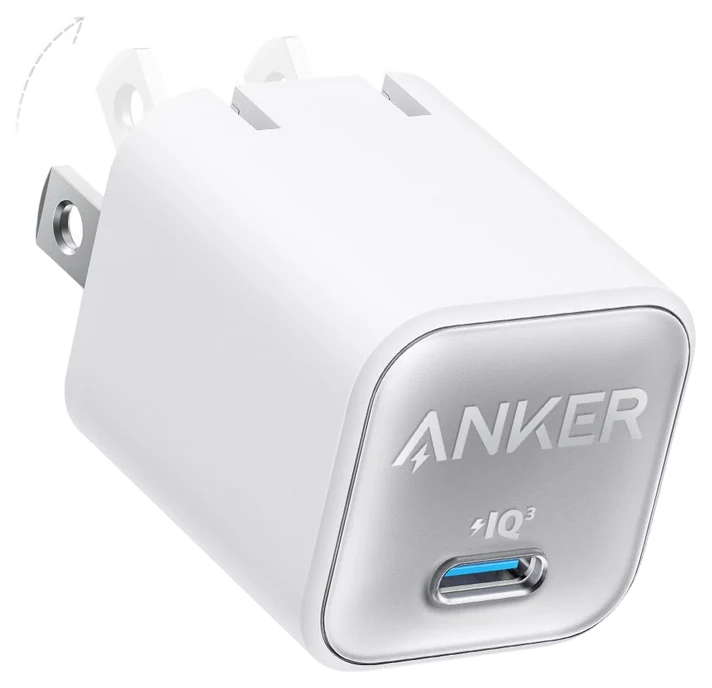
Anker 511 Charger$15–25The Anker Nano Pro (511 Charger), about $15–25 — a 20-watt charger smaller than the block it replaces, and it fixes the slow overnight charge almost every phone owner still puts up with.Check price
Want something bigger to unwrap
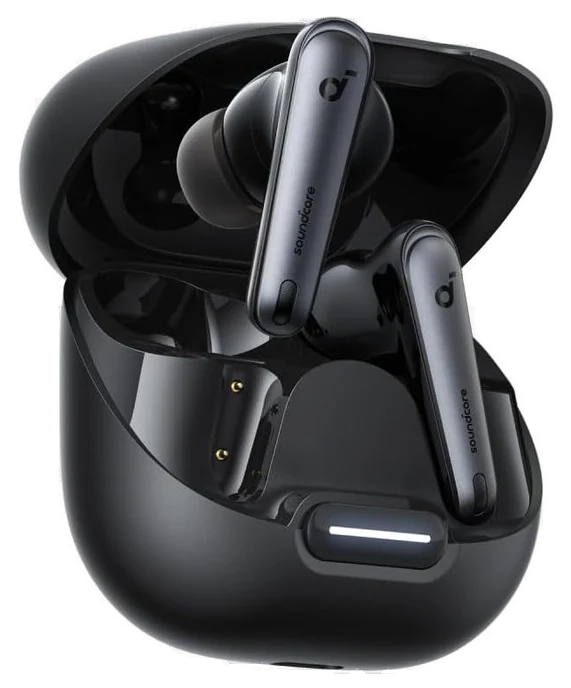
Soundcore by Anker Liberty 4 NC$70–100Soundcore Liberty 4 NC, about $70–100 — real noise cancelling under $100.Check price
Rule of thumb
Every pick here solves one daily annoyance and works the day it arrives.
We pulled proven picks from our category guides on chargers, smart plugs, speakers, earbuds, mics, trackers and desk gear, then kept only ones that work the day they arrive and hold at $100 or under.How we chose·How we verify·Corrections logged publicly
Seven picks that solve a real daily annoyance the moment they come out of the box, all under $100.
How we choseWhat we compared, and how we rank
We pulled proven picks from our category guides on chargers, smart plugs, speakers, earbuds, mics, trackers and desk gear, then kept only ones that work the day they arrive and hold at $100 or under. Updated September 2026. Prices are always moving, so every button and link pulls the live listing.
How we rank
Published specifications, verified owner reviews, and independent safety or standards data where it applies — weighted the same for every pick, never sponsored placement.
The Anker 511 Charger (Nano Pro) is proof that a stocking-stuffer price can still buy something worth keeping. It is a 20-watt USB-C block about the size of a large gumdrop, small enough to travel in a coat pocket. Plug it into a phone that has never seen fast charging and the difference shows up immediately: a dead iPhone reaches roughly half in under half an hour.
Underneath the plain shell is Anker’s PowerIQ 3.0 circuitry, which negotiates the fastest safe speed with whatever is plugged in, plus an ActiveShield temperature sensor that throttles output before things get warm. It works with any USB-C cable already in the house, charges Android phones, earbud cases and most tablets at their top supported speed, and comes in four colors that make it easy to tell whose charger is whose.
The limits: it has one port, so it will not double as a family charging hub, and the cable is sold separately. It also will not run a laptop, since 20 watts tops out well below what most notebooks need. As a gift, though, it solves a specific and common problem cheaply: the phone that always seems to be at 12 percent.
Strengths
Half-charges a phone in under 30 minutes
Small enough to disappear in a pocket
Built-in temperature protection, not a bare brick
Works with any USB-C cable already owned
Tradeoffs
Single port, can’t charge two devices
No cable included in the box
Not enough power to charge a laptop
Pick 2 of 7: No. 2Smart home starter
2
Kasa Smart Wi-Fi Plug Slim, 4-Pack
Smart home starter
Four rooms turned smart before you finish unboxing
Get it if they keep meaning to try smart home basics but haven’t committed to a hub.
Skip it if they already use a different smart plug ecosystem.
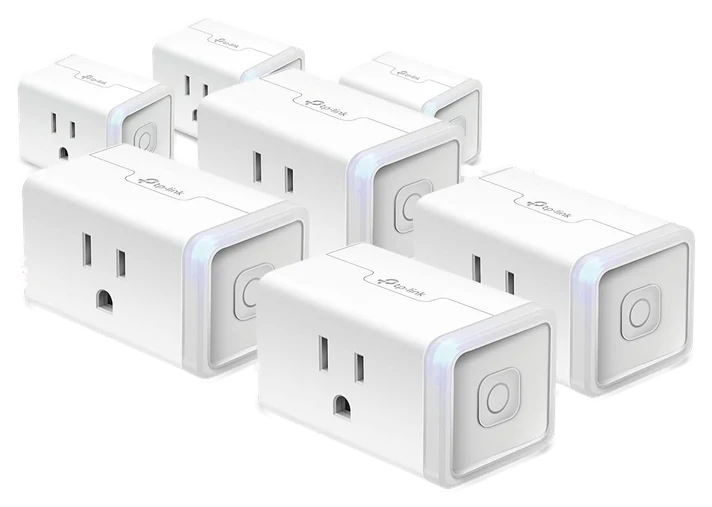
The Kasa Smart Wi-Fi Plug Slim, 4-Pack is the cheapest real answer to wanting a smart home without committing to one. Each plug slots into an outlet, connects straight to Wi-Fi with no separate hub, and turns a lamp, a fan or a string of lights into something schedulable and voice-controlled within about ten minutes per plug.
The slim design is the detail that makes it giftable rather than merely functional: it does not block the second socket on a duplex outlet the way older bulky smart plugs do, so it works in a bedroom nightstand as easily as behind a TV stand. It reports real-time and historical power use per plug, and it works with Alexa, Google Assistant and Siri Shortcuts without extra setup.
Four plugs is enough to notice the difference around a house but not enough to automate a whole floor, so heavy smart-home users will outgrow it. It also only handles standard outlets, not switches on the wall, and any device drawing more than 15 amps is outside its range. For a first taste of home automation with no subscription and no hub to buy later, it is hard to beat for the price.
Strengths
No hub needed, sets up over Wi-Fi
Slim design leaves the second outlet free
Per-plug energy monitoring shows the biggest cost
Works with Alexa, Google Assistant and Siri
Tradeoffs
Four plugs won’t automate a whole house
Only fits standard outlets, not wall switches
Needs a stable home Wi-Fi signal
Pick 3 of 7: No. 3Most fun to give
3
Ultimate Ears Wonderboom 4
Most fun to give
A speaker built to survive a pool, shower or backpack
Get it if they spend time outside, in the kitchen or near water.
Skip it if they want deep bass or app-based sound tuning.
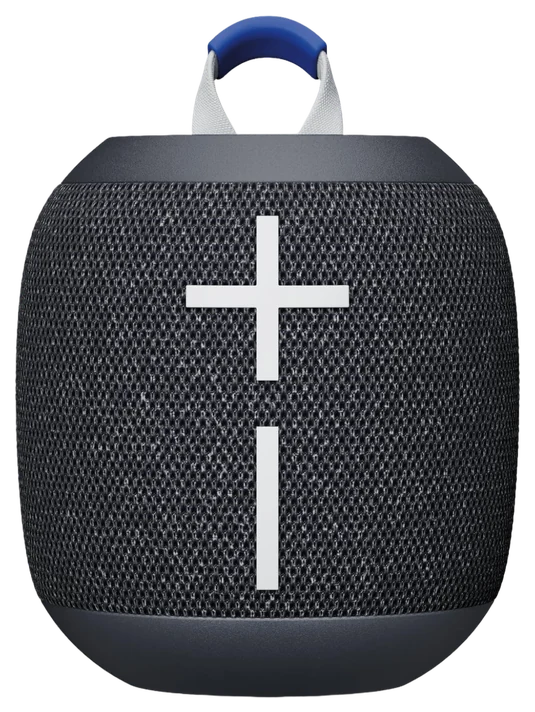
The Ultimate Ears Wonderboom 4 is small enough to clip to a bag and tough enough that dropping it in a pool is a feature demo, not an accident. It is IP67 rated, which means it survives being submerged a meter deep for half an hour and shrugs off dust, sand and the usual backyard abuse. It also floats, so a splash into the deep end does not end anything.
Sound comes out in every direction from the puck-shaped body, which matters more than it sounds: there is no wrong side to point it, so it works sitting on a picnic table or clipped to a bike without adjusting it. Battery runs about 14 hours on a charge over USB-C, two Wonderbooms can pair for stereo or louder mono sound, and it connects to two phones at once so a playlist disagreement has an easy fix.
It is not a bass-heavy speaker, so anyone expecting a party-sized low end will want something bigger and less portable. There is also no aux input or app for equalizer tweaks, which keeps it simple but limits tinkering. As a gift it fits an easy category: something a person already does (walking the dog, washing dishes, sitting by a pool) and never thought to add music to.
Strengths
IP67 waterproof rating and it floats
360-degree sound, no wrong side
About 14 hours of battery life per charge
Pairs with a second Wonderboom for stereo
Tradeoffs
Light on bass compared with larger speakers
No app or equalizer for sound tuning
Not loud enough for a large backyard
Also on the shortlist
Four more, in brief
Pick 4 of 7: No. 4Best earbuds pick~$70–100
4
Soundcore by Anker Liberty 4 NC
Upgrade pickBest earbuds pick
Real noise cancelling under $100, not scaled down
Get it if they commute, fly often, or work in a loud office.
Skip it if they need earbuds that can handle a swim.
Most noise-cancelling earbuds under $100 cut corners somewhere obvious. The Soundcore by Anker Liberty 4 NC mostly does not: Anker rates the adaptive ANC at up to 98.5 percent noise reduction, and it adjusts in real time to how sealed the earbuds sit in a particular ear rather than applying one fixed setting to everyone.
Sound quality holds up too, with 11-millimeter drivers and support for Hi-Res audio and the LDAC codec on compatible Android phones, a feature usually reserved for earbuds twice the price. A single charge runs close to 10 hours with ANC on, and the case pushes the total past 50 hours, with wireless charging so it can sit on the same pad as a phone overnight. Bluetooth 5.3 keeps the connection stable through a commute.
The case is on the larger side for a pocket, and the IPX4 rating covers sweat and light rain but not a swim or a shower. It is also an Android-first design: iPhone owners get full ANC and sound but miss a few app-only tuning options. For a gift aimed at someone with a daily commute or a lot of flights ahead, it delivers quiet, the one feature that changes a trip, without the price of the bigger brand names.
Get it if they commute, fly often, or work in a loud office.
Skip it if they need earbuds that can handle a swim.
Most noise-cancelling earbuds under $100 cut corners somewhere obvious. The Soundcore by Anker Liberty 4 NC mostly does not: Anker rates the adaptive ANC at up to 98.5 percent noise reduction, and it adjusts in real time to how sealed the earbuds sit in a particular ear rather than applying one fixed setting to everyone.
Read the full case
Sound quality holds up too, with 11-millimeter drivers and support for Hi-Res audio and the LDAC codec on compatible Android phones, a feature usually reserved for earbuds twice the price. A single charge runs close to 10 hours with ANC on, and the case pushes the total past 50 hours, with wireless charging so it can sit on the same pad as a phone overnight. Bluetooth 5.3 keeps the connection stable through a commute.
The case is on the larger side for a pocket, and the IPX4 rating covers sweat and light rain but not a swim or a shower. It is also an Android-first design: iPhone owners get full ANC and sound but miss a few app-only tuning options. For a gift aimed at someone with a daily commute or a lot of flights ahead, it delivers quiet, the one feature that changes a trip, without the price of the bigger brand names.
Strengths
Adaptive ANC near 98.5 percent reduction
About 50 hours of total battery
Supports Hi-Res audio and the LDAC codec
Wireless charging case
Tradeoffs
Case is bulkier than premium competitors
IPX4 rating covers sweat, not swimming
Some tuning options are Android-only
Pick 5 of 7: No. 5Best for streamers
5
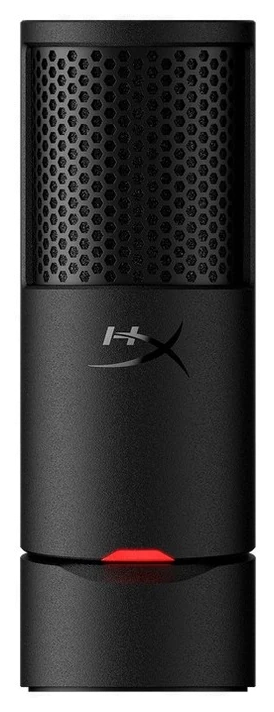
HyperX SoloCast 2
Best for streamers
Closes the laptop-mic gap for under $60
Get it if they stream, record, or spend hours a week on video calls.
Skip it if they only take an occasional video call and the laptop mic is fine.
Anyone who has sat through a video call straining to hear a laptop’s built-in mic knows the problem the HyperX SoloCast 2 solves. It is a cardioid condenser microphone that plugs straight into USB-C with no interface, no drivers and no settings to fight, and the improvement over a laptop mic is obvious the first time it picks up a voice clearly.
The cardioid pickup pattern favors sound directly in front of it and rejects noise from the sides and rear, so it stays clean in a room with a fan, a partner on another call, or a dog. A tap-to-mute sensor on top with an LED ring means muting does not require hunting for a button in software, and it works cleanly with Discord, OBS, Streamlabs and every major video call app.
It stands on a small desktop tripod rather than a boom arm, so a cluttered desk can crowd it, and a boom arm is a separate purchase for anyone who wants it out of the way. It is also a single condenser capsule, not a multi-pattern mic, so it will not switch to a stereo or omnidirectional mode for group recording. For one person talking to one camera, it is more microphone than the price suggests.
Get it if they stream, record, or spend hours a week on video calls.
Skip it if they only take an occasional video call and the laptop mic is fine.
Anyone who has sat through a video call straining to hear a laptop’s built-in mic knows the problem the HyperX SoloCast 2 solves. It is a cardioid condenser microphone that plugs straight into USB-C with no interface, no drivers and no settings to fight, and the improvement over a laptop mic is obvious the first time it picks up a voice clearly.
Read the full case
The cardioid pickup pattern favors sound directly in front of it and rejects noise from the sides and rear, so it stays clean in a room with a fan, a partner on another call, or a dog. A tap-to-mute sensor on top with an LED ring means muting does not require hunting for a button in software, and it works cleanly with Discord, OBS, Streamlabs and every major video call app.
It stands on a small desktop tripod rather than a boom arm, so a cluttered desk can crowd it, and a boom arm is a separate purchase for anyone who wants it out of the way. It is also a single condenser capsule, not a multi-pattern mic, so it will not switch to a stereo or omnidirectional mode for group recording. For one person talking to one camera, it is more microphone than the price suggests.
Strengths
Plug-and-play USB-C, no drivers or interface
Cardioid pattern keeps background noise out
Tap-to-mute sensor with a visible LED indicator
Works cleanly with Discord, OBS, call apps
Tradeoffs
Desk stand only, no boom arm
Single pickup pattern, not switchable for groups
More mic than occasional callers need
Pick 6 of 7: No. 6Best tracker pick
6
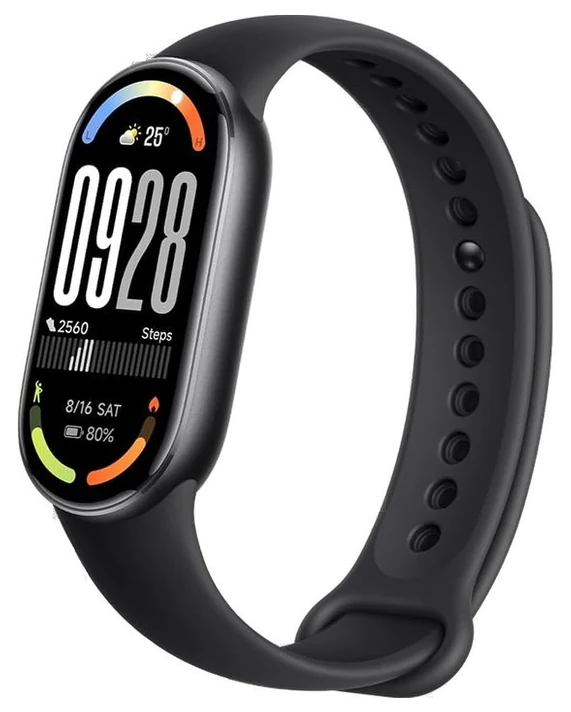
Xiaomi Smart Band 10 (Global Version)
Best tracker pick
Twenty-one days of battery for less than dinner out
Get it if they want basic health tracking without a nightly charging routine.
Skip it if they train seriously and need standalone GPS or deep analytics.
A fitness tracker is one of the trickiest gifts to get right, because most people who want one already tried a $250 smartwatch and gave up charging it nightly. The Xiaomi Smart Band 10 sidesteps that failure point entirely: Xiaomi rates it for up to 21 days on a charge, which turns “did you charge your watch” into a question nobody has to ask.
The 1.72-inch AMOLED screen runs at 60Hz and up to 1500 nits, large and bright for a band this thin, and 150-plus sport modes cover more than most people will ever use. It is rated 5ATM with swim tracking and AI stroke recognition, so showers, swimming and rain are not a concern, and a full recharge takes about an hour once the battery does run down.
There is no built-in GPS or Alexa, so it borrows location from a connected phone for route tracking on runs, and the companion app is more basic than what Garmin or Apple offer, without the depth for someone who wants to analyze training load. As a first tracker, or a replacement for someone who gave up on a smartwatch over battery life, it removes the single biggest reason people stop wearing one.
Strengths
Up to 21 days of battery
5ATM water resistance covers swimming and showers
Large 1.72-inch AMOLED display, 1500 nits
150+ sport modes with AI swim tracking
Tradeoffs
No built-in GPS or Alexa
Companion app is basic next to rivals
Fewer premium features than a full smartwatch
Pick 6 of 7: No. 6Best tracker pick
Xiaomi Smart Band 10 (Global Version)
Twenty-one days of battery for less than dinner out
Get it if they want basic health tracking without a nightly charging routine.
Skip it if they train seriously and need standalone GPS or deep analytics.
A fitness tracker is one of the trickiest gifts to get right, because most people who want one already tried a $250 smartwatch and gave up charging it nightly. The Xiaomi Smart Band 10 sidesteps that failure point entirely: Xiaomi rates it for up to 21 days on a charge, which turns “did you charge your watch” into a question nobody has to ask.
Read the full case
The 1.72-inch AMOLED screen runs at 60Hz and up to 1500 nits, large and bright for a band this thin, and 150-plus sport modes cover more than most people will ever use. It is rated 5ATM with swim tracking and AI stroke recognition, so showers, swimming and rain are not a concern, and a full recharge takes about an hour once the battery does run down.
There is no built-in GPS or Alexa, so it borrows location from a connected phone for route tracking on runs, and the companion app is more basic than what Garmin or Apple offer, without the depth for someone who wants to analyze training load. As a first tracker, or a replacement for someone who gave up on a smartwatch over battery life, it removes the single biggest reason people stop wearing one.
Strengths
Up to 21 days of battery
5ATM water resistance covers swimming and showers
Large 1.72-inch AMOLED display, 1500 nits
150+ sport modes with AI swim tracking
Tradeoffs
No built-in GPS or Alexa
Companion app is basic next to rivals
Fewer premium features than a full smartwatch
Pick 7 of 7: No. 7Best desk pick
7
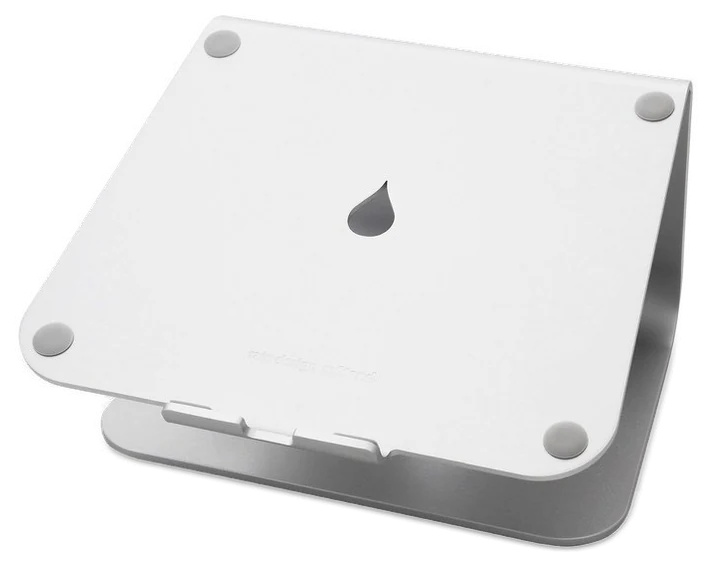
Rain Design mStand
Best desk pick
One block of aluminum that fixes laptop hunching for good
Get it if they work from a laptop for hours at a stretch.
Skip it if they need an adjustable-height or multi-device stand.
A laptop sitting flat on a desk puts the screen too low and the keyboard too close, a habit most people never notice they have until their neck does. The Rain Design mStand raises the screen close to eye level and tilts it back slightly, a small adjustment that changes an entire day of posture.
It is machined from a single piece of aluminum rather than bent sheet metal or plastic, so it does not wobble, and the metal doubles as a heat sink that helps a laptop’s fans work less. A two-inch cutout at the back routes a charging cable out of the way instead of across the desk, and non-slip feet keep it from sliding on a smooth desktop under normal typing pressure.
It only holds one laptop at a fixed height and angle, so anyone switching between a laptop and an external keyboard setup daily may want something with more adjustment. It also raises the laptop enough that a separate keyboard and mouse become necessary for comfortable typing, worth mentioning to someone who has not used a stand before. For a desk that gets used for hours a day, it is a permanent fix rather than a gadget used once and forgotten.
Strengths
Single-piece aluminum build with no wobble
Doubles as a heat sink for the laptop
Cable cutout keeps the desk tidy
Fixed angle needs no setup or adjustment
Tradeoffs
Fixed height and angle, not adjustable
Needs a separate keyboard and mouse
Only holds one laptop at a time
Pick 7 of 7: No. 7Best desk pick
Rain Design mStand
One block of aluminum that fixes laptop hunching for good
Get it if they work from a laptop for hours at a stretch.
Skip it if they need an adjustable-height or multi-device stand.
A laptop sitting flat on a desk puts the screen too low and the keyboard too close, a habit most people never notice they have until their neck does. The Rain Design mStand raises the screen close to eye level and tilts it back slightly, a small adjustment that changes an entire day of posture.
Read the full case
It is machined from a single piece of aluminum rather than bent sheet metal or plastic, so it does not wobble, and the metal doubles as a heat sink that helps a laptop’s fans work less. A two-inch cutout at the back routes a charging cable out of the way instead of across the desk, and non-slip feet keep it from sliding on a smooth desktop under normal typing pressure.
It only holds one laptop at a fixed height and angle, so anyone switching between a laptop and an external keyboard setup daily may want something with more adjustment. It also raises the laptop enough that a separate keyboard and mouse become necessary for comfortable typing, worth mentioning to someone who has not used a stand before. For a desk that gets used for hours a day, it is a permanent fix rather than a gadget used once and forgotten.
Strengths
Single-piece aluminum build with no wobble
Doubles as a heat sink for the laptop
Cable cutout keeps the desk tidy
Fixed angle needs no setup or adjustment
Tradeoffs
Fixed height and angle, not adjustable
Needs a separate keyboard and mouse
Only holds one laptop at a time
Tech gift FAQs
6 common questions, answered.
What makes a good tech gift under $100?
Something that solves a problem the person already has rather than introduces a new hobby. A charger, a tracker or a speaker gets used the day it arrives. A gadget with a learning curve often ends up in a drawer.
Is a GaN charger better than a normal one?
For size and heat, yes, not necessarily for raw speed on most phones. GaN chips run cooler and smaller than older charger designs, which is why a 20-watt charger like the Anker Nano Pro can be smaller than the charger it replaces while charging as fast.
Do smart plugs need a separate hub to work?
The Kasa plugs here connect straight to home Wi-Fi with no hub required. Some other smart home brands do need a hub, so check the box before assuming compatibility with an existing setup.
Are earbuds under $100 safe to give without knowing someone’s ear size?
Most true wireless earbuds, including the Soundcore Liberty 4 NC, ship with three or four ear tip sizes in the box, so a rough size guess is enough. A speaker or a tracker sidesteps the fit question entirely if that feels risky.
Which of these needs the least setup?
The Anker Nano Pro charger and the UE Wonderboom 4 speaker both work within seconds of unboxing. Anything with an app, the smart plugs, the earbuds, and the fitness tracker, needs five to ten minutes to pair and set up.
When do these prices tend to drop?
Watch for November and December sale events for the biggest cuts on electronics. Outside the holidays, prices on these categories move by ten to twenty percent through the year, so checking the live listing before buying is worth it.
22Sep 2026Correction, 22 September 2026The “Updated” date on this guide previously read July 2026. The guide was first published on 14 September 2026; the July date came from a template shared with older guides. No pick, price or ranking was affected.Every correction we’ve made ›
23Sep 2026Correction, 23 September 2026The Amazfit Band 7 can no longer be bought. Its slot now goes to the Xiaomi Smart Band 10 at about $45–55.Every correction we’ve made ›
New guides, re-ranked picks and the month's notable changes. No weekly filler, ever.
Unsubscribe any time. Your address goes to our newsletter provider and nowhere else — see our privacy policy.
Manage Consent
To provide the best experiences, we use technologies like cookies to store and/or access device information. Consenting to these technologies will allow us to process data such as browsing behavior or unique IDs on this site. Not consenting or withdrawing consent, may adversely affect certain features and functions.
Functional
Always active
The technical storage or access is strictly necessary for the legitimate purpose of enabling the use of a specific service explicitly requested by the subscriber or user, or for the sole purpose of carrying out the transmission of a communication over an electronic communications network.
Preferences
The technical storage or access is necessary for the legitimate purpose of storing preferences that are not requested by the subscriber or user.
Statistics
The technical storage or access that is used exclusively for statistical purposes.The technical storage or access that is used exclusively for anonymous statistical purposes. Without a subpoena, voluntary compliance on the part of your Internet Service Provider, or additional records from a third party, information stored or retrieved for this purpose alone cannot usually be used to identify you.
Marketing
The technical storage or access is required to create user profiles to send advertising, or to track the user on a website or across several websites for similar marketing purposes.